

Encoding Failed - Error retrieving frame
Hello all!
Preface: hardware isn't the issue I got tons of memory, fast CPU and great GPU and pleny of hardrive space. All drivers are updated and Premiere Pro is up to date. Here's the senario.
- I've done this same settings export many times before.
- I've deleted media cache
- I've tried the software encoding
- I've even rebooted and defragged my hard drives just in cases.
- I have exported in/out of the frames the encoding stops at (Error retrieving frame 8713) a minute before and a minute fter and that exports fine with the same export settings but when I export the entire sequenice it encoding fails at this frame every time.
- I've checked the frames and they are fine in the sequence nothing out of the ordanry and play fine bot the raw footage file and in Premiere Pro.
- I use Adobie Media Encoder for export.
Here is the fail message I get:
- Source File: C:\Users\AppData\Local\Temp\Ride 11 14 21_8.prproj
- Output File: D:\34 GX040055.mp4
- Preset Used: Custom
- Video: 3840x2160 (1.0), 59.94 fps, Progressive, 203 (75% HLG, 58% PQ), Hardware Encoding, Nvidia Codec, 02:31:45:09
- Audio: AAC, 320 kbps, 48 kHz, Stereo
- Bitrate: CBR, Target 69.00 Mbps
- Encoding Time: 00:45:14
11/17/2021 06:05:06 PM : Encoding Failed
------------------------------------------------------------
Error retrieving frame 8713 at time 08;01;52;44 from the file: D:\Ride Videos\Ride 11 14 21\GoPro Import\11 GX040050.MP4, substituting frame 8712
Screenshot of the attempts of the same export (named different) failed ones are the full sequince the sucssfull exports are the portions of the sequince with the failed frames when exporting the full sequince but they export sucessfully
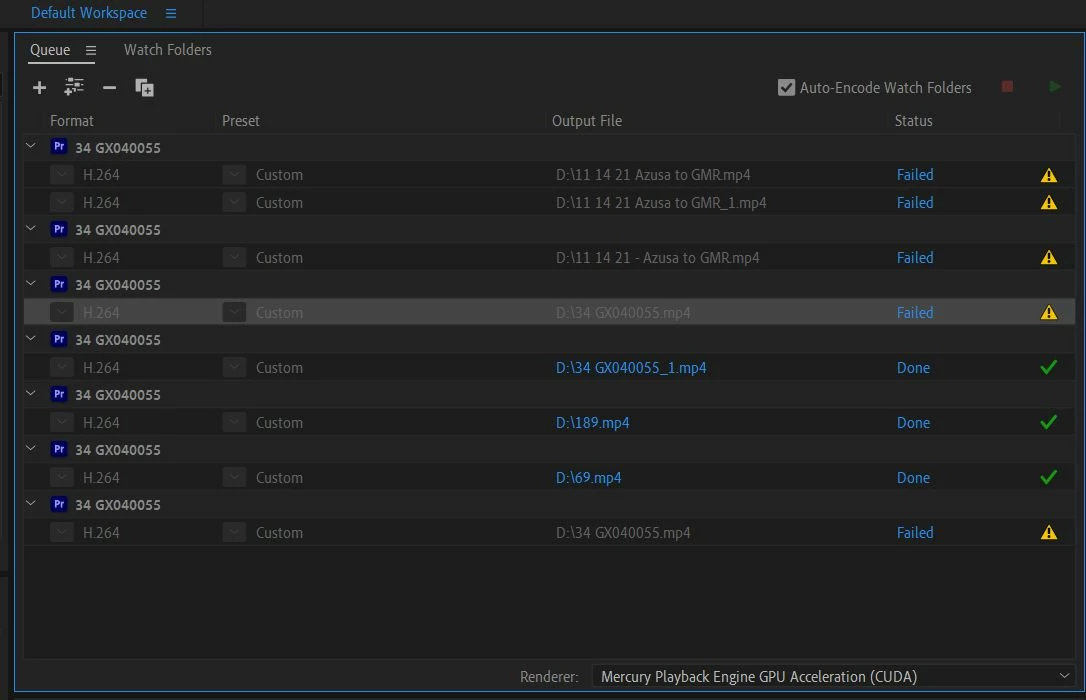
Hopefully someone out there has a answer I've looked online and tried a buch of stuff others have done that found sucess but nothing has worked for me so far.
Much appreciated in advance.
Ed
 AdChoices