
Daniel84
Known Participant
March 30, 2021
Answered

Encore CS6 - Can't burn Blu-Rays

  • March 30, 2021
  • 5 replies
  • 5377 views

Hello,

A couple years ago I was able to burn Blu-Rays with Encore and now it only burns DVDs.I'm not sure if that was in Encore 5.5 - it's on an old external that I'd have to look through to confirm.


In Premiere I selected "Match Sequence Settings" and that gave me an mpeg file. Then I sent it to Media Encoder before creating my project in Encore.


The project is about 14 GB and I'm using Verbatim BD-R  25 GB with a Pioneer BDR-XD05B external burner.


I am running Encore as an administrator and I can't burn directly to a disc and have also exported an ISO and then tried burning that to a disc by changing the Source in the Build tab to the ISO file instead of the Current Project since I saw a video on YouTube where that worked.


Here are the errors I've been receiving:


When try to burn the current project directly to disc, the Build Progress window begins with:

Importing Final version-fixe_sessionFiles-Dsf_session_1_video.m4v...

and when it fails I get:

Blu-Ray Error: "device error", Code 3 , Note: "AS_StorageError = -97060.


When I try to burn the ISO to disc, it fails within seconds with the message:

Blu-ray Error:"", Code: "0" , Note: "


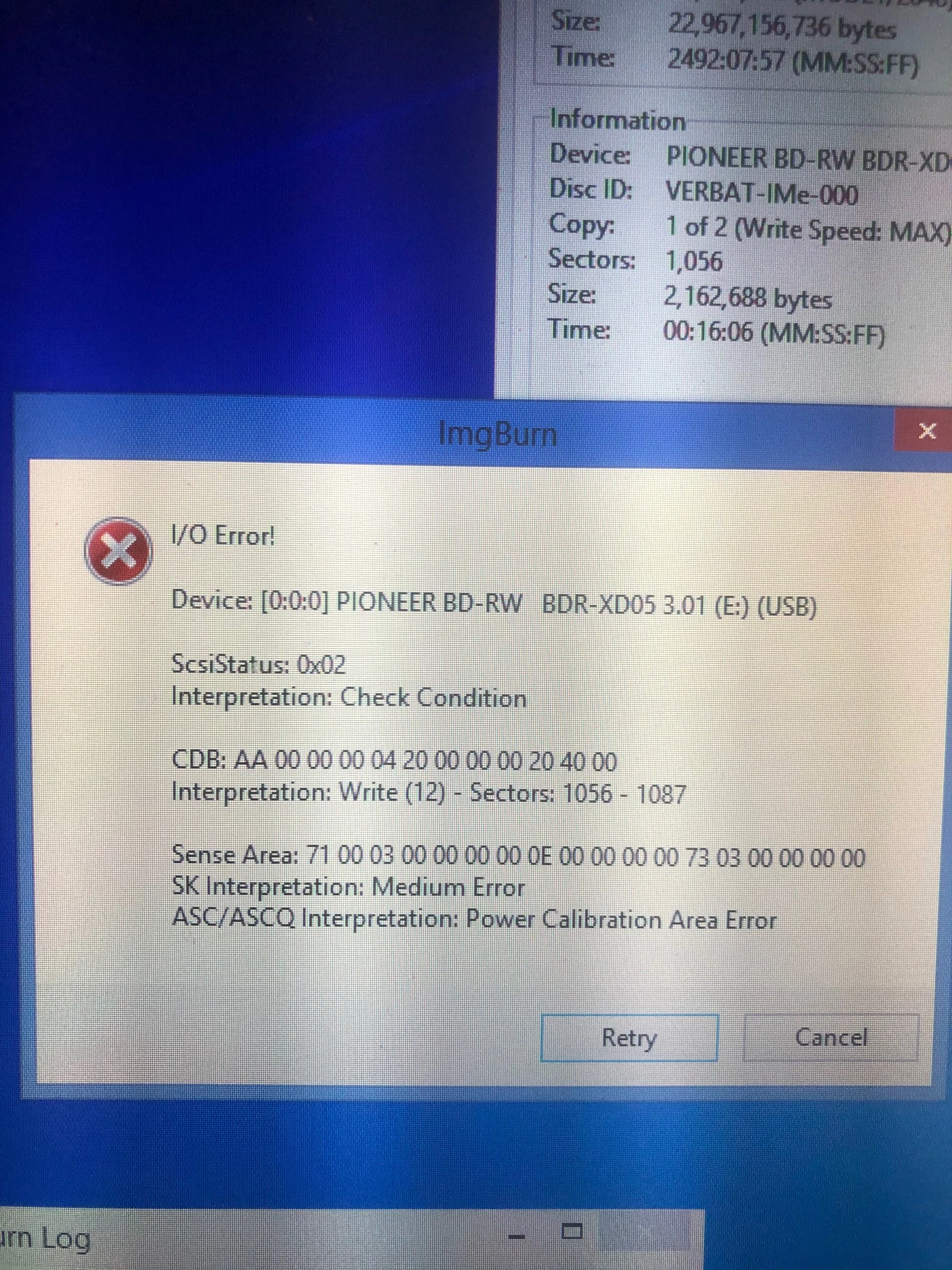
I have tried to burn a Blu-Ray through Imgburn using the ISO and I get this:


I/O Error

Device [0:0:0] PIONEER BD-RW  BDR-XD05 3.01 (E:) (USB)

ScsiStatus: 0x02

Interpretation:Check Condition


CDB: AA 00 00 00 04 20 00 00 00 20 40 00

Interpretation: Write (12) - Sectors: 1056 - 1087


Sense Area: 71 00 03 00 00 00 00 0E 00 00 00 00 73 03 00 00 00 00

SK: Interpretaion: Medium Error

ASC/ASCQ Interpretation: Power Calibration Area Error


I have also created the project in Encore with an mp4 file, which I exported from Premier with the H264 Match Source High Bitrate setting. I'm working on burning a Blu-Ray with this type of file and it's been going about half an hour and the Build Progress window says Transcoding.


Any thoughts?


Thanks for your time,

Daniel
 

This topic has been closed for replies.
Correct answer Stan Jones

I forgot to include the pop-up message I received in ImgBurn as well.


My guess is still that your drive may be bad; perhaps media, but the imgburn message does not show that.


This is an external USB drive? No internal drive?


Phone a friend and borrow an external drive to test?


Or create a tiny project, like a 20 second video with one simple menu. Build to an iso. Try to burn in ImgBurn. If it works great. (That may still not rule out hardware, but it is something.) If it fails, upload the iso to dropbox or similar, and one of us can try the burn.


Stan


5 replies

devonc36895410
Known Participant
May 17, 2021

So I am trying to burn a disc in Encore Cs6. I have done this plenty of times before with no problem. Now I am trying to burn a new dvd and what happens is the dvd burns and seems like everything is fine. After waiting about 30 mins for the dvd to complete, I go and test it out and the screen pops up but nothing plays.. It just shows a black screen. I try clicking the start arrow and it automatically just goe back to the pause button. Can someone please help me figure out what is going wrong? I have literally wasted 10 discs trying 

Warren Heaton
Community Expert
Community Expert
May 18, 2021

This sounds like an issue with the First Play action for the DVD title.


Does the Encore project play as expected when you simulate the title?  That is, when you click the Preview button in Encore or use File > Preview before doing build to DVD Disc (that is, burning a blank DVD)?


Does everything look as expected when you use Check Project (File > Check Project)?


As you troubleshoot this, use "DVD Folder" as the Output option to build a DVD directory structure to your hard drive for testing prior to buning to a DVD blank.  (Note: This is for testing, not for burning the resulting directory later.)

devonc36895410
Known Participant
May 18, 2021

Not sure where the "first play" action is


Inspiring
March 31, 2021

I use TMPGEnc Authoring Works 6.  If you create the video files in MPEG 2-DVD or H.264 Blu-ray you can produce discs that will not be re-encoded.  Authoring Works 6 has a free trial version.

Daniel84
Daniel84Author
Known Participant
March 31, 2021

I downloaded it this morning. Thank you for the suggestion.


I first want to give Encore a try with the H.264 Blu-Ray export setting.


It took about 10 minutes for the video file to import into Encore, but I got it in there along with the audio file. I created the menus, etc., but the project is 25.29 GB and my disc is 25 GB.


So before attempting to Build, I need to create a smaller file size. I did send the file from Premiere to Media Encoder though.


What can I do in my settings to make it smaller?

Community Expert
March 31, 2021

Reduce the bit rate on the Premiere export.

Stan Jones
Community Expert
Community Expert
March 31, 2021

Unfortunately, Adobe chose not to bring in the older forum posts and much of the Encore knowledge is lost.


Your error: Blu-ray Error:"", Code: "0" , Note: "

My only note other than links (to now nonexistent posts) was a bad burner.


Your error: 

Blu-Ray Error: "device error", Code 3 , Note: "AS_StorageError = -97060.


The AS_StorageError = xxxxx all appear to have physical storage, hard drive, or media issues. Keep in mind that for Blu-ray especially, Encore uses a huge amount of temporary storage. Make sure you are always running "as administrator" - it fixes many issues.


Sorry, only a bad link for the 97060 version of that error, but it occured often enough for me to keep a link.


Stan


Daniel84
Daniel84Author
Known Participant
March 31, 2021

I have been running as administrator since I saw that suggestion in another post. 


However, what do you mean by a bad burner? Are you referring to the external burner itself?


Thanks

Stan Jones
Community Expert
Community Expert
March 31, 2021

Yes, the actual burner itself. I did not test, but I recall ImgBurn maybe having the ability to test a drive?


But with many errors, it is hard to sort...


Stan


Warren Heaton
Community Expert
Community Expert
March 30, 2021

How is your drive formatted?  ExFAT?  Fat32?  NTSF?


Daniel84
Daniel84Author
Known Participant
March 31, 2021

Hard Drive is NTSF.

Averdahl
Community Expert
Community Expert
March 30, 2021
quote

I have also created the project in Encore with an mp4 file, which I exported from Premier with the H264 Match Source High Bitrate setting. I'm working on burning a Blu-Ray with this type of file and it's been going about half an hour and the Build Progress window says Transcoding.


Any thoughts?


By @Daniel84


Export from Premiere Pro using the H.264 Blu-ray format so you get a BD compliant file to start with. This file will not be re-encoded as your standard H.264 is today. Try that to start with, iow create a new project in Encore and feed it with only BD compliant files that requires no transcoding in Encore. This solves many errors.


When it comes to burning discs the thumb of rule is: Never use Encore to burn.

Always create ISO files in Encore and use a third party tool such as ImgBurn to burn the actual ISO file to BD disc.


Daniel84
Daniel84Author
Known Participant
March 31, 2021

I'll export the project under these settings in Premiere tonight and try to burn something tomorrow. Thanks for the suggestion.