
Davidius1078
Participating Frequently
September 27, 2018
해결됨

Encore CS6 - Transparent Steps

  • September 27, 2018
  • 3 답변들
  • 1085 조회

Hi,

I'm experiencing a strange problem with Encore CS6.

I've created several video files using After Effects and Premiere Pro.

All the these files are looking good on their own.

I've put everything together in Encore CS6 and build a 'Blu Ray' iso file.

When previewing it on my computer I notice that there's a transparent 'Stairs/Steps' through out the entire production.

You can see it in the menu, you can on everything.

I'm confused as to what can cause this.

If anyone has faced a similar problem, I'm happy to be directed towards a solution.

kind regards,

David T.
이 주제는 답변이 닫혔습니다.
최고의 답변: Stan Jones

I'm using Premiere Pro CC 2018

                Media Encoder CC 2018

                Encore CS6

Thank you for all your educational help.


So just to confirm.
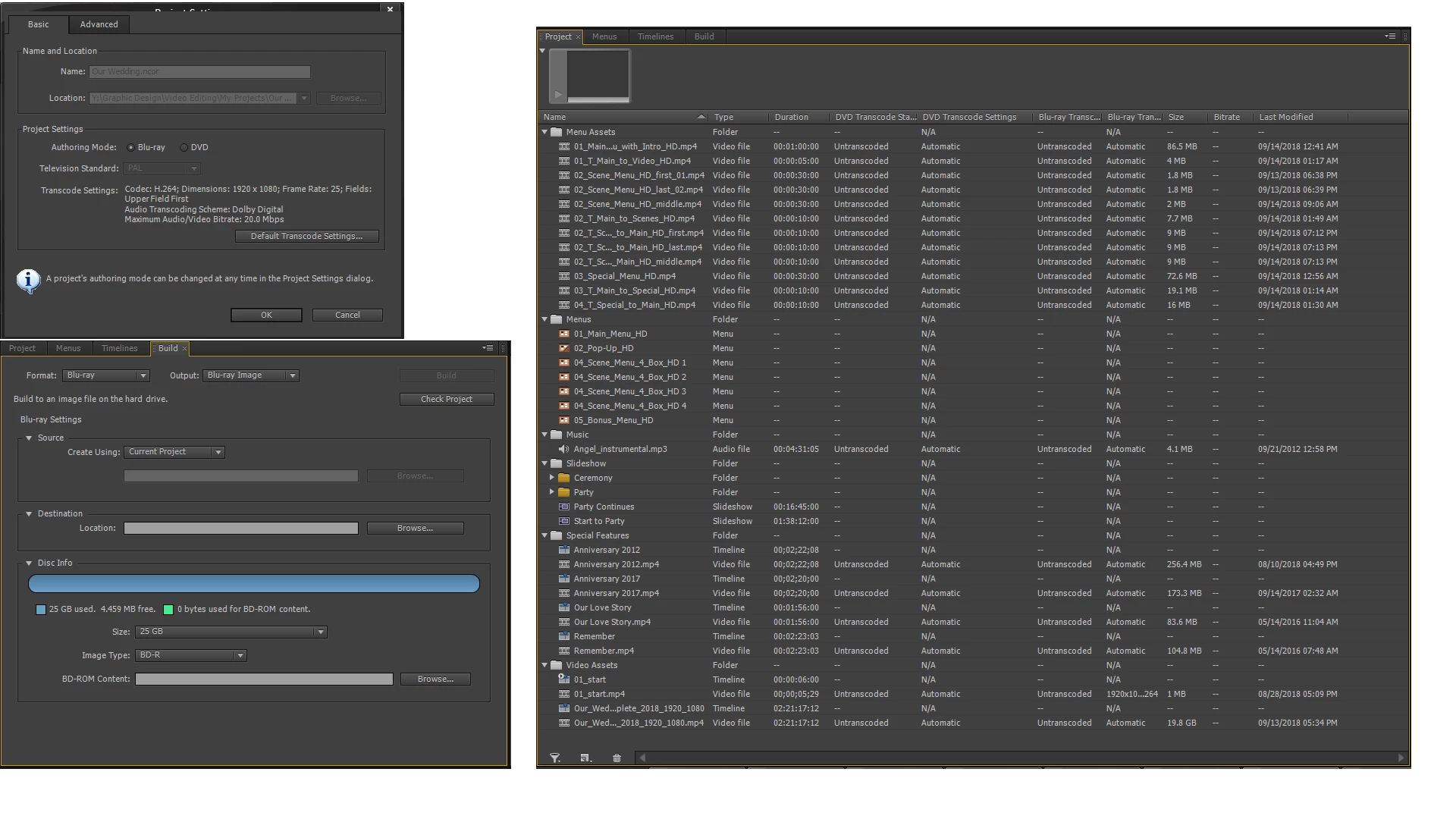
From what I can see here Encore is definately going transcode all these files.
That raises the following question when encoding the video files I need to explicitly indicate that they need to be Blu-Ray.
Have I understood you correctly?

T


There are two H.264 export formats in AME/PR. "H.264" and "H.264 Blu-ray." Use the latter. It produces two files, .m4v and .wav, rather than one .mp4.

However, there is a problem with export from the latest PR 2018.1.2. Is that the version you have?

An alternative is to use MPEG2 Blu-ray, but you have a lot of material, and I think need H.264.

3 답변

Davidius1078
Davidius1078작성자
Participating Frequently
October 3, 2018

Hi Michael,

Your approach is exactly the same as mine, except I haven;'t burned it on a disc.

But that's when I encountered this problem and I posted it here.

Davidius1078
Davidius1078작성자
Participating Frequently
October 2, 2018

Hi Stan,

I'm using PR  CC 2018 v 12.1.2.

I'll do the work and convert my material to H.264 Blu-ray.

If It solves the problem great, I haven't lost anything but gained a whole lot.

Thank you so much for your help.
As soon as I have done all the conversions I will rebuild and see if the problem is resolved.

Stan Jones
Community Expert
Community Expert
October 2, 2018

Create a simple test project first and use only one timeline for similar.  It can save you time.

Stan Jones
Community Expert
Community Expert
September 27, 2018

Please post a screen shot of what this looks like.

Is Encore transcoding the videos?

Davidius1078
Davidius1078작성자
Participating Frequently
September 28, 2018

I hope this helps to show what the issue is.