thirdeyepro
Participant
January 31, 2017
Answered

Encore inflating file sizes

  • January 31, 2017
  • 2 replies
  • 3125 views

When I add files to Encore, they'll show in the project pane with the correct file size (4.3 gb), but when I add the video to a timeline and then check the build pane, the disc info shows that it's now taken up more of the disc space than it should (4.72 gb) making it JUST too big for the disc. So frustrating.

I initially thought that maybe it was the chapter menus and the pictures I used in the menus that were taking up extra space and for some reason, wasn't being counted by the disc info until I added the video timeline... so I deleted them. Nope. It's just the video file that's taking up all the space for some reason. Adding the video file to a timeline mysteriously increases the file size from 4.3 to 4.72. Where is this extra 400 or so megabytes coming from? Is there any way to stop this from happening? I really don't want to have to waste time re-encoding the video (which takes hours) just to get rid of .02 megabytes that shouldn't be there anyway. Again... just plain frustrating.

[Moved from Premiere Pro to Encore... Mod]
This topic has been closed for replies.
Correct answer SAFEHARBOR11

The footage is a Super8mm film transfer, which was typically recorded in the 17fps range.

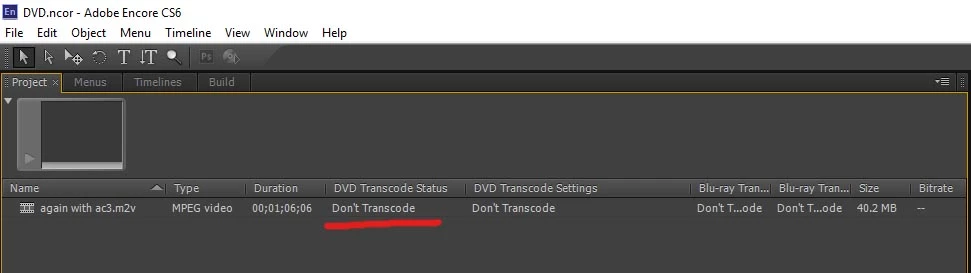
Here is a shot from Encore...


Have you changed any settings in Encore at all? By default, when opening a NEW Encore project, you should be able to drop in ANY clip that was exported from Media Encoder as MPEG-2 DVD and it will work, no need to change anything, whether footage is 4:3 or 16:9, Encore just "works" and does not transcode. Unless file is too big, then it would need to shrink it down to size.

So maybe try a New Project in Encore, Import your clip, then what does it say? Check under the Project tab, as shown in pic

From what I've seen of your Export settings, the .m2v clip ought to be compliant in Encore.

And to make sure I understand the 17fps thing, you had an outside company transfer the footage and they provided 720p clips at 17fps? That makes sense then, I've looked into those companies myself. Make sure to export as NTSC DV Wide Progressive though, no need to interlace that footage. I wonder if you are better off to just edit the clips in a 720p 29.97 sequence to start with, rather than 17fps sequence? Frame rate has to be converted as some point anyway.

Thanks


Jeff

2 replies

Stan Jones
Community Expert
Community Expert
January 31, 2017

The difference is .42 Gigabytes, except that isn't the way Encore counts it...

A single layer DVD, is called 4.7GB. But the technical size is measured in GiB, and that is only 4.37 GiB where 1 kbyte is 1024 bytes.

What this means is that if you read your file size as 3.9GB, it is actually 4,187,593,113 bytes. To make this confusing within Encore, Encore reports your file in the project panel as 3.9GB. But when it lists the amount of the disk used and free in the build panel, it is reporting bytes with "GB" after it.

So I suspect that your "4.3 BG" file is too big.

I assume that you see "do not transcode" in the DVD transcode status column in the project panel, confirming that Encore sees you file as DVD legal.

Participating Frequently
January 31, 2017

How did you create the content for the DVD - is it already MPEG-2 DVD compliant?

Always use a bitrate calculator when creating content for DVD - DVD-HQ : Bitrate & GOP calculator

Or a quick method is 560/minutes = bit rate, though I usually round down a little for safety margin.

For short vids, like 60 minutes or less, just encode at 8.0 and no worries.

Thanks

Jeff

Participating Frequently
February 2, 2017

Thanks for the screen shots. Not to change the subject, but why is the source sequence 17fps? Is source possibly phone footage, which may use a Variable Frame Rate? Premiere does not like Variable Frame Rate. This should not affect what is going on in Encore, but should be addressed as part of the overall workflow. Also, source is Progressive but DVD encode is set to Interlaced. I'd go with Progressive for DVD as well then.

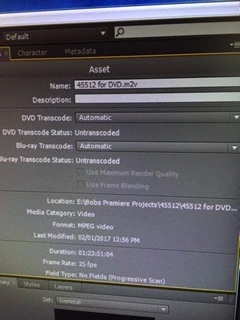
Well, 83 minutes encoded at 5.0 setting should certainly fit on a DVD. Maybe a shot of Encore screen to look at next step

Thanks

Jeff


The footage is a Super8mm film transfer, which was typically recorded in the 17fps range.

Here is a shot from Encore...

John T Smith
Community Expert
Community Expert
January 31, 2017

1 - do you have anything entered in the "rom content" block of your build?

2 - I don't remember the exact size, but "some" space is used for "house keeping" overhead