
Boardfran
Participating Frequently
January 16, 2018
Question

Error code -1610153867

  • January 16, 2018
  • 5 replies
  • 8419 views

Been looking all over for a solution, and as far as i can tell, no one who has this issue has been able to resolve.

I have a raw MXF file from a cannon camcorder that only plays the 1st frame, then the other ~33 mins of footage always fails to render.

Efforts to transcode or export to a different format all result in the same error:

Export Error

Error compiling movie.

Render Error

Render returned error.

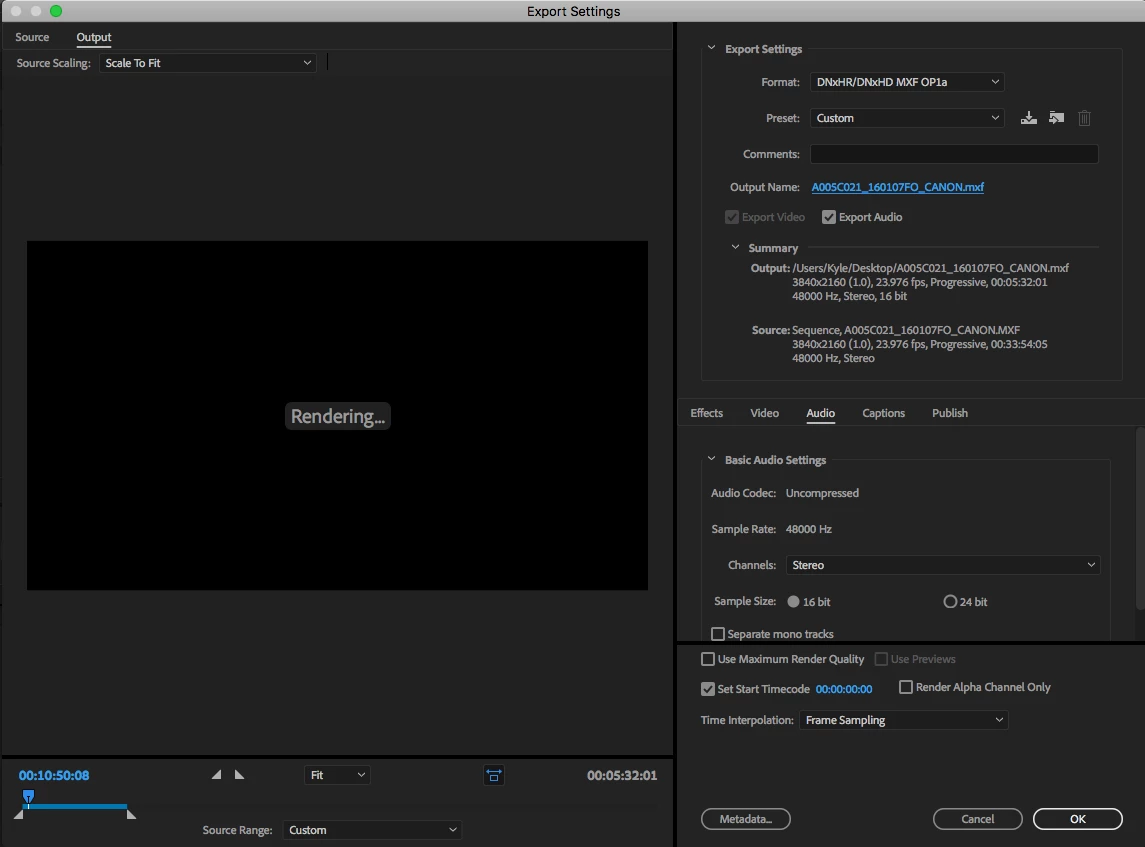
Writing with exporter: DNxHR/DNxHD MXF OP1a

Writing to file: /Users/Kyle/Desktop/Test.mxf

Around timecode: 00:00:17:17

Rendering at offset: 17.517 seconds

Component: DNxHR/DNxHD MXF OP1a of type Exporter

Selector: 9

Error code: -1610153867

The footage plays just fine in VLC player, but fails to render in premier and AME. when selecting Source range : "sequence in to out" there appears to be a in and out marker on the 1st frame. but manually adjusting these does not seem to help.

this file worked fine for a day, but the next day I came into the office the project opened and everything said media pending.

Already Tried the following fixes:

     Delete media and render caches

     Move project to a new computer and start edit process over again

     Copy and rename file to a separate hard drive

     Re-install premier and AME

     Change export settings to different formats including quicktime, h.264, mpeg4, avi, etc.


System Build:
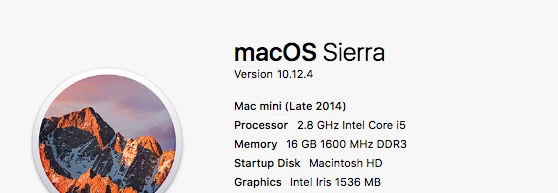
Export Settings:
Any suggestions would be appreciated. I really don't want to have to re-shoot this.

EDIT:

When trying to import into Handbrake the activity log shows the following:

[14:16:09] hb_scan: path=/Users/Kyle/Desktop/A005C021_160107FO_CANON.MXF, title_index=0

udfread ERROR: ECMA 167 Volume Recognition failed

disc.c:274: failed opening UDF image /Users/Kyle/Desktop/A005C021_160107FO_CANON.MXF

disc.c:352: error opening file BDMV/index.bdmv

disc.c:352: error opening file BDMV/BACKUP/index.bdmv

[14:16:09] bd: not a bd - trying as a stream/file instead

libdvdnav: Using dvdnav version 5.0.1

libdvdread: Encrypted DVD support unavailable.

libdvdread:DVDOpenFileUDF:UDFFindFile /VIDEO_TS/VIDEO_TS.IFO failed

libdvdread:DVDOpenFileUDF:UDFFindFile /VIDEO_TS/VIDEO_TS.BUP failed

libdvdread: Can't open file VIDEO_TS.IFO.

libdvdnav: vm: failed to read VIDEO_TS.IFO

[14:16:09] dvd: not a dvd - trying as a stream/file instead

Input #0, mxf, from '/Users/Kyle/Desktop/A005C021_160107FO_CANON.MXF':

  Metadata:

    uid             : 0831e495-7305-4901-802f-9c0002ec09e2

    generation_uid  : 0831e495-7305-4903-802f-9c0002ec09e2

    company_name    : CANON

    product_name    : XC15

    product_version : 1.00

    product_uid     : 060e2b34-0401-010d-0e15-005658430100

    modification_date: 2016-01-07 21:29:11

  Duration: 00:33:56.24, start: 0.000000, bitrate: 194754 kb/s

    Stream #0:0: Video: h264 (High 4:2:2 Intra)

      yuv422p, tv, bt709/bt709/bt709

      3840x2160

      23.98 fps, 23.98 tbn

    Stream #0:1: Audio: pcm_s16le

      48000 Hz, 1 channels, s16, 768 kb/s

    Stream #0:2: Audio: pcm_s16le

      48000 Hz, 1 channels, s16, 768 kb/s

[14:16:10] scan: decoding previews for title 1

[14:16:10] scan: audio 0x1: pcm_s16le, rate=48000Hz, bitrate=768000 Unknown (pcm_s16le) (1.0 ch)

[14:16:10] scan: audio 0x2: pcm_s16le, rate=48000Hz, bitrate=768000 Unknown (pcm_s16le) (1.0 ch)

error: av_read_frame error (-1052488119): Invalid data found when processing input

[14:22:32] Warning: Could not read data for preview 2, skipped

[14:22:32] scan: 1 previews, 3840x2160, 23.976 fps, autocrop = 0/0/0/0, aspect 16:9, PAR 1:1

[14:22:32] Title is likely interlaced or telecined (0 out of 1 previews). You should do something about that.

    This topic has been closed for replies.

    5 replies

    Participant
    January 7, 2019

    I would like to add my two cents to this discussion.

    I kept getting the same error message when I tried to render a sequence.  Error Compiling Movie.  Render Error.  Render returned error.

    I tried pretty much everything, including everything mentioned in this forum.

    I found that the video and audio were not the problem.  I had a .png and an .aep from an older version of a Premiere project that were preventing the thing from fully rendering.  These annoying files were a watermark image for a brand and in-frame text attribution.  Once I got rid of them, the rendering issues vanished.

    I haven't seen anyone on these forums have the same experience as me, so I hope this help someone down the road.

    Participant
    January 8, 2020

    Hey guys, thought i'd share my 2cents here also. My problem ended up being that I had .webm videos in and after converting them .mp4's the render began to work

    gerkintrigg80
    Participant
    June 20, 2020

    I have some WebM files in mine and getting the same error... but i don't think that was the problem because I'm fairly sure I had the error before.

    Participant
    December 9, 2018

    Hello Boardfran!

    I was also facing the similar issue while Exporting a video file into H.264 (mp4 Full HD) format. The Export used to stop at 2:16.05 duration. Tried a lot of thing same like you did, and nothing worked until I tried this....

    I figured out that the issue was in the video file I was using in the timeline. The format of the files which I was editing on timeline were  dot MXF & MOV. I converted that video clip into H.264 (mp4) and then imported it into the timeline. Export was finally done.

    I know it's too late to reply on this thread as you posted this issue in January but I also ended up coming here in search of the solution. The thread was marked unanswered. I tried to solve the issue my way. I succeed in doing so. Thus am posting my experience here.

    You Just convert the file to other format (I converted into mp4), Import the converted file to the project, replace it with the previous file. It worked for me.

    Do let me know if the issue is this method works for you.

    Community Manager
    November 19, 2018

    Hi Boardfran,

    Please let us know if you were able to resolve the issue you were facing with export. In case you are still facing the issue, please try to switch the Renderer to Mercury Playback Engine Software Only and then check if it's exporting properly.

    FAQ: How to change the Video Renderer in Premiere Pro?

    Regards,

    Sumeet

    silicontrip14456464
    Participating Frequently
    December 18, 2018

    We are also still experiencing this issue.  I've changed the renderer from OpenCL to software and still encounter the error.  Transcoding the clips to h264 isn't a suitable option.  Any help would be appreciated.

    Thanks

    Mark

    Inspiring
    September 21, 2018

    Is there a list of error codes somewhere?

    I have a Error code: -1610153867 in Media Encoder when exporting.

    The error code means something, right?

    I'm searching the web, but there is just a lot of seemingly random try this or try that.

    Boardfran
    BoardfranAuthor
    Participating Frequently
    January 18, 2018

    Any help at all?

    Ann Bens
    Community Expert
    Community Expert
    January 18, 2018

    You probably need to fix what is on the timeline at the given time in the error message.