
Participant
July 6, 2016
Resuelto

Error compiling movie error code -1609629695

  • July 6, 2016
  • 58 respuestas
  • 79735 visualizaciones

My System:

Windows 7 ultimate 64bit

Premiere CC2015.3

Graphics Adapter Nvidia Geforce GTX 980

All Drivers and apps updated


Exporting large Premiere projects (Duration appx. 1 hour) with Mercury engine activated don't cause any problem in 2K and 4K as well. But after I have replaced my original Mercalli stabilizer effects by Adobe Warp stabilizer I get the following error Information:
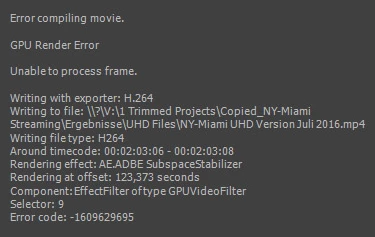
 

Deactivating GPU Support yields excellent results in terribly long time. I am surprised that the error doesn' occur at the  appearance of the first Warp effect but some Warps later.

I found several complaints with respect to "compiling movie error" but none with direct relation to Warp.

Can you help me?

Este tema ha sido cerrado para respuestas.
Mejor respuesta de Ingkris

Das Problem ist - zumindest für meine Projekte - jetzt gelöst. Seit dem neuesten Update von Premiere CC und Media Encoder tritt der Fehler nicht mehr auf.

58 respuestas

Participant
July 10, 2018

I had this issue show up today - very annoying but just opened Adobe Media Exporter and imported the project, the export worked fine.

Participant
June 22, 2018

I have had this problem for a couple of days!

I moved the files closer to the root!

Example:

C:\music videos\2018\artist name\folder 01

↑ This is too deep in the files

Try this

C:\folder 01

Close then re-open the program.

Relocate the files which you should have replaced into

C:\Folder    ← This should work!

This instantly worked for me!

Rez EsQuire

Participant
May 19, 2018

Hi guys. Я решила проблему этой ошибки кодированием в HEVC (H265). После нескольких выводов, результат 100%, т.е. сколько проектов поставила на кодировку, столько и перекодировалось. CUDA включена. Конечно получается немного дольше, но если сравнить время потраченное на попытки вывести проект в H264, то выходит быстрей вывести один раз в H265. При том что у меня CPU достаточно старый - i7 3600 (((.  И то для 60 минутного видео, вывод 24 hours для меня является приемлемым результатом. 

Durgadas Stefan Heller
Participant
June 17, 2018

After around 6 hours of trying I found a solution!!!! I got the error around 100 times!!! Now it is gone.

I tried 200 things nothing helped, but one did:

Create new Project, open old Project, select all needed scenes in old project strg+c, switch to new project press strg+v. The new project is working, all export is going fine, already exported 20 files in a list, all GREEN. Great Easy solution for me. Never liked green hooks THAT MUCH!!!!

Maybe the problem occurred because of different Premiere versions...

Participating Frequently
June 21, 2018

One other thing that helps in my case: Switching to CPU Rendering from GPU (GPU fails randomly). And Lumetri in combination with "Einstellungsebene" (probably "adjustment layer" in English) and "gaußscher Weichzeichner" (Probably "gaußian blur" in English) kills my Premiere kind of - it even renders the "gaußscher Weichzeichner" with IGNORING the keyframes, the output file is just wrong but successful. The blur is animated from 0 to 200 over some time - in the timeline and even preview rendering everything goes fine - but when I export the final file: blur 200 ALL the time Solution is no to place the animated blur in an adjustment layer. Really strange...

gtx1070 and gtx1080 with 16-32GB ram (2 different machines) - GPU rendering fails regularly - CPU works but with this annoying blur error.

Participant
April 23, 2018

I had the same error message, and it is indeed frustrating when you can't export the final file.

I spent several hours pinpointing the area, then the problem which cause the error. Apparently it was a plug-in from Red Giant Universe called "ecto" which causes a ghostly fire-like effect around letters or a piece of masked video. As soon as I deleted the effect the export went through flawlessly. I can only assume that Premiere had a problem rendering this effect because it uses up too much ram or something from the video GPU. You might try to look at areas that won't create a preview to find similar problems that cause this error. That's my take on this.

Participant
April 15, 2018

Hello all.

My name is Michael Starley . I came across this post due to the same issue . I know that this is a late reply and I do not know if this will help  .

I myself just wrapped a new PC build . I have overclocked all of the hardware , including graphics card(1060 Gt ) .

Overclocking demanded hours of testing and stabilization .

The issue with not being able to render caught me completely off guard . I thought that I had payed my due diligence in proving the system ready . After reading every ones post it dawned on me . I stress tested my graphics card at 1080p .

The rendering issue occurred while working with 2.k footage .(GPU not setup for that load)

I opened up my graphics card overclocking software and and removed 13 mhz from the gpu core clock setting .

That solved my problem . Hopefully  this can help others as well . No guarantees that 13 mhz will be your magic number though .

I would suggest removing 13 mhz at a time until problem is resolved .

The reason I am choosing 13 mhz at a time is because my graphics card is  Pascal architecture .

Pascal steps in increments of 13 . Your card may be different .

Hope This Helps

Kevin-Monahan
Community Manager
Community Manager
June 15, 2020

More powerful hardware can assist this situation, I feel, Michael. Hope you've since solved this.


Kevin

Kevin Monahan - Sr. Community & Engagement Strategist – Pro Video and Audio
Participant
February 24, 2018

Всем привет. У меня такая же беда (9 Код ошибки: -1609629695). Появилась на Premiere 17. Но у меня ошибка появляется или просто отказывается кодировать Encoder на эффекте Magic Bullet Denoiser III. Отключение CUDA в Premiere иногда решает проблему. Но не всегда. Если отключить Magic Bullet Denoiser III, то работает нормально.

Inspiring
January 22, 2018

So I don't know if this will help or not...but I was having this issue. I was exporting to an external drive an 8k h265 video. When I switched over to exporting to an internal drive, everything went fine.

Kevin-Monahan
Community Manager
Community Manager
June 15, 2020

Hmmm. Interesting. Thank you for sharing, John.

Kevin

Kevin Monahan - Sr. Community & Engagement Strategist – Pro Video and Audio
Participant
January 9, 2018

How I solved it:


I was getting this same error, error code -1609629695. This was on a project I had created two years ago, and had never had any difficulty rendering.


When I went to revise the project, I updated it to the Adobe Premiere Pro CC 2018.  I started getting this error when rendering media, whether in Premiere or Media Encoder. Changing the render engine made no difference. Off-lining and re-linking all media made no difference. Creating a new project and importing the relevant clips made no difference.


The error always came up when a clip contained an After Effects title that was linked to the original After Effects project, which had also just been updated to CC 2018.


I was able to solve this by rendering that title in After Effects, and importing the rendered .mov file into Premiere.

Participant
December 31, 2017

Hello,

This error can occur:

a) The most common way this happens is when you try to render two or more precomps that require a lot of RAM in the same timeline, to solve it simply render them individually in formats without loss of quality (like high quality avi for example) and then join them into a single composition, and render it back to a more compact format such as mp4

To find out which layer is causing problems, simply follow the render window or search the data in the Media Encoder.

b) But I also got this error when trying to render a comp that had a preset that simulated blur using javascript, and by habit, before rendering, I selected all the layers and triggered the standard AE motion blur. To solve this, just disable the Blur button.

Rgds!

Kevin-Monahan
Community Manager
Community Manager
June 15, 2020

Thank you for sharing workflow tips, Daniel. I think that more powerful hardware can assist your current workflow.


Thanks,
Kevi

Kevin Monahan - Sr. Community & Engagement Strategist – Pro Video and Audio
Participant
December 15, 2017

Win 10, i7-7700K, 2x1070 Sli, 32Ram
AE and encoder CC2017, than 2018 but same — error code 1609629695

Moderator Warning: Do not use profanity. It is against our community guidelines.

Kevin-Monahan
Community Manager
Community Manager
June 15, 2020

Vas, Sorry, but need more info to solve this. I think your GPU config might not serve you in SLI config. I would troubleshoot without that. I would be interested to find out more, as my guess is you have a GPU heavy export if you are failing more than 15 min. in. Either that, or it's some failure with a file at that timecode.


Cheers,
Kevin

Kevin Monahan - Sr. Community & Engagement Strategist – Pro Video and Audio