Exit
  • Global community
    • Language:
      • Deutsch
      • English
      • Español
      • Français
      • Português
  • 日本語コミュニティ
  • 한국 커뮤니티
0

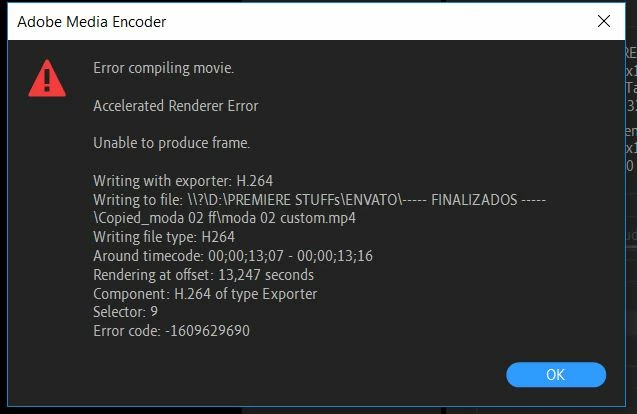
Error compiling movie - Media Encoder
New Here ,
Nov 01, 2018 Nov 01, 2018

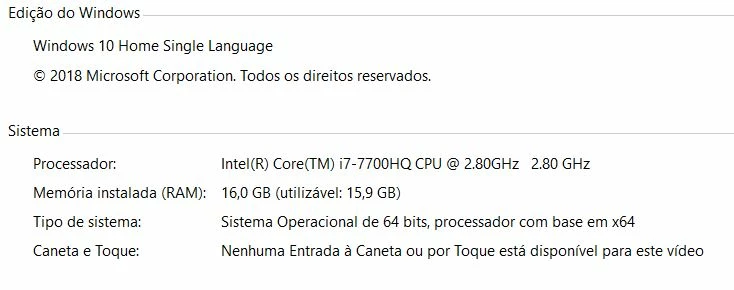
error.JPGsistema.JPG

Hi,
The problem has been solved by swapping Video Rendering and Playback from CUDA to Engine Software Only. But is that the solution? Before that, I deleted the supposedly defective frame, created a new sequence, and still the same error occurred at the same location on the timeline. I would like a definitive solution so that we do not waste time trying and disrupting our workflow.

320
Translate
Report
Community guidelines
Be kind and respectful, give credit to the original source of content, and search for duplicates before posting. Learn more
community guidelines
Adobe Employee ,
Nov 02, 2018 Nov 02, 2018

Hi joãor66143492,

Sorry for the inconvenience. It might be an issue with the GPU driver.

Try updating the driver to the latest version and see if it fixes the issue: Update the graphics driver | Windows 8, 7, Vista

What is the exact dot version of the app you are on? FAQ: How to find the exact version of Premiere Pro you're using?

Let us know the status.

Thanks,

Vidya

Translate
Report
Community guidelines
Be kind and respectful, give credit to the original source of content, and search for duplicates before posting. Learn more
community guidelines
Community Expert ,
Nov 02, 2018 Nov 02, 2018

Error Compiling Movie... some past discussions and ideas

May be caused by . in name https://forums.adobe.com/thread/2166620

-1st, create a new project and import the project that has errors and see if that fixes the problem

-http://helpx.adobe.com/premiere-pro/kb/error-compiling-movie-rendering-or.html

-and a long discussion https://forums.adobe.com/thread/1240823

Translate
Report
Community guidelines
Be kind and respectful, give credit to the original source of content, and search for duplicates before posting. Learn more
community guidelines
Adobe Employee ,
Dec 19, 2018 Dec 19, 2018
LATEST

Hi joãor,

The problem has been solved by swapping Video Rendering and Playback from CUDA to Engine Software Only. But is that the solution? Before that, I deleted the supposedly defective frame, created a new sequence, and still the same error occurred at the same location on the timeline. I would like a definitive solution so that we do not waste time trying and disrupting our workflow.

It sounds like you are running out of VRAM. I would recommend updating your hardware, especially a more powerful GPU. You can also offload much of the GPU processing by rendering previews in an intermediate deck, then output with that codec. It's called smart rendering: http://www.kevinmonahan.net/?p=88

Thanks,
Kevin

Kevin Monahan - Sr. Community & Engagement Strategist – Pro Video and Audio
Translate
Report
Community guidelines
Be kind and respectful, give credit to the original source of content, and search for duplicates before posting. Learn more
community guidelines