Known Participant
June 24, 2020
Question

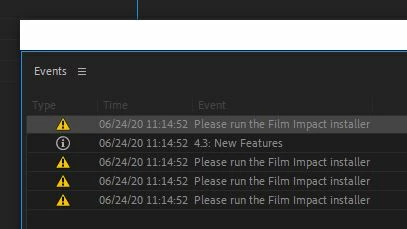
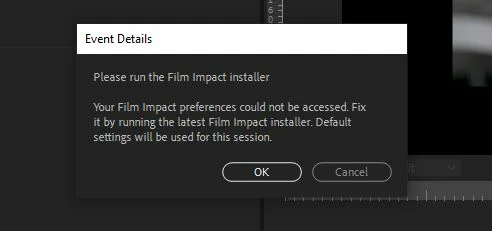
Error Message: Please run the Film Impact Installer

  • June 24, 2020
  • 2 replies
  • 8547 views

I need help understanding what I'm supposed to do with the new error message. (pics included) 10 days ago I last used Pr, and did not have this message.  I opened the project last night, before I noticed the new update, and saw this message for the first time ever.  I don't know of the "Film Impact Installer", never heard of it, and I don't know where to find the installer or if it's even necessary.


I shutdown and updated (yay ProRes) but the message remains.  It has not prevented me from working on my project.  I'm about to export now and I don't think it will be an issue.  I'll update this post if there is any problems.  


Thanks for reading.  Any help or suggestions appreciated.


Win 10

Core i9-9900K

RTX 2080

64gb Ram
2 replies

ResurrectionFilms
Participating Frequently
September 3, 2020

I was having this issue and it was driving me nuts! I did however install the transition pack from Adobe Exchange and it worked fine until the latest update of premiere, it looks like Film Impact also updated their free transition pack..

Uninstalling from exchange did not work, same issue. So what I did was I went to this folder in my C drive:
C:\Program Files\Adobe\Common\Plug-ins\7.0\MediaCore

and I deleted the Film Impact folder which might be called "FilmImpact" or  "Film Impact Essentials Lite"


Rome this folder and premiere should no longer throw this error. If you dont use the transitions then you are good. I do use them and in my case I had both of these folders in my MediaCore folder I removed the "Film Impact Essentials Lite" folder and left the other one and Film Impact is still installed and the error is gone and the double entry in the fx list is also gone now. 


I hope this helps

Inspiring
June 24, 2020

Do you have Film Impact transition packs installed on your computer?

Go to Effects > Video Transitions and see if the Film Impacts transitions are listed:

If they are there, and you are a licensed user, trying going to https://www.filmimpact.com and downloading the latest installer and reinstall your transitions.

If you are not a licensed user, on the same site, look for instructions for uninstalling.

MtD


fetanugsAuthor
Known Participant
June 24, 2020

Thanks Meg, but again I have no idea what that is.  I have the vanilla version, and have not downloaded any plug ins or 3rd party software.  I've only every updated via CC desktop app.  


There is no such item listed in my effects, having searched for it and found nothing.  

Winslow Barger
Participating Frequently
June 24, 2020

I noticed the same issue this morning after updating Premiere yesterday. 


I've never installed or used the Film Impact transitions before, but I noticed their transitions are listed under video transitions in Premiere.  It appears that they were included with the latest version.  I have used a couple of them and they work.  I was also able to export the video with the transitions and there were no watermarks.  I received the error message telling me to run the Film Impact installer, but it seems to be working without running the installer.  I'm not even sure where to find the installer... I did check out Film Impact's website but didn't see a reason to install their latest software so I'll pass for now.