Copy link to clipboard
Copied
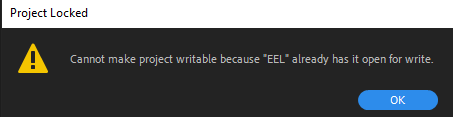
I'm using Premiere pro at work, and im the only one. It's been 2 weeks that the project is locked by a red padlock even though it's not a shared project...
Title edited by Mod.


 1 Correct answer


Hi haise5E13,
Go to the location where your project file is saved and look for a file with .prlock extension. If you find one, delete it and see if it helps.
Let us know the results.
Thanks,
Nishu

 7
Replies
7
7
Replies
7


Copy link to clipboard
Copied
Hi haise5E13!
Sorry to hear that. Can you provide more details on what's going on? Could you share a screenshot of the issue?
Let us know.
Thanks,
Kartika
Copy link to clipboard
Copied

Copy link to clipboard
Copied
Hello,
Your project is, I think, in read-only mode. What happens if you click on the lock?
Also, did you try to create a new one ?
Copy link to clipboard
Copied
Copy link to clipboard
Copied
And yes, i tried everything you said but none of these works.
Copy link to clipboard
Copied
Hi haise5E13,
Go to the location where your project file is saved and look for a file with .prlock extension. If you find one, delete it and see if it helps.
Let us know the results.
Thanks,
Nishu

Copy link to clipboard
Copied
I tried this & it worked for me. Thank you man


Find more inspiration, events, and resources on the new Adobe Community
Explore Now
 AdChoices