
hmdigiart.com
Participating Frequently
April 16, 2019
Answered

Error retrieving frame **** at time **

  • April 16, 2019
  • 58 replies
  • 267560 views

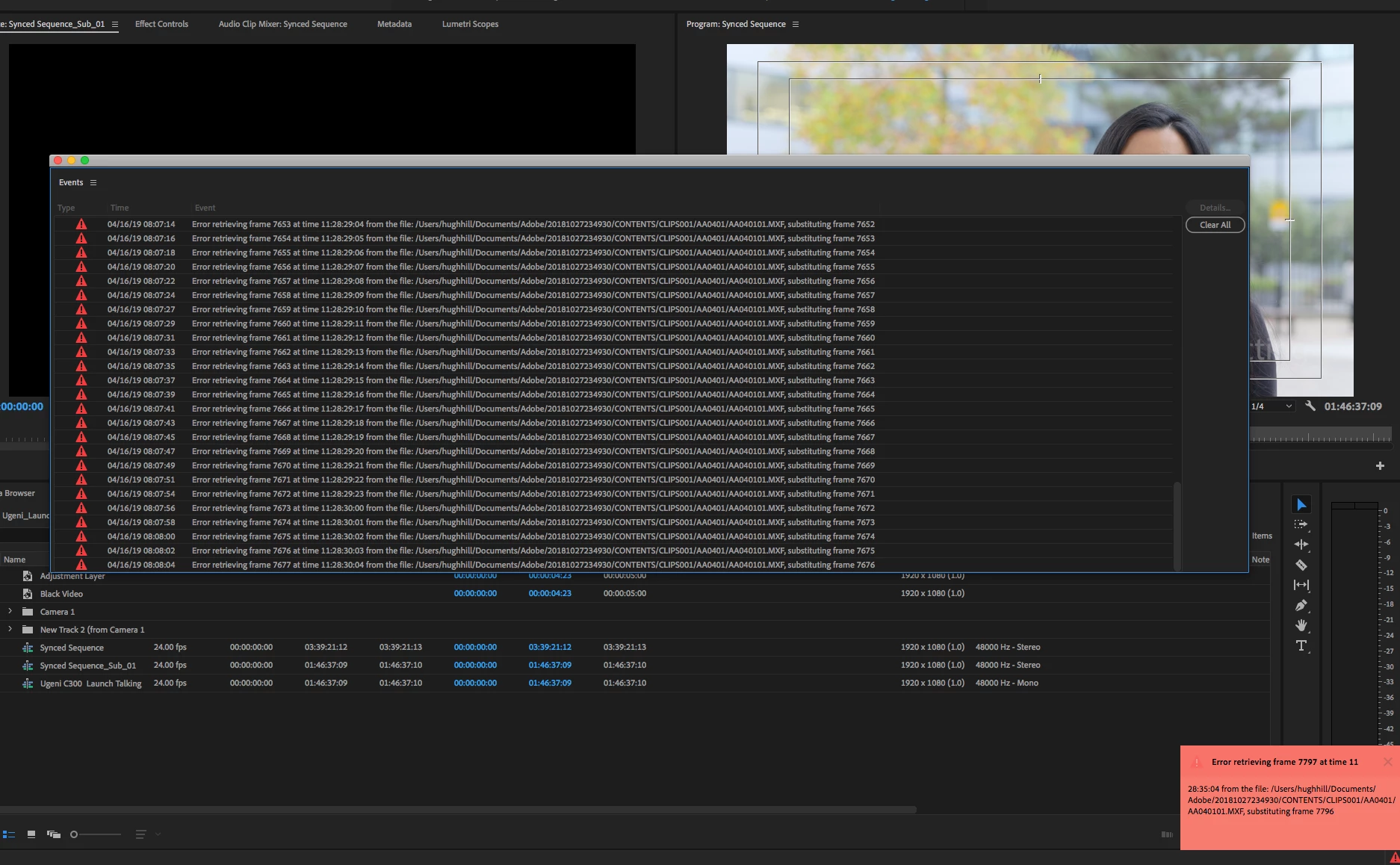
I am trying to footage taken at a recent event that I shot with one camera, I imported it into premiere pro cc 2019 and then exported it only to get this error message every few seconds.


"Error retrieving frame **** at time **:**:**:** from the file"


The footage was shot on a C300 at 24 fps, in full HD, the sequence is 24 fps 1920x1080 which is a match./

it's only when I try to export it out that I start getting the error.


Please help.


Thanks


H&M


included is a screen capture (hope it helps)


Correct answer Jens Trimmer

Here's an updated article with some troubleshooting steps to try if you are experiencing the error: https://videowithjens.com/premiere-pro-error-retrieving-frame/


If you prefer watching a video, I've made that too: 

58 replies

Participant
August 8, 2025

I Actually realised that it is hdd error or memory card that you are retrieving  from,just change the location of the file,worked for me


Participating Frequently
January 29, 2025

I don't understand what "underpowered computer" exactly means @excited_Genie16B8 

I know this is very old and I am new at editing, but I thought I got a high medium end processor and video card... I should have had no issues with it, but apparently it's not as good as I thought it'd be... any places to find out what the threshold is for underpowered?

Participating Frequently
January 30, 2025

This is the second time you've helped me, and I sincerely appreciate that!


I thought I got a pretty good desktop a year ago, and it appears I almost got good enough stuff.... Though I don't know if there's a gray area between recommended and underperforming...


i really thought my nvidia 4070 (base)

and i9-13900 would be pretty good

(DDR5 64gb ram 2x32 6000MT/s)


I appreciate your help both times now! 


Unicodia1
Inspiring
December 20, 2024

I had this happen again recently.  My files are on a dedicated ssd drive.  I've tried moving the video and audio files to another dedicated ssd, and creating a new project, but that doesn't work.  The thing that has worked for me everytime is to delete the file that had the issue from the drive, and reimport it from my camera using the Canon XF Utililty.  I bought extra media cards to make sure I can finish an edit before deleting the originals from the card.

Participant
December 7, 2024

Hello! Using Premiere Pro 2025 here! I have tried countless of suggestions here and the only thing that worked for me is nesting the scene (grouping it all into a nested scene) and exporting it. SUPER hope that there is a better fix in the future 😞 

Participant
March 28, 2024

A wee update to this - but please note that the BELOW SOLUTION DOES NOT APPLY TO EXPORT PROBLEMS arising from frame retreival errors, but to system bogging down with frame substitutions.


Was having the same-ish problem on a new install (and new machine) of Pr 24.2.1 (build 2) with 1080p25 HD422 .mxf files, initially on external GRAID HFS+ formatted 7200rpm drive mounted via MacDrive on PC (w11, fully updated at time of post). 


Wherever and whenever the play-head came to rest, either in Source or Programme Monitor/Timeline - not actually doing anything just sitting there - a slew of "error retrieving frame" alerts would pop up, starting after a minute or so referencing the clip in question, substituting adjacent frames, and then eventually substituting black video.


This was a new problem with a brand-new, well-spec'd, fast processor machine with 32gb ram, 16gb workstation GPU, different drives on different USB 3 ss10 ports. 


I had NO PROBLEMS DURING EXPORT, but viewing and working with footage got really clunky with duped frames, black video inserts etc. Problem would go away when media was rendered on the timeline (obviously not a cure for Source monitor media) - until any changes were applied, the the errors and clunkiness would return.


Restarts, deleting cache files, switching drives etc, made no difference.


I then spotted that 'playback resolution' was set to "1/2" (default on install apparently), which was not necessary given my setup. Switched to 'Full' and all the errors stopped.


I guess this may return if I find some way to max out my setup, perhaps with 8k video or hundreds animated video layers. Hopefully by this time ADOBE WILL FIX THIS!


Good luck out there - and happy knitting.


- x

 j

 w

Participant
March 19, 2024

What solved my problem was disabling the 'Posterize Time' Effect, so I can only assume that every effect that changes frames will cause the issues. I would try to disable all effects first.

Participant
October 11, 2023

I've been having this same issue too. After trying deleting cache, relinking, and basically everything else that people have suggested, what finally worked for me (per Video with Jens - https://videowithjens.com/premiere-pro-error-retrieving-frame/) is transcoding the MXF into another file format. So, to put it another way, this is entirely an issue with Premiere and there is no fix until Adobe decides to actually fix it. Having it still be an issue after four years is ridiculous, and it's especially frustrating given that so far, the transcoding I've tried of the MXFs significantly changes the look.

Participant
October 31, 2023

Same issue as well. Seemed to arise in the last two weeks or so. I was wodnering if it was my DXNR files. Cause when I pull in H.264 I get no errors. But really that shouldn't be happening regardless. 


Then tried installing an old update and that did not fix it either. Seems like we need a new update Adobe. 

Participating Frequently
November 1, 2023

It blows me away that people are still having problems despite this issue
being logged for almost half a decade.

--
Thomas Crotty

Creative Director

Sentinel AV

Participant
August 28, 2023

So this same thing was happening to me too and I tried everything...restarting everything, deleting my media cache, used software encoding instead of the gpu, render and replace the clips that seemed like were causing the issue, exporting the project from a new sequence and even new project, triple checking my timeline settings and experimenting with different variations according to the footage, changing my export settings, using different hard drives, testing all the footage individually in case it was a corrupted file(s), transcoding all the footage upon import, downloading older versions of premier, even did a factory wipe of my laptop. And sometimes something would work for that one time, but then back to the error retrieving frame message on the next project. No amount of YT videos could help me and I even did adobe support screenshare 5 or 6 times and they never found a solution for me either.


But I started outsourcing to the few friends I have that have been editing longer than me and one of them finally figured it out - it was a bad connection from my laptop to my external hard drive (a lacie) that was causing the issue because of the cord. I was using a usb-usbc cable with the adaptor, and that would work for mellow stuff like imports and editing, but when something more heavy-duty came around like rendering and especially exporting, the connection wouldn't be strong enough and the hard drive would either eject itself or do some weird halfway eject and the result was the "error retrieving frame" in my workflow. Now I just use the direct usbc-to-usbc cable and got rid of the adaptor and everything works great - got the error once, switched the cable to the other port, and it worked. This explains why I was getting mixed, unpredictable results during all my tests which was the most frustrating thing. My friend told me that this issue is pretty finicky and she even has one hard drive that only works with the adaptor cable (but usually you have to use the usbc-usbc one). Kind of like a phone charger that only works in certain ways. This issue was kicking my ass and sabatoging my ability to export videos for almost 3 painful months before this was discovered and now I have zero issues. Hope this helps!

Known Participant
August 28, 2023

All of this is nonsense.  I have a simple mpeg file that is a capture from an old HD video camera tape.  At random times, I get the "error retrieving frame".  It's not an "mxf" or anytthing weird.  Clearing the error list doesn't work because that just ... clears the error list. There's no proxies.  The file is on the SSD on my desktop.  Not an external drive.  I drag it to the timeline, scrub, and boom, red errors.  Now, I can try to cut the file apart around the error frames, but why do I have to?  Why, five years later, can Premier not recover?

Inspiring
December 19, 2023

The simple solution is never to use MPEG. It's outdated and problematic. Just transcode it before you start to a format that NLE's prefer. I'm on Mac so I use ProRes 422 HQ 10 bit (most MPEG formats are only 8 bit so you could get away with that) in a mov container. If you're on a PC use DnxHD.  I've had problems on multiple NLE's with some older DV formats - the people who created the codecs were often very "liberal" with the way they deployed them. MXF formats should work - I'm not sure what the issue is with that but once again, transcoding works.

Kevin-Monahan
Community Manager
Community Manager
July 10, 2023

Hello Community,

Try deleting any video preview files (render files). That has also helped some editors.


Thanks,
Kevin

Kevin Monahan - Sr. Community & Engagement Strategist – Pro Video and Audio
Participating Frequently
June 12, 2024

Doesn't work!! How has Adobe never fixed this issue!?? Pathetic! 

Unicodia1
Inspiring
May 24, 2023

I was so grateful to have had the files on my memory cards.  I tried several things suggested here, and avoided some of the options that I feared wouldn't work.  Given the time it would take to process, I didn't want to try them. Notably, turing off the GPU.  I tried relocating the files and using the Locate option.  I tried deleting my cache.  I restarted the computer.  The software was set to auto update, and so it was up to date.  Nothing was working.  I finally decided to try to reimport the footage from my SD card, and then replaced the old file with the new file, and it worked!!!  Now, I can sleep a good 4.5 hours and get up for the day job!