


Participant
February 22, 2017
Answered

Error when trying to export a file (Error Code 24

  • February 22, 2017
  • 3 replies
  • 4569 views

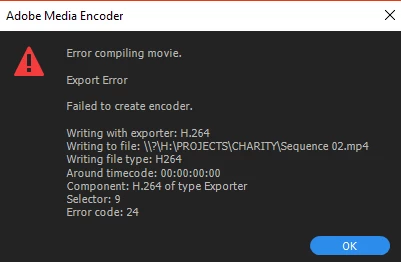
So I recently updated Adobe Premiere to the latest update as I was working a space with the 2017 version last week. When I opened the file on the computer I had just updated Premiere on, videos that I had imported had corrupted, and now when I try and import a video, all I can import is the audio. When I try and export the finished Sequence as well, I get this pop up. I have been looking over all the forums for solutions but to no avail.
This topic has been closed for replies.
Correct answer KnightLightFilms

What is your video card?

What specific version of driver for the card


I've got a GTX 660.

Also, I seem to have fixed the problem by downgrading from version 11.01 to 11.0.

3 replies

Flor123
Participant
August 9, 2017

I had the same problem, I have a GTX 960M, the technical service told me that it was a compatibility issue with the program and that I had to install an older version (CC 2015) however I kept trying and I was able to solve the problem with " Run as Administrator "  Premiere Pro CC 2017. Try that it can be useful, and you can use the current version of Adobe Premiere Pro CC 2017

Participant
September 14, 2019
Wow, this really help!!!!
vaibhavk32526539
Participant
March 26, 2017

I GOT THE SAME ERROR WHILE CONVERTING AFTER EFFECTS TO MP4 VIA ENCODER  what should i do plz help

kulpreet singh
Inspiring
February 22, 2017

Hi KnightLightFilms,

When I opened the file on the computer I had just updated Premiere on, videos that I had imported had corrupted,

I would suggest you to clean the media cache and import your original project in a new premiere pro project.

FAQ: How to clean media cache files?

now when I try and import a video, all I can import is the audio.

Make sure source video and audio is patched in the Timeline, then drag the clip to the Timeline.

Check this link: FAQ: Why does audio or video not go to the track where I drop it?

When I try and export the finished Sequence as well, I get this pop up. I have been looking over all the forums for solutions but to no avail.

Error compiling movie is a generic error. The reason could be the hardware setup, the footage used, effects used in the project, network issues.

The only thing that I can suggest is to try the steps mentioned in this document:

How to fix issues that cause errors when rendering or exporting

Thanks,

Kulpreet Singh

Participant
February 26, 2017

So I tried all of the suggested fixes. But I've unininstalled and reinstalled premiere 3 times now. And used the Adobe cleaner to make sure it's all off my computer. Still nothing fixes it. I make a new project, it only imports the sound. Even when I bring it into the source window it only gives me audio. I've tested multiple videos so I know they aren't corrupted.

Bill Gehrke
Inspiring
February 26, 2017

What is your video card?

What specific version of driver for the card