


- Home
- Premiere Pro
- Discussions
- Re: Text stroke outline icons mixed up
- Re: Text stroke outline icons mixed up
Essential Graphics graphical bug - Premiere Pro 24.2.1 (Build 2)

Copy link to clipboard
Copied
In the Essential Graphics Panel when editing text, under "Appearance" then "Stroke," the Inner, Center, and Outer stroke options to not match up graphically with what the titles are. The icons are correct, but the text is out of place.
Using Premiere Pro 24.2.1 (Build 2) on 2020 iMac Retina 5K on macOS Ventura 13.5


 1 Pinned Reply


Thank you for reporting this. This bug was fixed for Pr24.4. Please upgrade to that version to see the fix.

 12
Replies
12
12
Replies
12

Copy link to clipboard
Copied
Thank you for taking the time to report this here. We try to read everyone's bugs.
You included a screenshot of what the Outer, Inner, Center stroke pulldown looks like for you, but what does it look like on the text layer in the Program Mon? I'm not sure what the problem actually is.


Copy link to clipboard
Copied
The text next to the icons is incorrect as shown in OP's screenhot below and as is the beta.
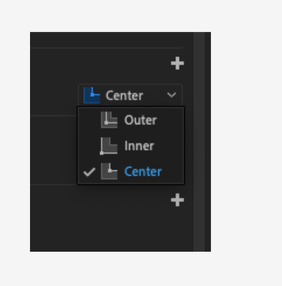
These are from 2023
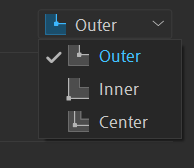
Good catch I never looked at the icons just the text.
Copy link to clipboard
Copied
Thanks Ann, I'm already looking into (and logging) that part, but the user said, "...stroke options to not match up graphically with what the titles are" which makes me think that the text layer's stroke was not behaving as expected.
Copy link to clipboard
Copied
It's not always easy to describe a bug or feature. (Especially if English is not your native language)
Copy link to clipboard
Copied
I think the text is correct but associated with the wrong icons.
Copy link to clipboard
Copied
I'm very sensitive to that fact and I'm not trying to embarrass anyone. On hindsight, I probably just read the description incorrectly, especially since the is no screenshot of the text in the PgM.
I already logged an internal bug for this:
Stroke priority labels do not match their icons in the EGP Stroke pulldown
Copy link to clipboard
Copied
Sorry @jstrawn, didn't look at replies until I finished my project. I mean that the icons on the buttons to change to Inner, Center, or Outer did not match with what the text on those buttons described (which you mentioned you are looking into now). Thanks for the responses!
Copy link to clipboard
Copied
You did not embarras anyone!!
Copy link to clipboard
Copied
Thank you for reporting this. The problem has been fixed in a recent beta build - Pr24.4 x Beta019 or higher.
It will also be fixed in the next public release of PrPro after Pr 24.2.1.

Copy link to clipboard
Copied
Looks like the "outer" and the "center" icons are switched

Copy link to clipboard
Copied
Thank you for reporting this. This bug was fixed for Pr24.4. Please upgrade to that version to see the fix.
Copy link to clipboard
Copied
This bug was also reported here:
https://community.adobe.com/t5/premiere-pro-bugs/essential-graphics-graphical-bug-premiere-pro-24-2-...
It should be fixed for everyone now with the public release of Pr 24.4.


Find more inspiration, events, and resources on the new Adobe Community
Explore Now
 AdChoices
