
Participating Frequently
July 8, 2018
Question

Essential grpahics pannel interface for Premiere Pro PC

  • July 8, 2018
  • 2 replies
  • 492 views

Hi,

I just started using the essential graphics pannel in premiere pro and my version isn't like the one like the ones on YouTube

I cant change the font, I dont have folders for differents type of animations, and a lot more. Why is that? Is it because I'm on PC?

here is what it looks like:
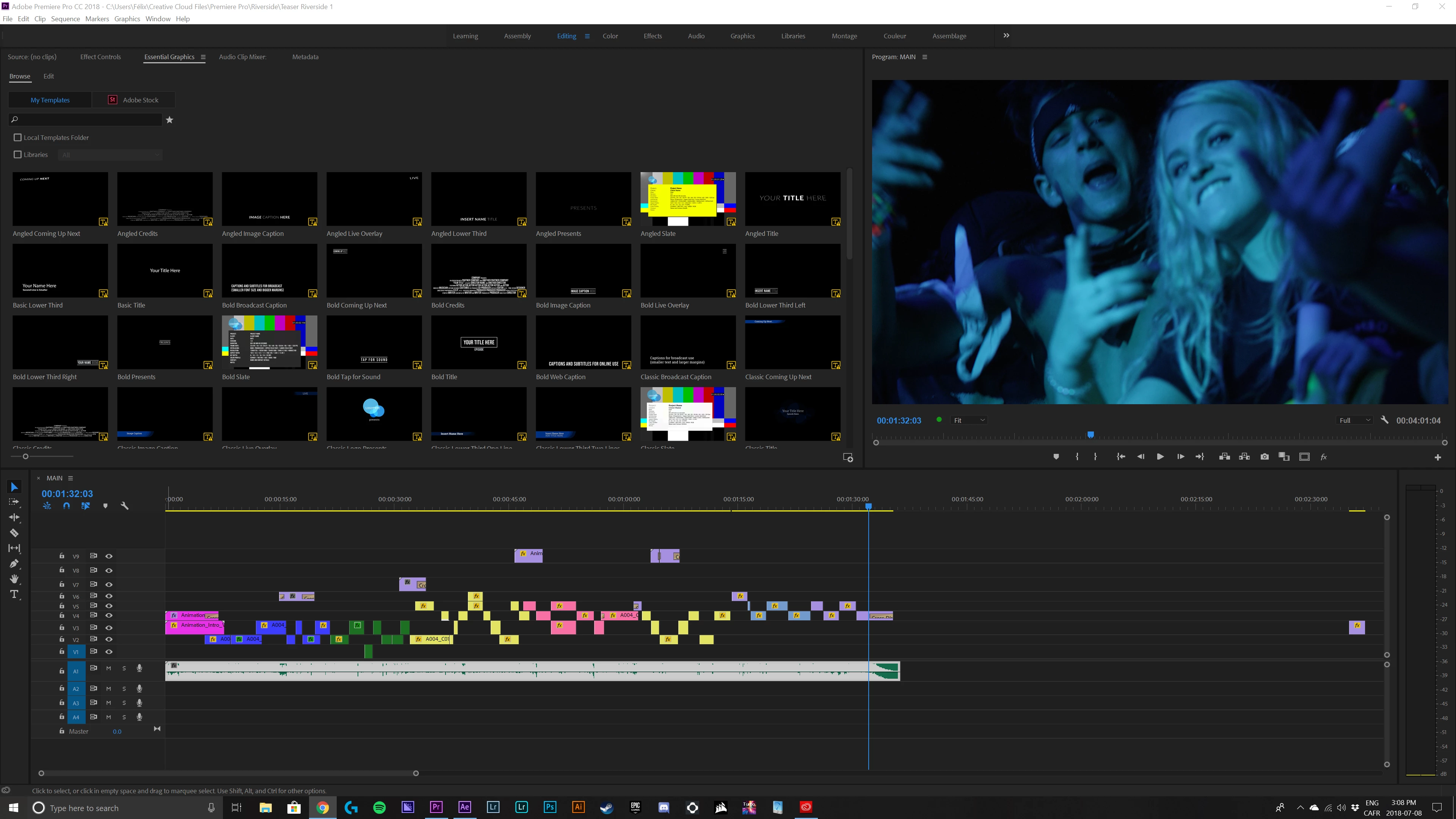
Im on the latest version of premiere pro and creative cloud. I use a custom PC, so its should not about the machine or the version of the app

    This topic has been closed for replies.

    2 replies

    R Neil Haugen
    Legend
    July 8, 2018

    You're still in the Editing workspace ... see the bar across the top under the main menu system, Learning, Assembly, Editing ... ? Go to the Graphics workspace tab.

    Neil

    Everyone's mileage always varies ...
    FCMediaAuthor
    Participating Frequently
    July 8, 2018

    I tried, its the same thing

    R Neil Haugen
    Legend
    July 8, 2018

    Shouldn't be. That's a customized workspace, not the way it ships. Go into the Workspace menu and select Reset to Saved Layout.

    Neil

    Everyone's mileage always varies ...