
breadstand
Inspiring
August 6, 2022
Answered

Essential Motion Graphics Template Text Gray/Grey

  • August 6, 2022
  • 2 replies
  • 3674 views

I am new to Premiere Pro and purchased some Motion Graphics Templates to do titles. All of the purchased templates I have do not display the text in the actual color. They all seemed to be gray. I purchased templates from a few different platforms, including the Adobe Stock Essentials.


It's important to note that the built-in templates work just fine.


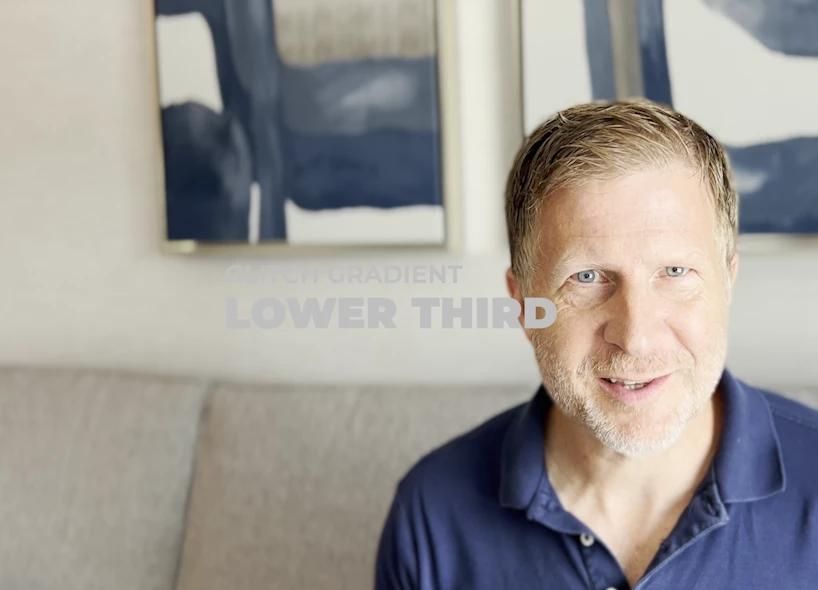
I included a photo here. Why is it grey? Why are they ALL grey?  Notice the text in the photo. The color is supposed to be white and I confirmed that it's white. I even tried rendering, no difference. 
 

This topic has been closed for replies.
Correct answer breadstand

Some playing makes me think it has something to do with blending with the other layers. For example, if I delete the content in the lower layer, the text color is white. Once I put it back, it goes gray again. It's like there is some sort of blending of layers or opacity of something. 


Okay, I solved it. There is some problem with the sequence settings. I created video in the iPhone 12 Pro Max and it has some unique color palette or settings that was setting the color for the sequence. When I create my own sequence and force the iPhone video to conform to the sequence settings, then it works properly (the color on my iPhone video is off though). 

2 replies

R Neil Haugen
Legend
August 6, 2022

Go to the Text 1 Color at the bottom of the EGP, and set a color there, see if that works.


Neil

Everyone's mileage always varies ...
breadstand
Inspiring
August 6, 2022

Yeah. it's set to white. Doesn't matter which color I use. It's like "gray." It's like there is a gray mask or filter over every MOGRT that was imported.

Participant
June 20, 2023

Hey! Can you show us how you solved it please? I'm having the same problem. Thank you so much.


Interpreting clips and modifying their color ruined all of my other clips so instead I selected the element that appears grey'd out and used Lumetri Color settings to change the LUT of the element to a 709 profile which seems to have helped a great bit.

R Neil Haugen
Legend
August 6, 2022

We'd need to see the controls of at least the EGP, if not the ECP also. So a screen grab would be very useful.


Neil

Everyone's mileage always varies ...
breadstand
Inspiring
August 6, 2022

Thanks! Here's the whole screen.