
Participant
September 18, 2014
Pregunta

Export a clip in exactly the same quality as the original

  • September 18, 2014
  • 1 respuesta
  • 43057 visualizaciones

I have just tried importing a DSLR H264 file in premiere and export it back

1. At the question if i would like to create the new sequence i choose using the clip's settings

This generated a correct sequence (regarding the frame size the pixel aspect ratio and the field order) but it set the preview settings in i mpeg / 50% quality, while the clip uses the quicktime H264 codec (let us say that this will be used in the editing procedure and can be altered at the export)

2. I immediately exported the clip from the sequence using the match sequence setting option (which uses the I mpeg codec)
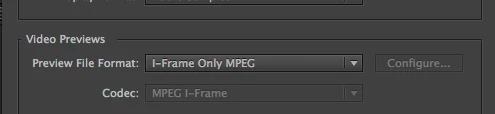
3. I Linked then to AMA in the Avid facility we have, (both the original and the -so called same as sequence = same as clip export - (I used link to AMA so that i could prevent Avid from trnascoding any of the clips.

4. the results (using Avid's Color Scopes) are that there is a colour shift to the exported video from Premiere vs the original.

5. I retried using H264 as the export codec and disabling the Limit data rate and enabling any time cost setting
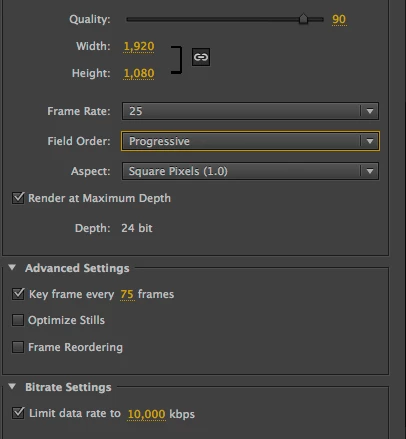
6. I tried many other possible solutions regarding the export codecs or the sequence settings and still having a different kind of shifting all the time

What is the official Adobe solution to import and export in a lossless way any material, or importing something in Premiere means you start shifting from original?

Este tema ha sido cerrado para respuestas.

1 respuesta

cc_merchant
Inspiring
September 18, 2014

What is the official Adobe solution to import and export in a lossless way any material,

Use a lossless codec. Anything else entail losses.

Participant
September 18, 2014

can you please name me one (non image sequence based) losseles codec i should use?

Participant
April 21, 2020

So, one question just to be completely clear.

I have 4 files with footage from exact same camera on exact same settings. I put them all in same sequence in single Adobe Premiere project.

Do I understand correctly that there is essentially no way that these clips will just be "stitched" together unchanged, and the video invariably has to be completely re-encoded from scratch? Is this "how the NLEs work"? Is there a way not to mangle the input video data when re-exporting from Premiere?

Personally every time my experience with Premiere was as follows: create new project, create new sequence with the same sizes and framerate as source clips, put clips to sequence, Premiere says that sequence doesn't match the clips and asks whether I want to match the sequence to source settings, I say "yes, change settings", then I do my stuff to video and when I re-export it doesn't matter whether I check "match the sequence settings" checkbox or not, frame size and rate will be mangled - usually different aspect ratio and less size. I am aware that I somehow "need to choose where this video will be played" but I am not a publisher and video is supposed to be played on the PC media player, so what I want is just the best possible quality (which is always the source quality).


Dear friends of Adobe Premiere,

this is exactely what I need. Export without re-encoding.

6 years later. Is there any way how to export video withou re-encoding? Sometimes I nees stitch up just 2 clips. Cut of some unwanted scenes and export it. Simply merge it. 

I want use it on my PC. I do not want share it on the internet. So I want the same as original

Edit: My videos are either MOV/MJPEG/4:2:0(camera Panasonic LX3) or XAVC 1080p 50Mbs(Sony handycam AX53)


Thank you very much