
Participant
September 18, 2014
Pregunta

Export a clip in exactly the same quality as the original

  • September 18, 2014
  • 1 respuesta
  • 43057 visualizaciones

I have just tried importing a DSLR H264 file in premiere and export it back

1. At the question if i would like to create the new sequence i choose using the clip's settings

This generated a correct sequence (regarding the frame size the pixel aspect ratio and the field order) but it set the preview settings in i mpeg / 50% quality, while the clip uses the quicktime H264 codec (let us say that this will be used in the editing procedure and can be altered at the export)

2. I immediately exported the clip from the sequence using the match sequence setting option (which uses the I mpeg codec)
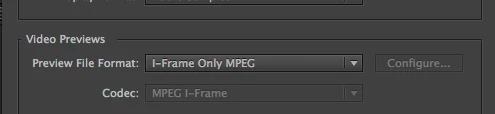
3. I Linked then to AMA in the Avid facility we have, (both the original and the -so called same as sequence = same as clip export - (I used link to AMA so that i could prevent Avid from trnascoding any of the clips.

4. the results (using Avid's Color Scopes) are that there is a colour shift to the exported video from Premiere vs the original.

5. I retried using H264 as the export codec and disabling the Limit data rate and enabling any time cost setting
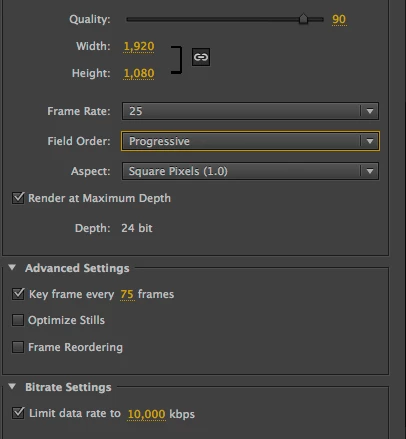
6. I tried many other possible solutions regarding the export codecs or the sequence settings and still having a different kind of shifting all the time

What is the official Adobe solution to import and export in a lossless way any material, or importing something in Premiere means you start shifting from original?

Este tema ha sido cerrado para respuestas.

1 respuesta

cc_merchant
Inspiring
September 18, 2014

What is the official Adobe solution to import and export in a lossless way any material,

Use a lossless codec. Anything else entail losses.

Participant
September 18, 2014

can you please name me one (non image sequence based) losseles codec i should use?

Participant
September 23, 2014

Dont use Match Sequence settings as the mpeg I frame only codec is a codec for previewing hence of lesser quality.

Premiere edits native means there is no qualityloss.

For export you can use a lossless code like Lagarith or UT.

The new yet to come update for CC 2014 has a new codec: Cineform (visually lossless)

But what is the final destination of your edit.


First of all thanks for the reply. Both codecs you mention are pc only codecs and i am working on a mac

I am working on an avid environment, having proposed the install of 3 premiere suites

My point is that i want to edit no matter the codec (impeg or whatever) but be able to export the edit using the native video codec and at the native quality like avid's AMA link way

So when i use H264 i want to export H264

Nevertheless i have done some experiments here and came at the following conclusions

1) exporting using animation codec gives back 100% quality in the best speed

while this is back imported to Premiere and matched down with the original using Premiere scopes and the sequence's preview files being set to H264 gives back 100% the original, when i match it on avid (1 track the original AMA linked 2nd track the exported from Premiere (also AMA linked) ) the Avid's scopes are showing a minor shift in chroma and luma (which visually is non identified)

My question though is more generic and has to do with the whole philosophy of Premiere's materials handling.

I import a video - it is by default using the 50% quality impel in order to edit quickly and when it comes to export what do i do?

I use a different export codec than the one i used to edit?

What about the effects rendered on the timeline (having used the imeg codec)?

I try to switch the sequence's settings to a quicktime animation codec when i finish an edit (it losses the preview files generated by the impel codec) and then export using again the animation codec, but that;s me

I try to find if there is an official  Adobe Lossless method of doing this...