
Participant
September 18, 2014
Pregunta

Export a clip in exactly the same quality as the original

  • September 18, 2014
  • 1 respuesta
  • 43057 visualizaciones

I have just tried importing a DSLR H264 file in premiere and export it back

1. At the question if i would like to create the new sequence i choose using the clip's settings

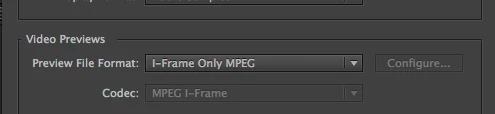
This generated a correct sequence (regarding the frame size the pixel aspect ratio and the field order) but it set the preview settings in i mpeg / 50% quality, while the clip uses the quicktime H264 codec (let us say that this will be used in the editing procedure and can be altered at the export)

2. I immediately exported the clip from the sequence using the match sequence setting option (which uses the I mpeg codec)
3. I Linked then to AMA in the Avid facility we have, (both the original and the -so called same as sequence = same as clip export - (I used link to AMA so that i could prevent Avid from trnascoding any of the clips.

4. the results (using Avid's Color Scopes) are that there is a colour shift to the exported video from Premiere vs the original.

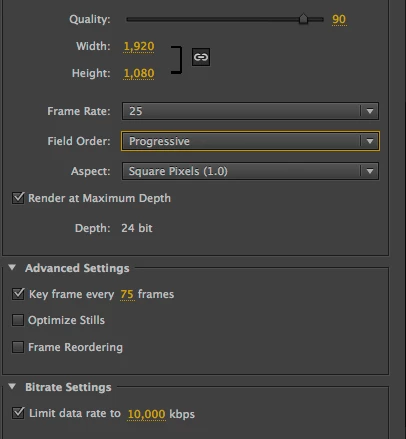
5. I retried using H264 as the export codec and disabling the Limit data rate and enabling any time cost setting
6. I tried many other possible solutions regarding the export codecs or the sequence settings and still having a different kind of shifting all the time

What is the official Adobe solution to import and export in a lossless way any material, or importing something in Premiere means you start shifting from original?

Este tema ha sido cerrado para respuestas.

1 respuesta

cc_merchant
Inspiring
September 18, 2014

What is the official Adobe solution to import and export in a lossless way any material,

Use a lossless codec. Anything else entail losses.

Participant
September 18, 2014

can you please name me one (non image sequence based) losseles codec i should use?

October 22, 2014

You have a misconception about how NLEs work ..especially Premiere.

I import a video - it is by default using the 50% quality impel in order to edit quickly and when it comes to export what do i do?

I use a different export codec than the one i used to edit?

What about the effects rendered on the timeline (having used the imeg codec)?

NLEs are non destructive and reference the source files for the edit process.  The preview codec has nothing to do with the Export (unless one chooses to use it)

All Clips, FX , audio , graphics etc  are  exported using the  Source File(s).

There are a range of export codecs and they are chosen for the end use of the export ( ie deliverable for purpose) , eg You Tube, Webmail, DVD, CC & Grade, broadcast TVC, preview copies.....

There is not one that does all.

You want a high quality export that works cross platform...  DNxHD ()which you should be already aware of coming from AVID).


So, one question just to be completely clear.

I have 4 files with footage from exact same camera on exact same settings. I put them all in same sequence in single Adobe Premiere project.

Do I understand correctly that there is essentially no way that these clips will just be "stitched" together unchanged, and the video invariably has to be completely re-encoded from scratch? Is this "how the NLEs work"? Is there a way not to mangle the input video data when re-exporting from Premiere?

Personally every time my experience with Premiere was as follows: create new project, create new sequence with the same sizes and framerate as source clips, put clips to sequence, Premiere says that sequence doesn't match the clips and asks whether I want to match the sequence to source settings, I say "yes, change settings", then I do my stuff to video and when I re-export it doesn't matter whether I check "match the sequence settings" checkbox or not, frame size and rate will be mangled - usually different aspect ratio and less size. I am aware that I somehow "need to choose where this video will be played" but I am not a publisher and video is supposed to be played on the PC media player, so what I want is just the best possible quality (which is always the source quality).