This topic has been closed for replies.
Correct answer R Neil Haugen

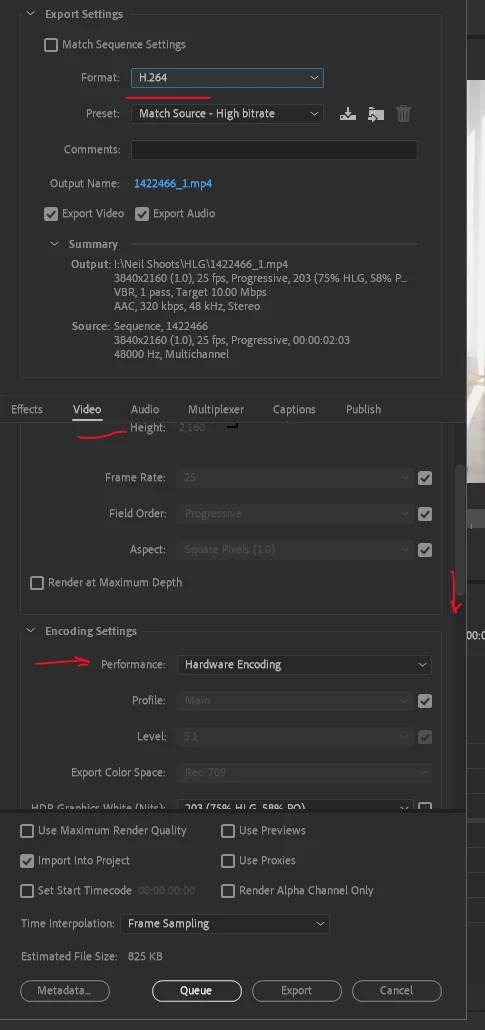
For H.264 exports, you go down to the Video tab, scroll down a bit until you get the option "Encoding Settings" ... see where mine shows "Hardware Encoding"?


Just use that drop-down to change to Software Only.


You can also go into the Preferences for Premiere and Media tab of the Preferences dialog, un-check hardware encoding for H.264/HEVC files.


Neil

2 replies

R Neil Haugen
R Neil HaugenCorrect answer
Legend
December 20, 2021

For H.264 exports, you go down to the Video tab, scroll down a bit until you get the option "Encoding Settings" ... see where mine shows "Hardware Encoding"?


Just use that drop-down to change to Software Only.


You can also go into the Preferences for Premiere and Media tab of the Preferences dialog, un-check hardware encoding for H.264/HEVC files.


Neil

Everyone's mileage always varies ...
MahaB82A
MahaB82AAuthor
December 20, 2021

Thanks.

Kevin J. Monahan Jr.
Community Manager
Community Manager
December 20, 2021

Hi Maha,

Where it says "Hardware Encoding," choose Software Encoding instead. Let us know if that works.


Thanks,
Kevin

Kevin Monahan - Sr. Community and Engagement Strategist – Adobe Pro Video and Audio
MahaB82A
MahaB82AAuthor
December 20, 2021

Thanks, it works.