
Participating Frequently
November 30, 2018
Answered

Export fail: projet looks good, but export is flickering

  • November 30, 2018
  • 5 replies
  • 5260 views

Hi

I'm in the middle of a deadline project, it should be supersimple but now i'm failing, as everything looks good in the project, but when trying to export, this is what I get:

My export setting are:

In the project everything looks good, this flickering only appears when I export the media.

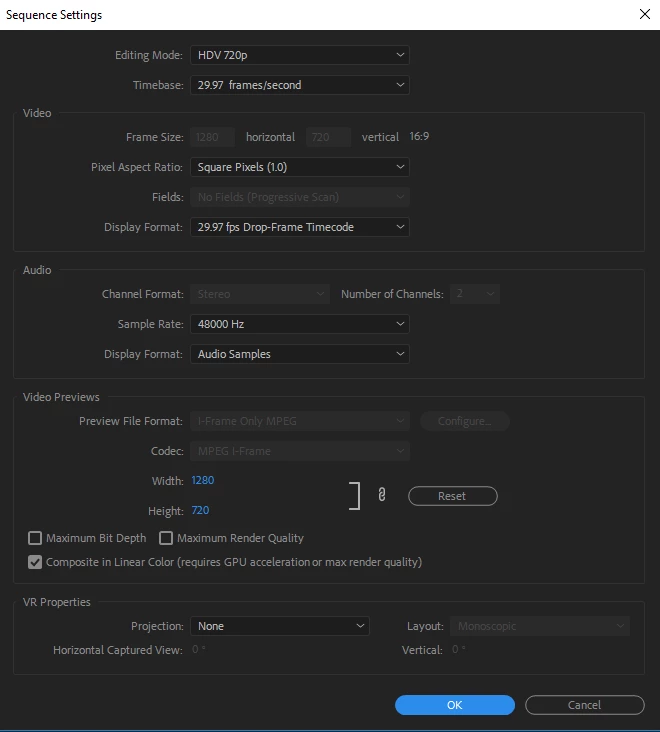
Sequence setting looks like this
I would really appreciate any help, I'm clueless what's the issue!

Thank you in advance!

This topic has been closed for replies.
Correct answer Averdahl

thank you, but this also didn't work.

i have no freaking idea....what to do.


Try this:

Resolution for an issue where green, purple, or pink haze appears in the Source or Program monitors, or the exported fil…

If it don´t work resetting the Preferences can do wonders:

FAQ: How to reset (trash) preferences in Premiere Pro?

If none of the abowe do the trick i would have manually deleted the Media Chache Database and the Media Cache files:

FAQ: How to clean (delete or trash) media cache files?

5 replies

andszHUAuthor
Participating Frequently
November 30, 2018

the driver was okay, it was the Mercury Playback Engine  that did the trick

andszHUAuthor
Participating Frequently
November 30, 2018

Meh, thank you so much guys, but still no love

Averdahl
Community Expert
Community Expert
November 30, 2018

What happened when you exported to another format than H.264?

Import the file into Premiere Pro and see how it plays back.

If that don´t do the trick try to trash the Preferences: FAQ: How to reset (trash) preferences in Premiere Pro?

Averdahl
Community Expert
AverdahlCommunity ExpertCorrect answer
Community Expert
November 30, 2018

thank you, but this also didn't work.

i have no freaking idea....what to do.


Try this:

Resolution for an issue where green, purple, or pink haze appears in the Source or Program monitors, or the exported fil…

If it don´t work resetting the Preferences can do wonders:

FAQ: How to reset (trash) preferences in Premiere Pro?

If none of the abowe do the trick i would have manually deleted the Media Chache Database and the Media Cache files:

FAQ: How to clean (delete or trash) media cache files?

Mo Moolla
Legend
November 30, 2018

Untick this box

Mo

Vishu_Aggarwal
Participating Frequently
November 30, 2018

Yes

Vishu AggarwalAdobe Certified Instructor, Professional and Expert
Vishu_Aggarwal
Participating Frequently
November 30, 2018

Also, try unchecking the composite in linear color in the sequence settings.

Vishu AggarwalAdobe Certified Instructor, Professional and Expert
Vishu_Aggarwal
Participating Frequently
November 30, 2018

Disable Hardware Encoding in Export Settings > Encoder Settings > change it to Software Encoding and try exporting again.

Vishu AggarwalAdobe Certified Instructor, Professional and Expert
andszHUAuthor
Participating Frequently
November 30, 2018

Thank you for the tipp, but it didn't help. Also I tried to copypaste the sequence content in a new project, that also failed. Bitrate encoding is on CBR, but also tried other options, it didn't help...

Vishu_Aggarwal
Participating Frequently
November 30, 2018

Try using the Media Encoder, it might help...or export is some other format like .mov or avi & then convert to MP4 using Media Encoder.

Vishu AggarwalAdobe Certified Instructor, Professional and Expert