Participating Frequently
July 31, 2025
Question

Export only uses 12% of GPU with i5-14400F and RTX 4060

  • July 31, 2025
  • 5 replies
  • 2242 views

Hello!  I recently upgraded (I hoped!) an older machine with spinny disks to an Acer Nitro with the following specs.  When I use Handbrake, I get about 50% GPU usage on a straight export.  With PP as you can see it's less than 10%. I've set everything I can find.

Component Details

CPUIntel Core i5-14400F (6 P-cores + 4 E-cores, 16 threads total)
GPUNVIDIA GeForce RTX 4060 (8GB VRAM, CUDA Capability 8.9)
GPU DriverNVIDIA Studio Driver (latest as of reinstall, confirmed with GPUSniffer)
Memory (RAM)32 GB DDR5-5600
OSWindows 11 Home (64-bit), fully updated
Power PlanSet to Best Performance
Premiere ProTested on both v24.6.5 and v25.3, currently installed 25.3
Mercury Playback EngineSet to CUDA
DisplayDual Monitors (2560×1440 each, no Advanced Color enabled)


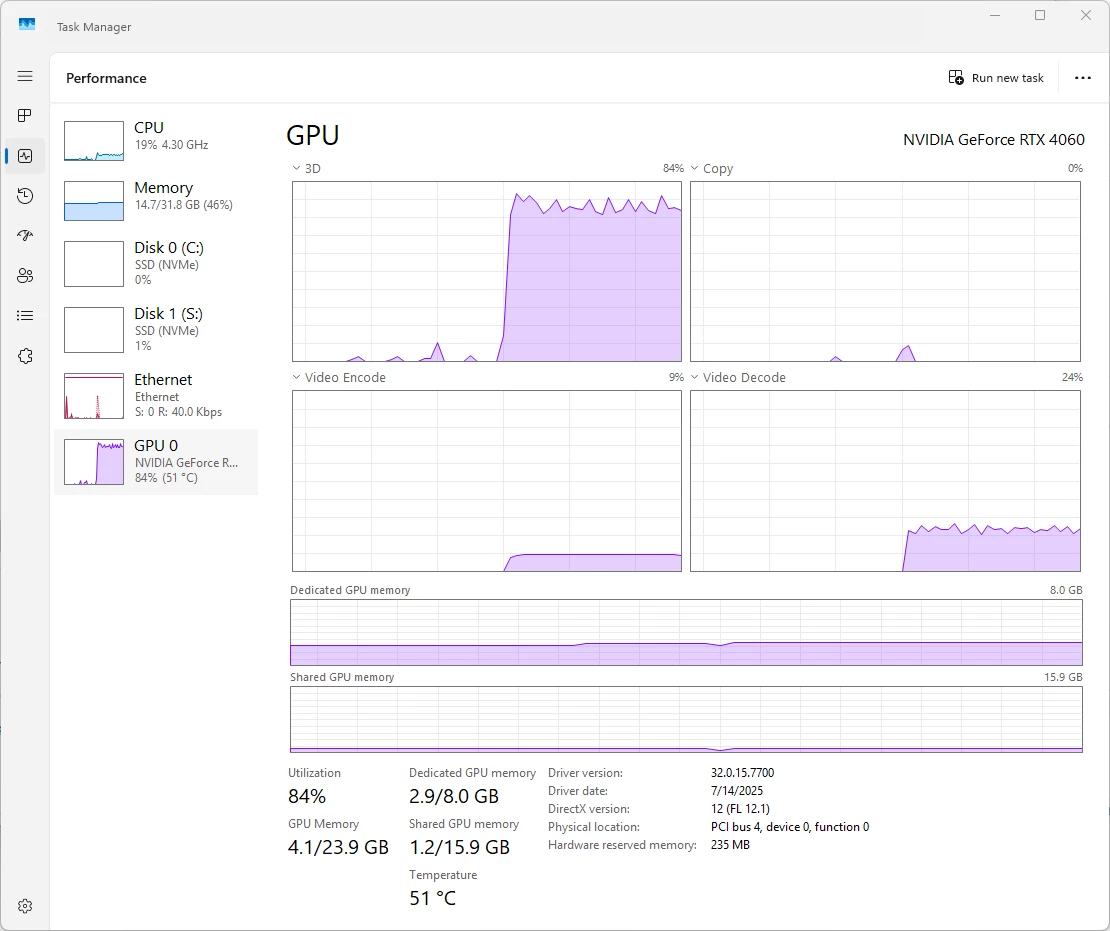
Here are screen shots of my NVIDIA Control Panel, my export setting in PP 25.3, and my GPU performance during export.  I'm just trying to export a simple MP4 after applying a 40% Gaussian blur.  Any help, direction, whatever would be helpful.  Thank you in advance.


5 replies

joe_0310Author
Participating Frequently
August 4, 2025

I've done everything I can think of.  I tried with the older free version of Voukoder, and with a trial of the for-fee Voukoder Pro.  I tried routing through AME and directly from PPro.  In all cases the export takes around 30 seconds or so, with the 3D performance peaking at about 75% and the Video Encode at 10-15%.  Then I run the same input file through Handbrake and Video Encode goes to 100%, with 3D at around 85%, and it creates the file in about 6-7 seconds.
So I'm willing to replace the CPU and get a standard I5-14400, but I'm worried it may not perform, either, and I don't get the sense so far that there's a clear reason why Handbrake works and PPro doesn't.  Is there any way to get a more definitive answer before I drop a couple hundred dollars?

Community Manager
August 1, 2025

I would generally expect your newer machine to outperform your prior machine in PPro - but many factors can come into play when comparing across workflows and hardware. You've done a good job isolating a simple use-case though (the 30 second MP4 export), and I'm somewhat surprised to see the older machine complete the export faster. 

One thing that would be useful to try - if you are able to - is to swap the GPUs of the machines and rerun your simple export. That may help narrow down whether the difference is primarily a result of the GPU, or something about the remainder of the system config. I would try to make sure the same nVidia/AMD driver versions are used after swapping to minimize the number of variables as even driver versions can make a difference. 

joe_0310Author
Participating Frequently
August 1, 2025

Thanks, Kyle!  Swapping GPUs is not really in my wheelhouse at this time.  While I'm okay opening my new machine (I've installed memory and a high-performance SSD),  I am absolutely loathe to play with the perfectly working old machine. Again, it may be a red herring, but I continue to wonder about the fact that Handbrake is so much faster and makes better use of the RTX 4060 than Premiere.

I'm currently trying Voukoder as another data point, but the older free version seems to be doing essentially the same thing.  Another option will be to try Media Encoder. The problem of course is every one of these tests takes time.  I'm just wondering if there's any logging that can be enabled on PP to help identify why the RTX 4060 video encoder is not being used to its fullest.

Legend
August 1, 2025

You got things wrong there. Your GPU is being slammed by simply rendering the Gausian blur effect, which along with whatever GPU-accelerated effects you might not have been aware of that totaled 84% GPU utilization (as indicated by the 3D load). By contrast, the RX 580 does not do much to process the Gausian Blur effect, and thus the 3D utilization is very low there, resulting in very poor GPU effects performance.


The NVENC encoder is stuck below 10% because H.264 doesn't demand much if any hardware encoding capability. Your old GPU showed far greater encoding utilization because the RX 580's encoder is far less advanced than the RTX 4060's.


However, the CPU utilization being below 20% in this workflow is indicative of a bottleneck somewhere in your system. Usually in the form of misbehaving background processes interfering with your new system's performance that didn't occur with your old PC.


What's worse, big-name computer brands tend to load the system with bloatware that steals performance from your new system and often cannot be easily uninstalled without destroying its existing OS installation.

joe_0310Author
Participating Frequently
August 1, 2025

Thanks for that input, @RjL190365.  The Gaussian blur was just an attempt to see what happens with more load.  I admit I don't know much so I wanted to see what happened.  But the latest comparison was with no effects of any kind.  It takes twice as long on the new machine.  And from my testing, Handbrake is faster.  I don't know enough to know whether this is a fair comparison or not, but when I turn it to as high of quality as I can, the same file exports in 10 seconds and seem to make much better use of the GPU.  My goal I guess is to see if I can get that same performance from Premiere Pro.


Legend
August 1, 2025

First thing to check:


Was your old PC a custom- or self-build? And is your new PC bloated with tons or trialware (trial programs)?


Second, AMD GPUs historically prioritize speed over quality to begin with. Did you ever inspect the image quality of your exports from both the old and the new PC?

mattchristensen
Community Manager
Community Manager
July 31, 2025

@joe_0310 could you help me understand what your concern is here? It sounds like you're comparing the GPU usage in Handbrake when doing a straight transcode, against the export from Premiere Pro when you have a blur applied.


These aren't the same operations, and so I wouldn't expect the same system utilization. Some things to consider which can affect system utilization:

  • Make sure Preferences > Media > Hardware accelerated decode is turned on in Premiere Pro. You may also see sub-checkboxes for Intel and NVIDIA, though as mentioned if your Intel CPU doesn't have an included GPU on the chip, you may not see an Intel checkbox
  • Compare the bitrate export settings between Handbrake and Premiere Pro. Are you using VBR 1-pass? If so, at what target bitrate and is it the same in both?
  • Is your Premiere Pro sequence size and frame rate matching your source clip, and then are the export settings also matching? If not that's fine, but it could be a difference in performance compared to Handbrake which is just passing through the same frame size.


Finally, what's more important at the end of the day is not the usage % of an individual component, but the time it takes to complete the job. How much faster or slower is Premiere Pro at the export compared to Handbrake? And what if you do it without the blur? 

joe_0310Author
Participating Frequently
July 31, 2025

Thanks for the response, Matt! Understand that I'm pretty far down the rabbit hole here, so it may look like I'm off in the weeds a bit. The root cause is that my new solid state machine is slower than my old box. My old box is decent, but unless I'm missing something the new box should outperform it pretty handily. You can see the specs on the new machine in my first post, and I briefly outlined the old machine. Would you agree that with the same Premiere Pro project cnofigured the same way new box should outperform the old box?  Because it doesn't.


So I've been looking at all sorts of things, and one suggestion to make sure the RTX 4060 wsa being engaged was run it through Handbrake and that's where I found that Handbrake outperformed PP, certainly from the aspect of making use of the RTX 4060.  Absolutely it's apples and oranges, but the primary thing I was checking was whether or not the RTX 4060 was available to be used at all, and Handbrake proved that it was.  As I get some more time, I'll try to gather some more apples to apples comparisons especially of PP on the old box and PP on the new box.

R Neil Haugen
Legend
August 1, 2025

I'll be interested in any reply from Matt on this ... or @RjL190365 who is the 'resident expert' volunteer on hardware issues. I know from working in several video post apps that every one of them is coded to handle hardware differently.


And in this case, as Handbrake doesn't need any other resources, it is probably coded to use hardware very differently than an NLE, which has to allow for a ton of effects processing & such in the configuration for how it uses the hardware available to it.


The GPU isn't simply another form of CPU, it has very different internal math and coding processes. So the program can't simply throw one thing at whatever is available ... that has to be separate coding chains depending on a ton of other factors. 


Which we users rarely can even guess at. But as stated, it will be interesting to get a response from Matt or RJL, as I learn from both all the time.

Everyone's mileage always varies ...
R Neil Haugen
Legend
July 31, 2025

If you do any long-GOP it is not as wise to use an Intel CPU with F in the name. As that means it specifically has no iGPU hardware, therefore no QuickSync to do hardware long-GOP encodes and decodes.


Just as a note.

Everyone's mileage always varies ...
joe_0310Author
Participating Frequently
July 31, 2025

I appreciate the note.  Other comments (including your own) have alluded to that.  Unfortunately, this was the build that was available.  I can replace the CPU, but it's not something I had planned to do.  Especially since Handbrake DOES take advantage of the Video Encode, I hold out hope that there is some configuration that would convince PP to at least be as tech-aware as Handbrake.   If not, then upgrade it is.  At that point the question becomes which CPU to use.  

R Neil Haugen
Legend
August 4, 2025

Perfect, thanks!  I made the mistake of going all the way back to the Adobe home page, thich is why I couldn't fnid anything.  The link you provied is excellent, and it got me to the Puget Sound page which basically identified that I have a low-end card and CPU.  Probably why the machine was cheap.  🙂  That still doesn't explain why PPro doesn't work as well as Handbrake, although I've read some articles that explain the different paths that they use.  But in my real-world testing, it seems that some software won't take advantage the RTX 4060 and that the most cost effective way to start is to upgrade my CPU (as counter-intuitive as that may be).  If that goes well, I'll look at the next steps.


Every app is coded differently, and players do not have nearly the same processing chain needs of an editing app. Because players are not built to run numerous layers of multiple video and audio streams at once, as an editing app must be built.


As to the use of the GPU and CPU, they are always set for different parts of the process, they are not simply extensions of the other. Completely different code and processing chains required. 


So as an app is designed, they set the code for certain things to the CPU, for others to the GPU if available, and set the limits as to how far up the line each can go in relation to the other processing chain.


So if the CPU can only do so much, the GPU will spend a lot of time pretty much idling.

Everyone's mileage always varies ...