
Known Participant
March 13, 2023
Answered

Export Quicktime

  • March 13, 2023
  • 1 reply
  • 3174 views

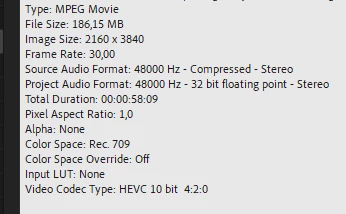
how do I export a file in quicktime with the option to control the final file size, because I went to export a 2min file (2160 x 3840) and it gave me a final file of 8Gb, I have a friend who is editnaod in davinci resolve and he said that there is a way to control the file size, he edited a file of 0:00:58, according to the attachment

this is the file edited in davinci in quicktime

Muito obrigado a todos.
This topic has been closed for replies.
Correct answer R Neil Haugen

Hey Ricardos,

The bitrate settings are available for H.264 and HEVC (H.265) codecs. You can select them in the Format drop-down box. If you wish to have a smaller file size in Quicktime format, try the Prores 422 LT option in the Video Codec drop-down menu. 


For the interframe codecs like ProRes, Cineform, and Dnx, you set the approximate bitrate as Ishan helped with, by choosing which version of that codec. There are charts for each you can find online for approximate bitrate per choice.


So if you look up say ProRes in a search, you'll get the variants and the bit depths and rates for each.


Neil

1 reply

R Neil Haugen
Legend
March 13, 2023

Change the bitrate or quality setting. Higher settings get larger files for the same length, lower settings get smaller files for the same length.


Neil

Everyone's mileage always varies ...
Known Participant
March 13, 2023

Neil, thanks so much for your help. I send you the print of the configuration screen to show you how I am exporting, the video quality and bitrate option does not allow it to be changed Where am I going wrong?

Known Participant
March 14, 2023

Hey Ricardos,

The bitrate settings are available for H.264 and HEVC (H.265) codecs. You can select them in the Format drop-down box. If you wish to have a smaller file size in Quicktime format, try the Prores 422 LT option in the Video Codec drop-down menu. 


Thank you very much for the information for the tip I will test it and come back with the result thanks again