
Known Participant
October 4, 2018
Answered

Export settings Dv Pal

  • October 4, 2018
  • 20 replies
  • 9270 views

Hello,

I need your help for a short video (5 minutes) shot in Dv Pal format 720x576.

Which kind of settings should I use to have the best quality for it?

Which basic settings should I use for the video section?

Which are the best bitrate settings to use?

Should I tick maximum render quality box?

Until now I have done some test with h264 but I am really upset by the quality.

Thanks in advanced for your answers.
    Correct answer Ann Bens

    You can tweak the bitrate if you want:

    20 replies

    Known Participant
    October 4, 2018

    Second onr. You can notice now 720x480

    Ann Bens
    Community Expert
    Community Expert
    October 4, 2018

    Now post screenshot of properties of a clip. Need to be sure this is not PAL.

    Known Participant
    October 4, 2018

    Known Participant
    October 4, 2018

    Ok this is the first export

    Known Participant
    October 4, 2018

    I didn't say post screen shot. I just said that I when i import again the video seems to be cut

    Known Participant
    October 4, 2018

    Yes, quiet new Ann.

    Ann Bens
    Community Expert
    Community Expert
    October 4, 2018

    Try and answer all my questions otherwise its going to be a long day.

    I asked YOU to post a screenshot to show the export settings with left tab to output and with an visible image.

    Known Participant
    October 4, 2018

    Where can I see it? I think yes I have put blands band around it. Is this affecting?

    Ann Bens
    Community Expert
    Community Expert
    October 4, 2018

    Post screenshot have no idea what you mean.

    Is video-editing new to you?

    You will have to ask the festival guys how they want your movie.

    Known Participant
    October 4, 2018

    The high bit rate tach source solution seems working very good. Another issue came out. I need to export only the video with the definitive audio in another window. When I insert the exported video a portion of screen seems to be cut (in mp4 /h264). Indeed, in the export the video is not anymore 720x576 but it's smaller. If I export in avi the quality seems still really poor. What do you suggest?

    Ann Bens
    Community Expert
    Community Expert
    October 4, 2018

    Is it widescreen or 4:3.

    Ann Bens
    Community Expert
    Community Expert
    October 4, 2018

    I need to export only the video with the definitive audio in another window.

    What do you mean by that.

    Ann Bens
    Community Expert
    Community Expert
    October 4, 2018

    DV pal is SD and not HD.

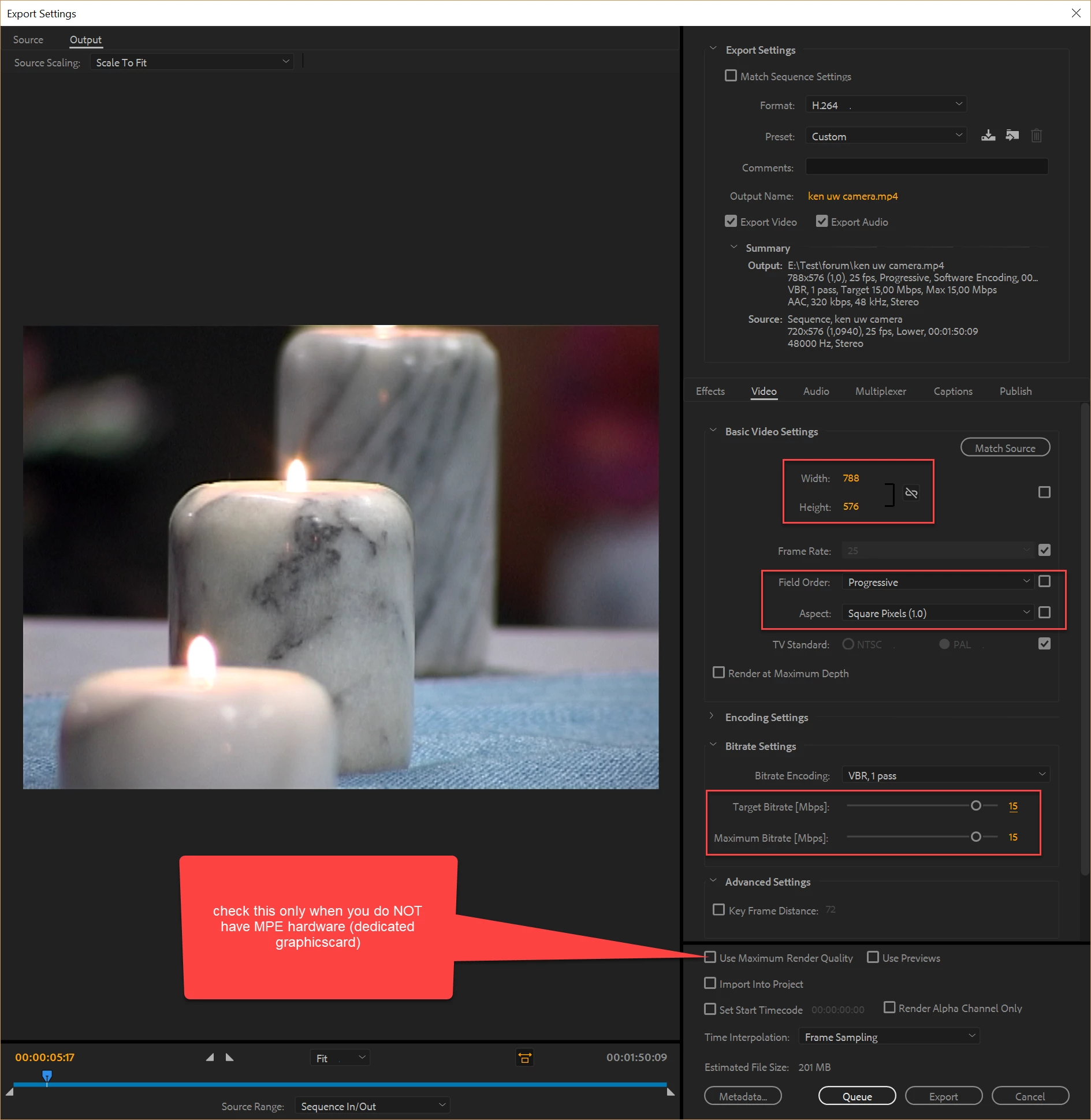
    If its for Youtube and widescreen export to mp4 (H.264) 1050x756, par1.0 bitrate match source adaptive high bitrate (you can tweak the bitrate)

    If its 4:3 make it 788x576, par 1.0.

    Youtube needs to be Progessive.

    Known Participant
    October 4, 2018

    Ann is not for youtube. Is it ok ok if I put Maximum bitrate? I also don't understand when says Lower/upper first. When I choose upper the quality seems better.

    Ann Bens
    Community Expert
    Community Expert
    October 4, 2018

    What is the end product/device going to be?

    Legend
    October 4, 2018

    riccardor88384511  wrote

    ...a short video (5 minutes) shot in Dv Pal format 720x576.

    If what you are saying is accurate, then it's likely that the clip will look bad regardless of how you output it. 720x576 will look poor on any 1080p screen, which have been standard for several years now, and will look way worse on a UHD 4K display, which are also quite commonplace now.

    Vishu_Aggarwal
    Participating Frequently
    October 4, 2018

    Which format & codec do you can to export the video?

    If it is .mov then use DVPAL preset or use Uncompressed preset this will give you the good quality but bigger file size. In case you want to export in MP4 using h.264 then use "Match-source with High Bitrate" this should give you the best quality with lower file size compared to .mov

    If you're scaling or moving (animating) the media then check maximum render quality box otherwise, uncheck it and best bitrate setting is useful when you have video in 10 bit or higher, so I think it will not be required. Checking also increase the export time a lot.

    Here is the good blog post to read about these two settings - Premiere Pro CC: What the Heck Do These Image Options Mean? | Larry Jordan

    Vishu AggarwalAdobe Certified Instructor, Professional and Expert
    Known Participant
    October 4, 2018

    I exported in H264