
Export settings for 1080p YouTube video?
Hi! I am new to APP (I use CS6) and this is my first time exporting a video. I'd like to upload it to YouTube for 1080p resolution, but the export settings really confuse me. I've tried exporting it and uploading to YouTube once, but my highest resolution options were either 480p or 720p50HD (which I have absolutely no idea what it is) instead of 1080p.
I am trying a second export with similar settings, but still am not sure if it will work.
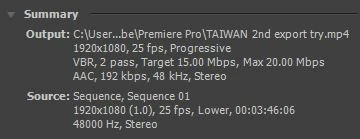
My video was shot with a Canon DSLR (rebel t5i or EOS 700D) -- at 1920x1080p, 25fps, 48000Hz, Stereo etc. (seen in the img above)
Here are my export settings:
VIDEO
Format: H.264
Preset: HD 1080p 25
TV Standard: NTSC
Frame Dimensions: 1920 x 1080 pixels
Frame Rate: 25 fps
Field Order: Progressive
Pixel Aspect Ratio: Square Pixels (1.0)
Profile: High
Level: 5.1
(Render at Max. Depth - checked)
Bitrate Encoding: VBR, 2 Pass
Target Bitrate [Mbps]: 15
Max. Bitrate [Mbps]: 20
AUDIO
Audio Format: AAC
Codec: AAC
Output Channel: Stereo
Freq: 48000Hz
Audio Quality: High
Bitrate [kbps]: 192
(Use Maximum Render Quality - checked)
--
I decided not to use the YouTube presets because apparently they're not that good so...
anyone? please help! :s
 AdChoices