
Participating Frequently
October 20, 2015
Question

Export settings for 1080p YouTube video?

  • October 20, 2015
  • 2 replies
  • 51785 views

Hi! I am new to APP (I use CS6) and this is my first time exporting a video. I'd like to upload it to YouTube for 1080p resolution, but the export settings really confuse me. I've tried exporting it and uploading to YouTube once, but my highest resolution options were either 480p or 720p50HD (which I have absolutely no idea what it is) instead of 1080p.

I am trying a second export with similar settings, but still am not sure if it will work.
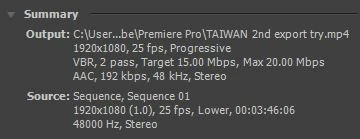
My video was shot with a Canon DSLR (rebel t5i or EOS 700D) -- at 1920x1080p, 25fps, 48000Hz, Stereo etc. (seen in the img above)

Here are my export settings:

VIDEO

Format: H.264

Preset: HD 1080p 25

TV Standard: NTSC

Frame Dimensions: 1920 x 1080 pixels

Frame Rate: 25 fps

Field Order: Progressive

Pixel Aspect Ratio: Square Pixels (1.0)

Profile: High

Level: 5.1

(Render at Max. Depth - checked)

Bitrate Encoding: VBR, 2 Pass

Target Bitrate [Mbps]: 15

Max. Bitrate [Mbps]: 20

AUDIO

Audio Format: AAC

Codec: AAC

Output Channel: Stereo

Freq: 48000Hz

Audio Quality: High

Bitrate [kbps]: 192

(Use Maximum Render Quality - checked)

--

I decided not to use the YouTube presets because apparently they're not that good so...

anyone? please help! :s

    This topic has been closed for replies.

    2 replies

    Participant
    February 8, 2023

    I can't see the Youtube 1080 Preset. Can somebody help?


    shooternz
    Legend
    October 20, 2015
    I decided not to use the YouTube presets because apparently they're not that good so.


    Who said so and why did you not try it  and work it out for your self?

    chennjiAuthor
    Participating Frequently
    October 20, 2015

    I am currently halfway through my third export using a YouTube preset

    and I read a few other forums on other websites and watched about 3 tutorials that all said this so :1 well some said they weren't good, others said using other presets would be better

    and I am trying to figure it out! But I am new to this whole thing and it's a bit overwhelming...

    Ann Bens
    Community Expert
    Community Expert
    October 20, 2015

    I forgot what exactly my settings were when I first exported the file, but I imagine this is around the same v

    My first try for the export got me 1080p50 (don't know what the difference is compared to 1080p so I tried exporting it a second time)

    My second try got me to 420p and my third got me to 360p (I used different presets/settings for every try -- but my audio settings remain unchanged for all three tries)


    Would have been nice if the left screen had a picture instead of black all over.

    Anyway export settings are fine.

    You only need to change the sequence settings to match the footage.