

TMAINC
Participating Frequently
May 20, 2023
Answered

Export to YouTube Not High Quality

  • May 20, 2023
  • 2 replies
  • 3425 views

https://youtu.be/dhkl0rDBMAU


I just completed this video. It is my first lyric video so I want to get the kinks worked out in this one before I move to the next one. My biggest issue is with the text which is all pixelated. Plus, the photos from Adobe Stock Images are definitely not as sharp as they should be. Some of the photos I used are from the client and were not shot at Hi-Res, so those are the exceptions. All of the other photos and graphics are included in various Mogrt's that I used or came from Adobe Stock Images. I'm not sure what I missed in the settings when I exported it, but I need the overall video to be sharp and crisp and the text to not be pixelated. Any advice would be appreciated.
Correct answer Sami Succar

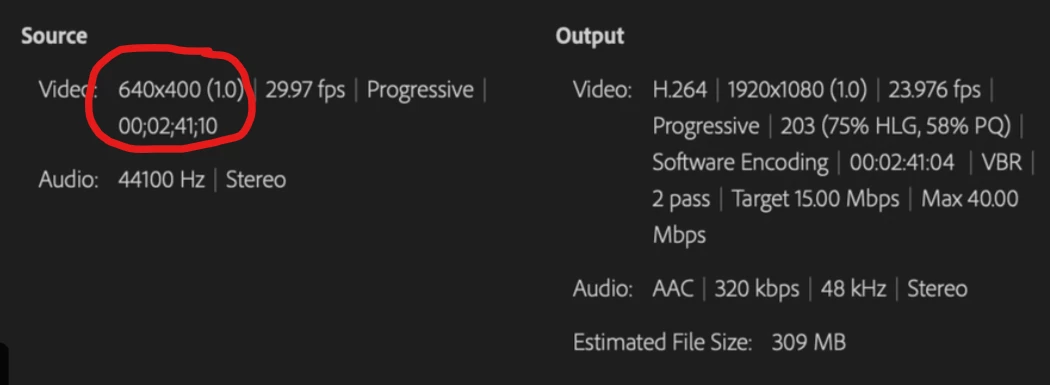
There's your issue, the source is way too small, only 640x400 that you're trying to ouput to 1920x1080.


Go back to your timeline, go to Sequence > Sequence Settings, and adjust its size to 1920x1080. Bear in mind that you'll need to double check all your footage and graphics after you do that. Once you're done, you can now export again, and it should be alright.

2 replies

Participating Frequently
January 8, 2025

you can use https://theyoutubepremiumapk.com/ for quality and premium watch

Inspiring
May 21, 2023

Yeah, the video on YouTube has a very low resolution. Please share a screenshot of your sequence settings and your export settings so we can better assist you.

TMAINC
TMAINCAuthor
Participating Frequently
May 21, 2023

Thanks so much for your feedback! I really appreciate your help. Let me know if I'm missing a screenshot of anything you need.

Sami SuccarCorrect answer
Inspiring
May 21, 2023

There's your issue, the source is way too small, only 640x400 that you're trying to ouput to 1920x1080.


Go back to your timeline, go to Sequence > Sequence Settings, and adjust its size to 1920x1080. Bear in mind that you'll need to double check all your footage and graphics after you do that. Once you're done, you can now export again, and it should be alright.