
Participating Frequently
December 7, 2018
Answered

Exported video doesn't play

  • December 7, 2018
  • 1 reply
  • 6954 views

I went through the getting started tutorial and that exported video is fine. Now I have a .mov clip to import, edit and export. 

Following along using the same steps and settings as the getting started tutorial, the exported video plays only the audio.

I've tried exporting it as a .mov file as well as the H264 as in the tutorial, but the result is the same - audio only.

The original file is a .mov file that was made as a quicktime screen recording on my Mac.  The original file plays on the Mac and on my Windows 10 PC.

The edit is just a shortening of the clip. There are no effects of any kind in it.

Any ideas?  What should I try?
    This topic has been closed for replies.
    Correct answer Ann Bens

    Yes, it remembers the last path.  How can you change the file name and path?  I've changed the project path. But how to get the edited video file  to go into or some other path of my choosing is the question there.

    Thanks again for your help.


    You have very odd framerate: your sequence is 2.2 and your output 5 frames. That is not going to play.

    Its a screenrecording yes: needs to be at least 15 frames when recording. Better yet: 29.97 frames.

    Double click on the blue name and change it.

    1 reply

    Ann Bens
    Community Expert
    Community Expert
    December 7, 2018

    Post screenshot of export settings.

    Participating Frequently
    December 8, 2018

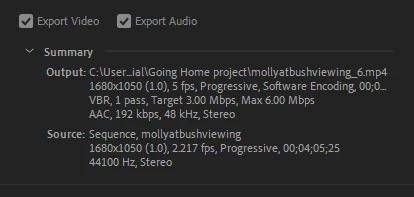
    Here's the Export settings. By the way, how do you change the output paths, filename etc?  I have started a new project and it's still going into the directory of the Tutorial project.

    Thanks for your help.

    Ann Bens
    Community Expert
    Ann BensCommunity ExpertCorrect answer
    Community Expert
    December 8, 2018

    Yes, it remembers the last path.  How can you change the file name and path?  I've changed the project path. But how to get the edited video file  to go into or some other path of my choosing is the question there.

    Thanks again for your help.


    You have very odd framerate: your sequence is 2.2 and your output 5 frames. That is not going to play.

    Its a screenrecording yes: needs to be at least 15 frames when recording. Better yet: 29.97 frames.

    Double click on the blue name and change it.