
Frasski
Inspiring
February 3, 2020
Answered

Exported video seems to be corrupted

  • February 3, 2020
  • 4 replies
  • 6558 views

Hi!


So for some reason, after I export a video on Premiere Pro, the exported video/footage always looks very glitchy and corrupted. I can't exactly remember when this started happening and I think it has to do something with my GPU since it's been acting funny.


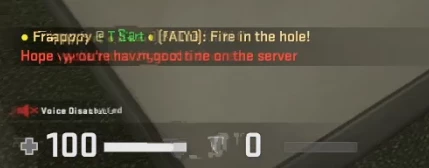
Below is an example of what it looks like. The whole video doesn't look like that, it just appears every few frames or so. It looks like frames are corrupted in my video or something.

It's not really a big deal, but it's annoying and I want my content to be as good and as refined as possible. I really need help on this, thanks in advance!
 

This topic has been closed for replies.
Correct answer Frasski

Everyone, upgrading from version 13 to Premiere Pro version 14 fixed the issue for me. I was too afraid to upgrade since when I tested it last time, it wouldn't play one of my video files and would outright crash. Thank you to everyone who tried to help and for their time. I appreciate it!

4 replies

Participant
December 31, 2022

When I try to play after I export, I got message like this, 


When I export, I tried at least 3 different methods like bellow;  


However, I failed. Sometimes, I got so many picture images not video. It took more than 24 hrs.


Community Expert
January 2, 2023

more details needed:

how long is your edit?

are you on software only or GPU acceleration?

did you use third party plugins? lot of effects? Lumetri? mogrts?

what if you try to export to QuickTime?

Frasski
FrasskiAuthorCorrect answer
Inspiring
February 4, 2020

Everyone, upgrading from version 13 to Premiere Pro version 14 fixed the issue for me. I was too afraid to upgrade since when I tested it last time, it wouldn't play one of my video files and would outright crash. Thank you to everyone who tried to help and for their time. I appreciate it!

Community Expert
February 3, 2020

what format are you exporting to? 

are you on software only or GPU acceleration renderer?

if on GPU acceleration, try to export to QickTime GoPro Cineform YUV 10 bit

if GPU acceleration is greyed out, update your graphics card from the vendor's site

Frasski
FrasskiAuthor
Inspiring
February 3, 2020

Alright, so it's even worse when you export it to QuickTime. Though, I noticed something. The first time I exported I forgot to set the framerate to 60 so it was just "1" in the export settings and the video looked like it was 15 or 20 FPS. Though, there was no glitchyness or anything. When I exported to 60 FPS however, there was A LOT of glitchyness.

Frasski
FrasskiAuthor
Inspiring
February 4, 2020

Are you seeing any issues if you play back the orignal footage in a video playback software such as VLC?


Nope, the original footage is as fine as it can be.

Inspiring
February 3, 2020

It would be helpful to know which projects settings you are using in Premiere, as well as the export settings for the footage, and any relevant system information (e.g. processor, graphics card, operating system etc).

Frasski
FrasskiAuthor
Inspiring
February 3, 2020

Sorry, forgot to include that. Below should be everything you requested, sorry if I missed something.

Specs:

CPU: Intel Core i5-8600k

GPU: GTX 1660 Ti

RAM: 8GB

Motherboard: Gigabyte Z370P D3

OS: Windows 10 1903 64-bit 


Project Settings:

Export Settings: