Legend
February 20, 2018
Question

Exporting, Archiving The Master File

  • February 20, 2018
  • 1 reply
  • 8117 views

Hello Everyone.

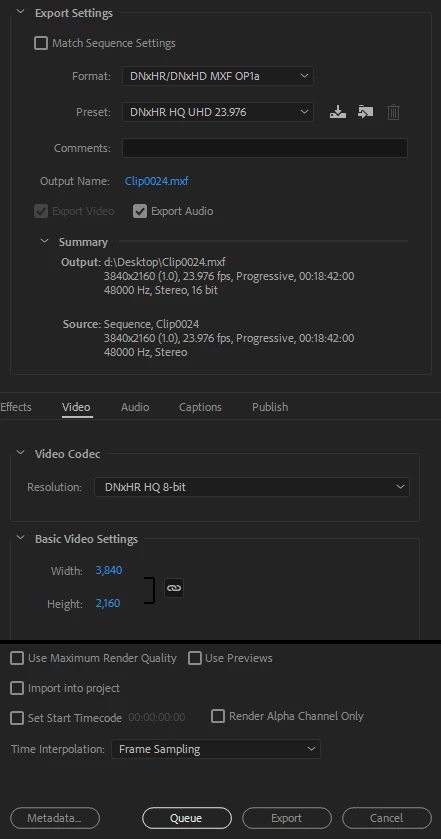
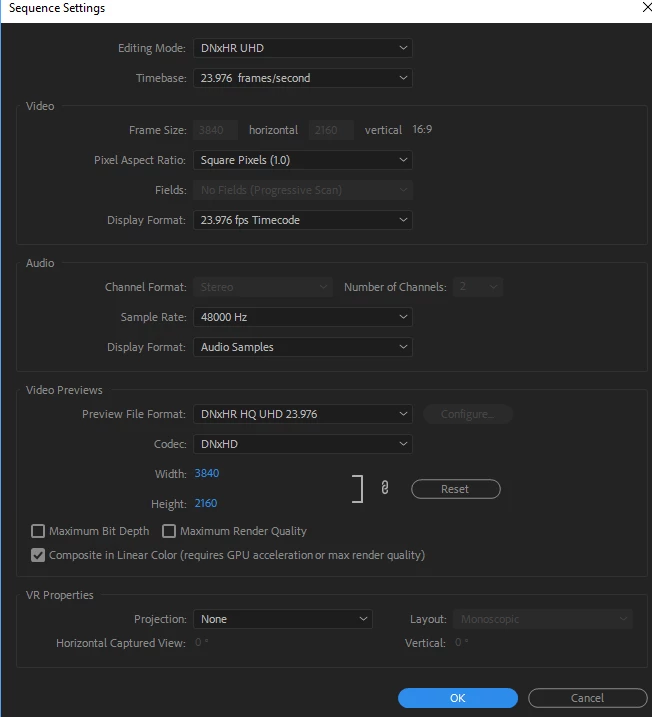
I have a Sony PXW-Z150. Please look at the Attachment files. When Import the 4k Files, I Drag My files Into New Item, and after editing, I go to the Export

Media, and I use the Format: DNxHR/DNxHD MXF OP1a. 

I heard different stories. Some people say, Its better to use H264, and some say, use the HEVC (H.265)  and I also heard, only Check the Match Sequence Settings Box.

Would you please look at my Screen-Shots, and let me know what you recommend for Mastering and Archiving.

Also, Is there any Codec, that  I can Download for this  camera, or whatever is Inside the Premiere Pro, I should use.

Thank You Very Much.
    This topic has been closed for replies.

    1 reply

    Legend
    February 20, 2018

    For Masters, I'm a fan of the Cineform and UT codecs.  The first is built-in to Adobe software, the latter can be added to your system below.

    https://www.videohelp.com/software/Ut-Video-Codec-Suite

    Cineform is visually lossless at a Quality level of 4.  It's comparable to ProRes HQ and DNxHR, but often with a better quality/file size ratio.  UT is mathematically lossless.  You just can't get any better than that.

    Participating Frequently
    February 20, 2018

    Good advice from Jim. I will add that H.264 and H.265 are VERY highly-compressed formats really meant for delivery, not mastering. You want a larger, less-compressed file for that, which will be pretty much "lossless quality" from what you edited. Then from that high-quality master, you can later export to various other compressed delivery formats as needed.

    I saw a post yesterday from a person that got their indie movie accepted for distribution, but the only copy they had was an .mp4, ouch!!

    There really are no export formats that "match" exactly what the camera recorded in, nor is that something you should strive for because again, camera recording formats generally have high compression applied and you want subsequent copies to not be compressed like that again.

    I'd never rely on "Match Source" since you don't know what you will get - choose a good intermediate codec like the ones Jim mentioned or DNxHD (or ProRes on Mac) - and just make sure the settings match yourself, meaning frame rate, frame size, pixel aspect, and fields.

    Thanks

    Jeff Pulera

    Safe Harbor Computers

    Legend
    February 23, 2018

    One error I see - you have Height as 2560, should be 2160. When you have all settings correct, SAVE the preset using the little icon to the right of "Custom" Preset and that will make it easier next time, just choose AVI and then YOUR preset. Always look at the SUMMARY area and verify that SOURCE and OUTPUT settings match before exporting, easy way to see errors in setup.

    About the person doing the archiving - I take that to mean he is simply SAVING THE ORIGINAL CLIPS from the camera. This is NOT the edited material, just copying and saving the raw footage.

    Thanks

    Jeff


    First of all, I appreciate very much for all your helps. This Forum Is Awesome.

    I have attached the Screen-shots. I have few questions please.

    1- Inside Export settings, When I Click on Codec Setting, A pop-up window opens on the Top Left side, There Is Frame divide Count,

    and also, Intra-frame prediction type, and Assume interlace Video.

    Should I leave It as Default ?

    2- Also, If you look at UtVideo Codecs, there are so many of them in that list. Which one I should chose.

    3- do I need to check the Maximum Render, and Use Maximum Render Quality ?

    4-  My friend shoots Documentaries. This Is what he told me:

    Inside Premiere Pro, After He Is finished Editing The Project that contains all the adjustment Layers, with Color corrected Layers, and Effects, and Sounds. He said He saves the Project as a Premiere Pro Project file, and use this file for  his Master. Then for Delivery, what ever clients wants he exports from the original Master Edited file. Is this OK ?

    Thank you very much.