
tbucks12
Inspiring
February 12, 2017
Beantwortet

Exporting to bluray

  • February 12, 2017
  • 3 Antworten
  • 6055 Ansichten

Hello !

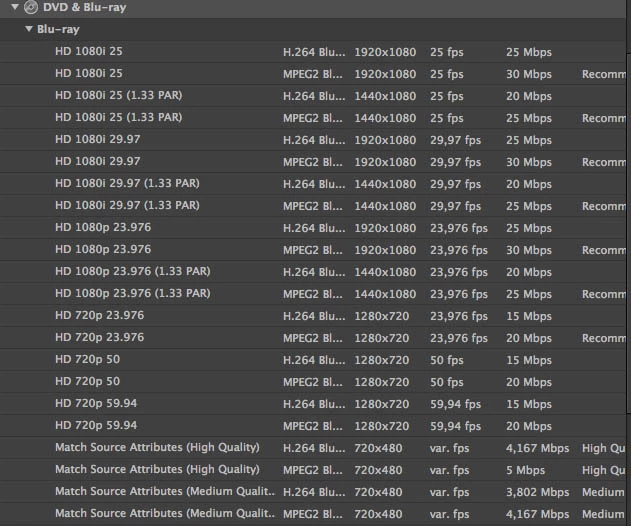
I need to export 2x 55min films onto a bluray, but I've never done this before and am full of questions. Please have a look at the attached image, these are the codecs that I can choose from on my Premiere pro CS6 and Media encoder.

My sequence is in 25fps, and I would usually export it in something like HD 720p 25. But there is no such codec under Blueray in H264.

Do I need to download a codec somewhere? Or can I use one of these codecs without affecting my frame rate?

Thank you kindly for your help in advance,

T
    Dieses Thema wurde für Antworten geschlossen.
    Beste Antwort von Ann Bens

    Tried various things (exporting in VR 2 pass and lowering bitrate to 20mbs and exporting in 1080p 25)

    No luck, same error.

    Help?


    The only thing I can think of to get the project out of the door is to export to mpeg2 Blu-ray (same settings)

    btw 1080p25 is bd illegal.

    3 Antworten

    tbucks12
    Inspiring
    February 22, 2017

    Hello all, sorry, things have been crazy.

    I ended up exporting to Bluray Mpeg2, and this did the trick!

    Even if it will only be basic H264 quality.

    Thank you kindly for all of your help.

    FSlodysko7547253
    Inspiring
    February 12, 2017

    25fps used to describe a PAL dvd, rather than an NTSC dvd.  These conventions were kind of tossed out the window when blu-ray was born and now 25fps is not supported.  This was done mostly for the convenience of mass-production of blu-ray players, and played a small part of the HD-DVD vs Blu-Ray battle.

    Keep in mind that at this point, framerate is just an aribtrary number assignment.  If your project is 25fps, and you export to 23.976fps, the only thing that is happening, is that the output is re-numbering the frames.  The same number of frames will be exported, it's just counted in a different way in your export.

    If your project is 720p at 25fps, try exporting to 720p at 23.976 and watching it.  I think you'll find you won't notice a difference in playback quality.

    Legend
    February 12, 2017

    Those are presets, not codecs.

    You can customize any of those presets (or create your own), and set the parameters as you require.

    In Media Encoder, click on the highlighted preset name in the Queue to open up its configuration window (the Export Settings dialog).

    tbucks12
    Inspiring
    February 12, 2017

    Hi Eikonoklastes, thanks for your reply.

    There is no 720p 25 in the lists of preset when I click where you mention. And there is no option for me to set it myself (apart from selecting from a list of presets- as mentioned- I'm not sure will be good for my project's frame rate of 25.) Check out the grab screen down below.

    Do I need to go somewhere to download this preset?

    Arg, and I need to export all of this by tomorrow morning...

    tbucks12
    Inspiring
    February 12, 2017

    If I export to HD 1080i 25, will it affect the quality as my initial source is progressive?