
Inspiring
April 21, 2017
Answered

Exporting video file with integrated audio for YouTube

  • April 21, 2017
  • 5 replies
  • 10058 views

Here is the problem i am having I want to just export one file altogether because i do youtube videos and I don't need audio and video separated at all i wanted just export the video and audios together with out this problem. could you please help do this

[Title edited for question clarity and future forum search... Mod]
    This topic has been closed for replies.
    Correct answer Ashley7

    billh45620646  wrote

    Here is the problem i am having I want to just export one file altogether because i do youtube videos and I don't need audio and video separated at all i wanted just export the video and audios together with out this problem. could you please help do this

    [Title edited for question clarity and future forum search... Mod]

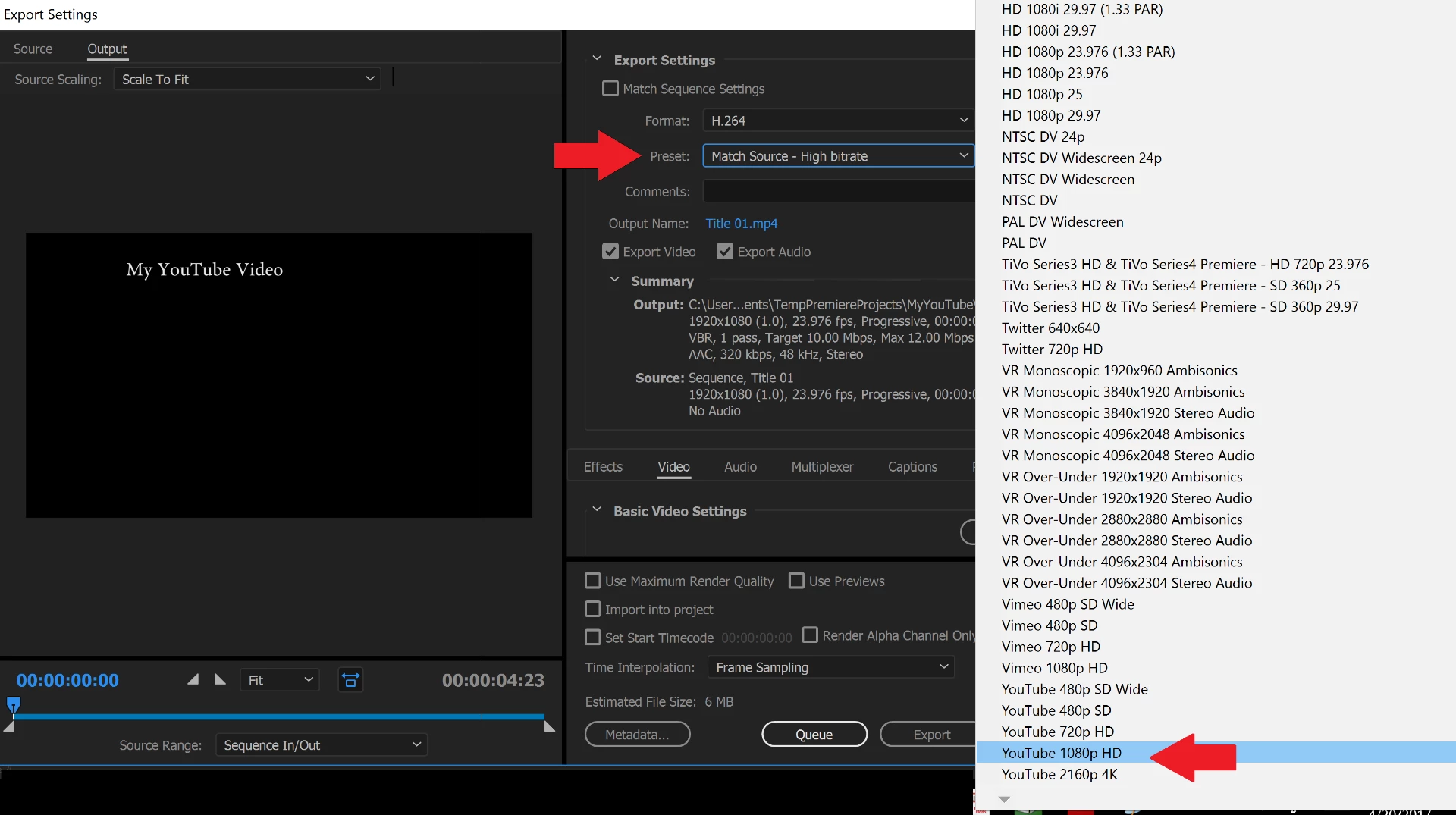
    Select H.264 then the desired YouTube format in the export settings. The default export both audio and video. See screenshot below. I use YouTube 1080p HD but you may have other needs. My understanding is Adobe works with folks like YouTube to come up with these settings so they are a great starting point if not final set of settings.

    5 replies

    Participant
    March 5, 2024

    What is the answer? !  I'm having the same problem!  I don't want 2 files! Just one with both audio and video. 

    Inspiring
    April 22, 2017

    ok let me explain this I record with shadow play which mixes my voice and game audio together. now when i do my edit's and go to export i get to files one with audio and one with video now when i got to watch the video their is no audio file, all with the file I am not using Media Encoder. and i already record this H.264 and export after the edit's H264 but still get to files audio file and video file and i just want them to be together not separated like they are 

    Ann Bens
    Community Expert
    Community Expert
    April 22, 2017

    See post 4.

    Inspiring
    April 23, 2017

    Thank you all for the help i got it working and now we can Rock This like a boss

    Inspiring
    April 21, 2017

    Jim Simson The point i'm making across ( I do not want the audio file export separate from the video i am exporting now when i do  (Youtube in 4K) them are the settings I'm using if you would click on it you see the settings now me taking a screen shot is not going to tell you what i need because I just told what i am doing not hard understand here. in your screen shot you have the same thing i do where it's export video / export audio file now when i do that. the audio file is not with this the video at all i have to put them in two different programs like power director which i do not want to do. I want the audio file with this video when i export it I do not need to separate files, I need the audio file and the video together in one file that's it, I feel like I keep repeating my self.

    Ann Bens
    Community Expert
    Community Expert
    April 21, 2017

    Post a screenshot of your export settings.

    Legend
    April 21, 2017

    Be sure to complete step 1 from the link below.  It's important.

    Unofficial Premiere Pro Troubleshooting Guide

    Ashley7Correct answer
    Legend
    April 21, 2017

    billh45620646  wrote

    Here is the problem i am having I want to just export one file altogether because i do youtube videos and I don't need audio and video separated at all i wanted just export the video and audios together with out this problem. could you please help do this

    [Title edited for question clarity and future forum search... Mod]

    Select H.264 then the desired YouTube format in the export settings. The default export both audio and video. See screenshot below. I use YouTube 1080p HD but you may have other needs. My understanding is Adobe works with folks like YouTube to come up with these settings so they are a great starting point if not final set of settings.