zuzullo
Participating Frequently
January 11, 2012
Answered

Extract ALL frames to JPEG

  • January 11, 2012
  • 4 replies
  • 34715 views

How can I extract all frames from a AVCHD clip to JPEG?

    This topic has been closed for replies.
    Correct answer Ann Bens

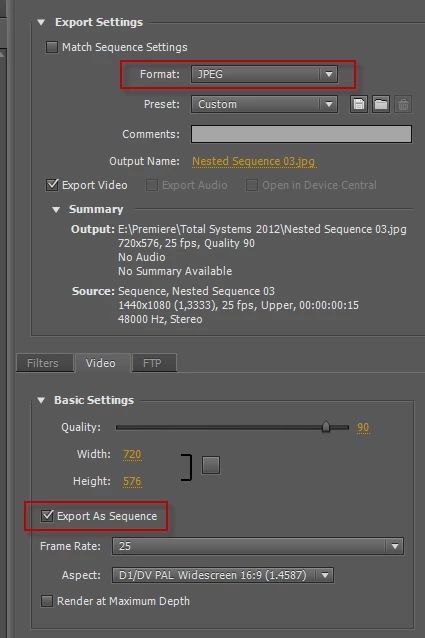
    http://content.screencast.com/users/zuzullo/folders/Jing/media/69a6301f-612b-4ff4-9ba5-0c253fce7f8c/2012-01-11_1822.png


    Export all frames in JPEG: works without any problem.
    4 replies

    Participant
    June 24, 2021

    There is an Easy way:
    1) Open Photoshop

    2) Goto: File > Import > Videoframes to Layers

    3) After Import in PS goto: File > Export > Layers to Files

    4) Choose your Filetype and Prefix

     🙂 et voila!

    Participant
    June 3, 2019

    I have a video of a PowerPoint presentation that had 40 slide. If I export sequential frames, it will give me thousands of images but only 40 unique images and rest all will be duplicates. Is there a way to get only those 40 unique frames?

    Ann Bens
    Community Expert
    Community Expert
    June 3, 2019

    One by one I am afraid.

    You can use the export frame option in the source or program monitor.

    yizid74759554
    Participant
    September 26, 2017

    hii all

    How can I control the amount of images I gonna export

    For example I have a video of 1 minute I get 1000 frames who need 1000 frames come on

    i need only 32 frames for example

    how can i control on it ???

    Legend
    September 26, 2017

    In and Out points will determine which parts get exported.

    yizid74759554
    Participant
    September 26, 2017

    hi jim

    tnx for relpy

    but i need to extract all video not only part of it

    i want to extract all video just by only 32 frames for example, not 1000 frames...

    Harm_Millaard
    Inspiring
    January 11, 2012

    You are gonna LOVE this: Manually.

    Let's just hope your time-line is a bit shorter than say 1 million frames.

    zuzullo
    zuzulloAuthor
    Participating Frequently
    January 11, 2012

    Are you sure?

    I heard there are people doing that in order to preciselly control the detail, using than Photoshop for doing so.

    Ann Bens
    Community Expert
    Ann BensCommunity ExpertCorrect answer
    Community Expert
    January 11, 2012

    http://content.screencast.com/users/zuzullo/folders/Jing/media/69a6301f-612b-4ff4-9ba5-0c253fce7f8c/2012-01-11_1822.png


    Export all frames in JPEG: works without any problem.