
Participant
July 1, 2024
Answered

Extracting Content from Premiere Pro via Script

  • July 1, 2024
  • 1 reply
  • 593 views

Hello Everyone,


I'm new to Premiere Pro scripting.

I need help with extracting content created within Premiere Pro using a script. Is this possible?

If so, could you please guide me on how to do it?

If not possible, is there any alternative way (plugins or extensions) to achieve this?

Your advice would be greatly appreciated.
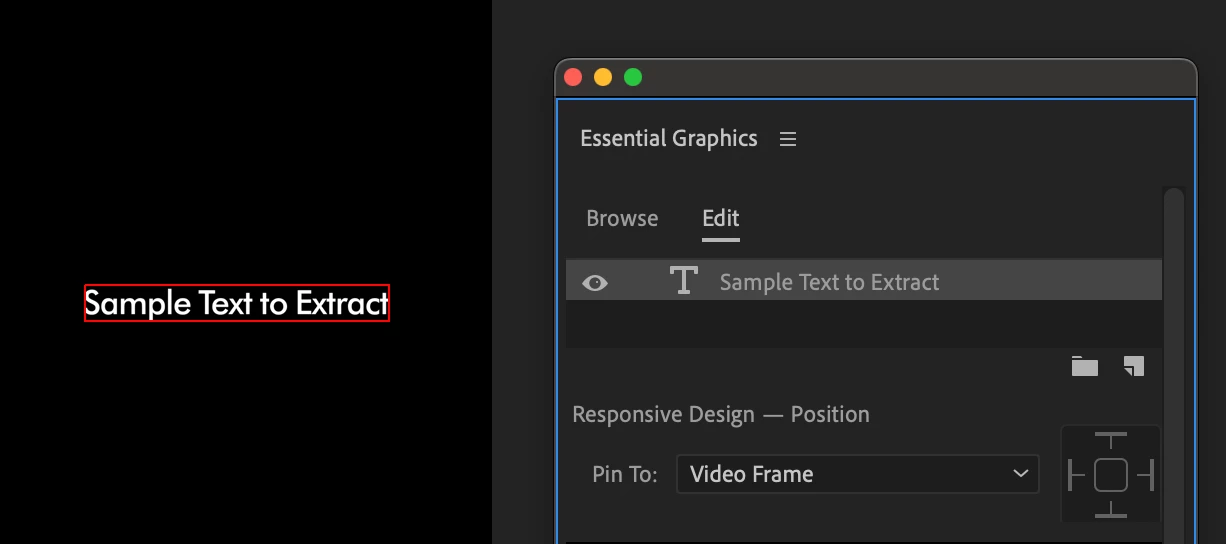


Thank You!


This topic has been closed for replies.
Correct answer Mathias Moehl

You cannot access the text of titles created in Premiere Pro using the scripting API. You can only do that with texts of motion graphics templates created in Ae.


In this tutorial I explain the difference between these Pr texts and Ae texts at 3:23


The tutorial is about my (paid) extension Automation Blocks, but the same limitations apply to all scripting-based approaches. Automation Blocks is just an easier way to use Pr's scripting features.

1 reply

Mathias Moehl
Community Expert
Mathias MoehlCommunity ExpertCorrect answer
Community Expert
July 1, 2024

You cannot access the text of titles created in Premiere Pro using the scripting API. You can only do that with texts of motion graphics templates created in Ae.


In this tutorial I explain the difference between these Pr texts and Ae texts at 3:23


The tutorial is about my (paid) extension Automation Blocks, but the same limitations apply to all scripting-based approaches. Automation Blocks is just an easier way to use Pr's scripting features.

Mathias Möhl - Developer of tools like BeatEdit and Automation Blocks for Premiere Pro and After Effects
PrabhuSAuthor
Participant
July 2, 2024

@Mathias Moehl, thank you for the information.