

spaceprobe
Inspiring
January 26, 2018
Answered

Fade to black on still frame

  • January 26, 2018
  • 3 replies
  • 14175 views

Hi all,

I want to fade out whilst holding the last frame of a short video.

I've added a still frame at the end by Clip > Video Options > Insert Frame Hold Segment

I created a keyframe part way through the still frame segment and left the opacity at 100%, then created another keyframe just in from the end of still frame segment and set the opacity to 0%

As I drag the ¿¿scrubber?? across the still frame segment I can see the opacity (numbers in the effect controls panel) changes from 100 to 0% but the video image doesn't change in any way - it doesn't fade.

What am I doing wrong?
Correct answer Ann Bens

Honestly! What's the point of your answering my query?? Anyone can answer any query by pointing the person to Learn & Support! Is that why you're a level 8 contributor - you sit at your desk all day replying to queries with the Learn and Support link?

In response to your first "answer", I searched Learn and Support for "Film Fade transition", all I get is very general info on how to add a transition and I can't work it out. That's why I'm here - for help I can't get from Learn and Support.


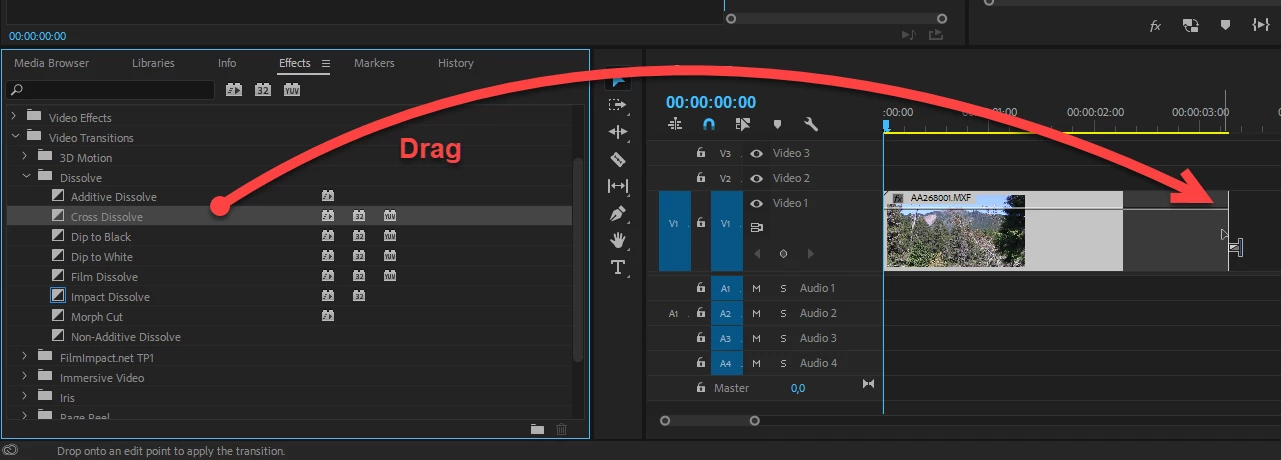
The film fade transition is one of Jim's own presets, hence you wont find it in the default Transitions.

Its either called Film Dissolve or Cross Dissolve.

Adding a fade is dropping/drag one of the Dissolve's on the end of a clip.

3 replies

Participant
July 26, 2019

I know this is old but I found a solution for others. My frame hold segment would not let opacity be affected by keyframes just as described in this post. My frame hold was on a logo that over layed the scene that just comes out of animation so it really needed to be the frame hold so the transition would not look jerky. SOLUTION. Right click the frame hold and "create subsequence" then drag that in and create your keyframes etc.

milomumbles
Participant
May 4, 2021

Thank you!

Known Participant
October 3, 2025

Many thanks. Great solution.

Peru Bob
Community Expert
Community Expert
January 26, 2018

Instead of Frame Hold, take a Frame Grab with the camera icon and then import it and place it on the timeline and stretch it out to the desired length.

spaceprobe
Inspiring
January 26, 2018

Brilliant thanks!

A combination of Ann Bens and Peru Bob did the trick. For some reason dragging the transition over the still frame segment (the way I made it) does nothing - no fade. Using Peru Bob's technique to extend the last frame, it works perfectly.

Thanks.

K.

-- Adobe user since 1987 : Illustrator version 1.0 | Adobe Type Manager | PageMaker
Legend
January 26, 2018

Add a Film Fade transition to the end of the clip.

spaceprobe
Inspiring
January 26, 2018

Quick pointer on how to do that?

-- Adobe user since 1987 : Illustrator version 1.0 | Adobe Type Manager | PageMaker
Legend
January 26, 2018