


Question
FAQ: How to solve low-level exception error after updating to Premiere Pro 14.1?
Update: Solution: Update to Premiere Pro 14.2
Need to remain on 14.0? You may install Premiere Pro 14.0.4 from Creative Cloud Desktop app to continue using Legacy Titles with GPU Accelerated Renderer. Here is how to download the previous version of Premiere Pro.
We have identified that using GPU Accelerated Renderer might cause a low-level exception error to appear in Premiere Pro 14.1.
These errors might appear:
- While using Auto Reframe with the nested clip option. Auto reframe works fine, so you can simply ignore these errors.
- While using the Legacy title. To workaround this issue navigate to File > Project Settings > General and set the Renderer to Mercury Playback Engine Software Only.
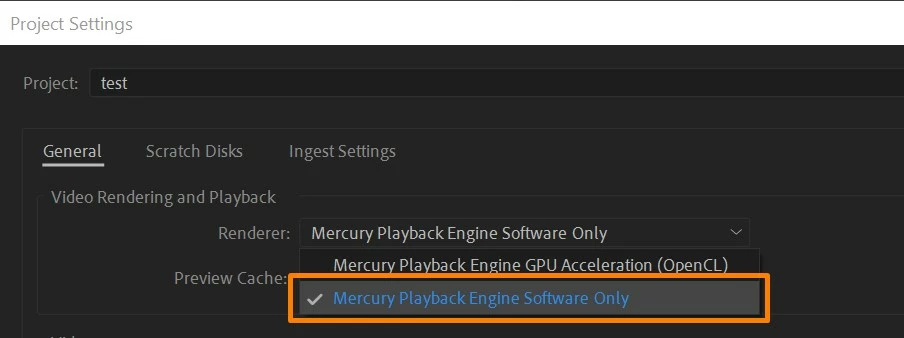
- While playing back the media (A low-level exception occurred in: Adobe Player (Player:5)).
In this case, try clearing the media cache and check if it's working properly. If you are still experiencing the error, switch the Renderer to Mercury Playback Engine Software Only.
Hope this helps in solving the issue. Let us know if you have any questions. To know more about the known issues you may refer to this link.
Thanks,
Sumeet
 AdChoices