

Community Manager
April 15, 2020
Question

FAQ: How to solve low-level exception error after updating to Premiere Pro 14.1?

  • April 15, 2020
  • 30 replies
  • 119262 views

Update: Solution: Update to Premiere Pro 14.2


Need to remain on 14.0? You may install Premiere Pro 14.0.4 from Creative Cloud Desktop app to continue using Legacy Titles with GPU Accelerated Renderer. Here is how to download the previous version of Premiere Pro.


We have identified that using GPU Accelerated Renderer might cause a low-level exception error to appear in Premiere Pro 14.1.


These errors might appear:

  1. While using Auto Reframe with the nested clip option. Auto reframe works fine, so you can simply ignore these errors.
  2. While using the Legacy title. To workaround this issue navigate to File > Project Settings > General and set the Renderer to Mercury Playback Engine Software Only.
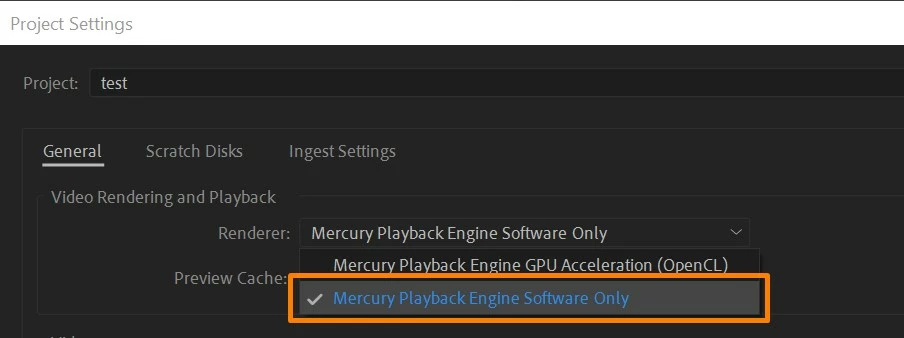
  3. While playing back the media (A low-level exception occurred in: Adobe Player (Player:5)).
    In this case, try clearing the media cache and check if it's working properly. If you are still experiencing the error, switch the Renderer to Mercury Playback Engine Software Only.


Hope this helps in solving the issue. Let us know if you have any questions. To know more about the known issues you may refer to this link.


Thanks,

Sumeet

This topic has been closed for replies.

30 replies

Participant
April 11, 2023

Para solucionar el problema (low level exception occurred) haga los siguientes pasos


- Haga una copia del archivo original y cambie su nombre


- Dentro de premier haga doble click sobre el archivo con error (editar
archivo sin conexión) cambie el nombre del archivo y utilice el nuevo
nombre asignado a la copia, presione aceptar


- Dar click derecho al archivo con error, seleccione la opcion vincular
medios, presione la opcion localizar, buscar y selecionar la nueva
copia, presione aceptar (no intente reproducir el proyecto - puede

presentar fallos en algunos equipos)


- Presione ctrl+s y cierre el programa

Participant
April 11, 2023

To solve the problem do the following steps


- Make a copy of the original file and rename it


- Within premier double click on the file with error (edit
offline file) rename the file and use the new
name assigned to the copy, press accept


- Right click on the file with error, select the link option
media, press the option locate, search and select the new copy,
press accept
(do not attempt to reproduce the project - you may present failures
in some equipment)


- Press ctrl+s and close the program

makdm1
Participating Frequently
February 3, 2022

Hate to have to tell you this but this same low level exception error is still happening in version 22.1.2


Mod note: Edited for content. Please take off topic commentary to the Video Lounge forum. File bugs here.


Participant
October 11, 2021

This is quite disappointing that this problem still exists. Cleared cash - does not help. I am not going to "Renderer to Mercury Playback Engine Software Only" or downgrade the software as this is rediculous. You can not just advice this for 1.5 years. The project does not even contain any titles. There must be a solution. Windows 10 pro, AMD Rizen 7 2700 Eight-Core Processor 3.65 GHz, 32 GB, x64. Adobe Premiere Pro 15.4.1 (Build 6)

Participant
October 20, 2021

maximz17056182 that's it!

I have Windows 10 Home, i7 9th, rtx2070, 32gb, and a lot of erros de memory!

"I am not going to "Renderer to Mercury Playback Engine Software Only" or downgrade the software as this is rediculous. You can not just advice this for 1.5 years. The project does not even contain any titles. There must be a solution."

Participant
July 30, 2021

This just happened to me using the latest version, 15.4. I can't work with these unreliability issues.


Mod note: Edited for content. Off topic commentary was removed. Please take off topic commentary to the Video Lounge forum. File bugs here.

Participant
August 16, 2021

Same thing here. Can't open or work on my project without it crashing within 10 seconds of opening. Switching the software only and reverting to previous v15 releases doesnt' work. Will try v14 now as I have a deadline and I'm running out of options.

Kevin-Monahan
Community Manager
Community Manager
August 16, 2021

Sorry, Oliver. 

I need more info to help you. I have a bunch of different computers and am not seeing this issue here. We don't know anything about your system and media, so it's tough giving detailed advice.


Do you have any Legacy Titles in your sequence? Did you delete media cache and preferences after updating to the new version? The rule of thumb is to finish your project in the same version you started with, so moving back to v14 is not a bad idea. Let us know how it goes.


Thanks,

Kevin

Kevin Monahan - Sr. Community and Engagement Strategist – Adobe Pro Video and Audio
Participant
May 2, 2021

Is this an annual thing now?  At least for me, this bug is back.

milosh9k
Participant
May 2, 2021

It looks so. I stayed on 14.5 (I think) for a long time, as it worked there perfectly well, and recently upgraded to 15.0. I exported several projects successfully, but later found out it crashes form time to time. Haven't tested the new 15.1, usually I use the slow software export as it works well.

Participant
September 26, 2020

thanks its work. just change render engine

mikelmags
Participating Frequently
May 9, 2020

just realized .. even the old encoder 14.1 is so slow, took me 3 hours to render a 5-minute video clip (12 hours on an old mac mini)  realized I have to downgrade it again... bow its 15 minutes utmost. why all these bugs??

Kevin-Monahan
Community Manager
Community Manager
May 13, 2020

Mike, Sorry, man! Sure sounds like you need to enable your GPU in Project Settings > General under the Renderer. Can you check that?


Thanks,
Kevin

Kevin Monahan - Sr. Community and Engagement Strategist – Adobe Pro Video and Audio
Participant
May 7, 2020

On Mac switching to software solved the problem for me. Then when I had the time, I went through my project and deleted all of the Legacy Titles. I was then able to switch back to Metal GPU without errors.


Zack

Kevin-Monahan
Community Manager
Community Manager
May 13, 2020

Hey there, Zack. 

Sorry for the pain, man. Glad you are out of major trouble.

After deleting Legacy Titles, did you use the Essential Graphics panel and newer Title tools? I'm trying to figure out, for the team, as to why people are still using Legacy Titles at all. If you could give me your feedback, that would be cool.


Hope you are well, sir!


Thanks,
Kevin

Kevin Monahan - Sr. Community and Engagement Strategist – Adobe Pro Video and Audio
Participant
May 13, 2020

Hi Kevin,


"I'm trying to figure out, for the team, as to why people are still using Legacy Titles at all."


I can't recall Adobe telling us to stop using legacy titles, so when Essential Graphics was added to Premiere, I didn't scour my projects to replace every legacy title. I assumed that legacy titles wouldn't eventually break a project in a mysterious way.


In fact, a very quick Google turns up no guidance to stop using legacy titles except in troubleshooting threads about this problem.


To answer your question, I think people are still using legacy titles because they're there and no one told them to stop.


Zack

GJZaraJr
Participant
April 29, 2020

JZara InSight made a video about the Low-level error, follow the link: https://youtu.be/mzq-CkDg0NQ

How to resolve the Low-Level Error in Adobe Premiere.

First of all, I would like to thank the people of the Adobe community.

In particular to John T Smith who sent me the link to solve the problem.


Note: I know that it is normal for errors to occur, as working with complex software such as Adobe Premiere is not an easy task, congratulations to the Adobe team.

Kevin-Monahan
Community Manager
Community Manager
May 13, 2020

Thanks for the heads up GJ Zara. Nice to hear from you. I appreciate you sharing the link to the video too. I see that it's in Portuguese—awesome! Thanks!


Take Care,
Kevin

Kevin Monahan - Sr. Community and Engagement Strategist – Adobe Pro Video and Audio