
Participant
March 5, 2024
Answered

Filter icon in Transcribe Panel is not there

  • March 5, 2024
  • 1 reply
  • 1795 views

Heya! I'm decently new to Premiere, but I was transcribing audio and was trying to find a way to automate the deletion of silent clips and learned of a method including using the filter icon to delete any pauses in the audio. The problem is - I have no filter icon and I don't know what I did to cause that to happen.
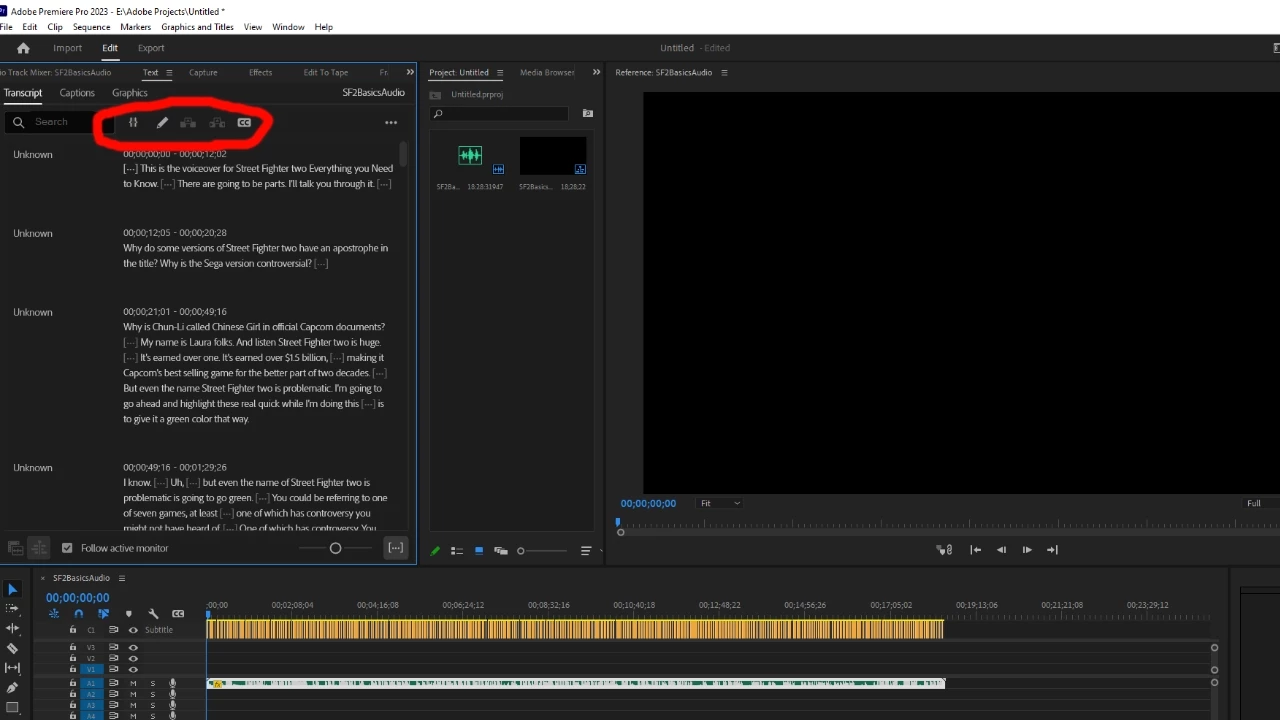
Thank you to anyone who takes the time to read this and offer solutions! 

This topic has been closed for replies.
Correct answer mattchristensen

@Lenard35864649ycmm It looks like you're using Premiere Pro 2023. The filter button you describe that allows you to do bulk removal of pauses and more was added in Premiere Pro 2024. You can find the update in your Creative Cloud desktop app.


https://helpx.adobe.com/premiere-pro/using/whats-new/2024.html

1 reply

mattchristensen
mattchristensenCorrect answer
Legend
March 5, 2024

@Lenard35864649ycmm It looks like you're using Premiere Pro 2023. The filter button you describe that allows you to do bulk removal of pauses and more was added in Premiere Pro 2024. You can find the update in your Creative Cloud desktop app.


https://helpx.adobe.com/premiere-pro/using/whats-new/2024.html