


Participant
December 2, 2021
Question

Filter Offline (RGB Curves) - Error since updating to v22.0.0 (Build 169)

  • December 2, 2021
  • 3 replies
  • 3994 views

I recently updated Premiere Pro to version v22.0.0 (Build 169)


When I load existing projects, any instance of the RGB Curves filter is now listed as Filter Offline (RGB Curves) in the effects panel, and the filter is non-functioning.
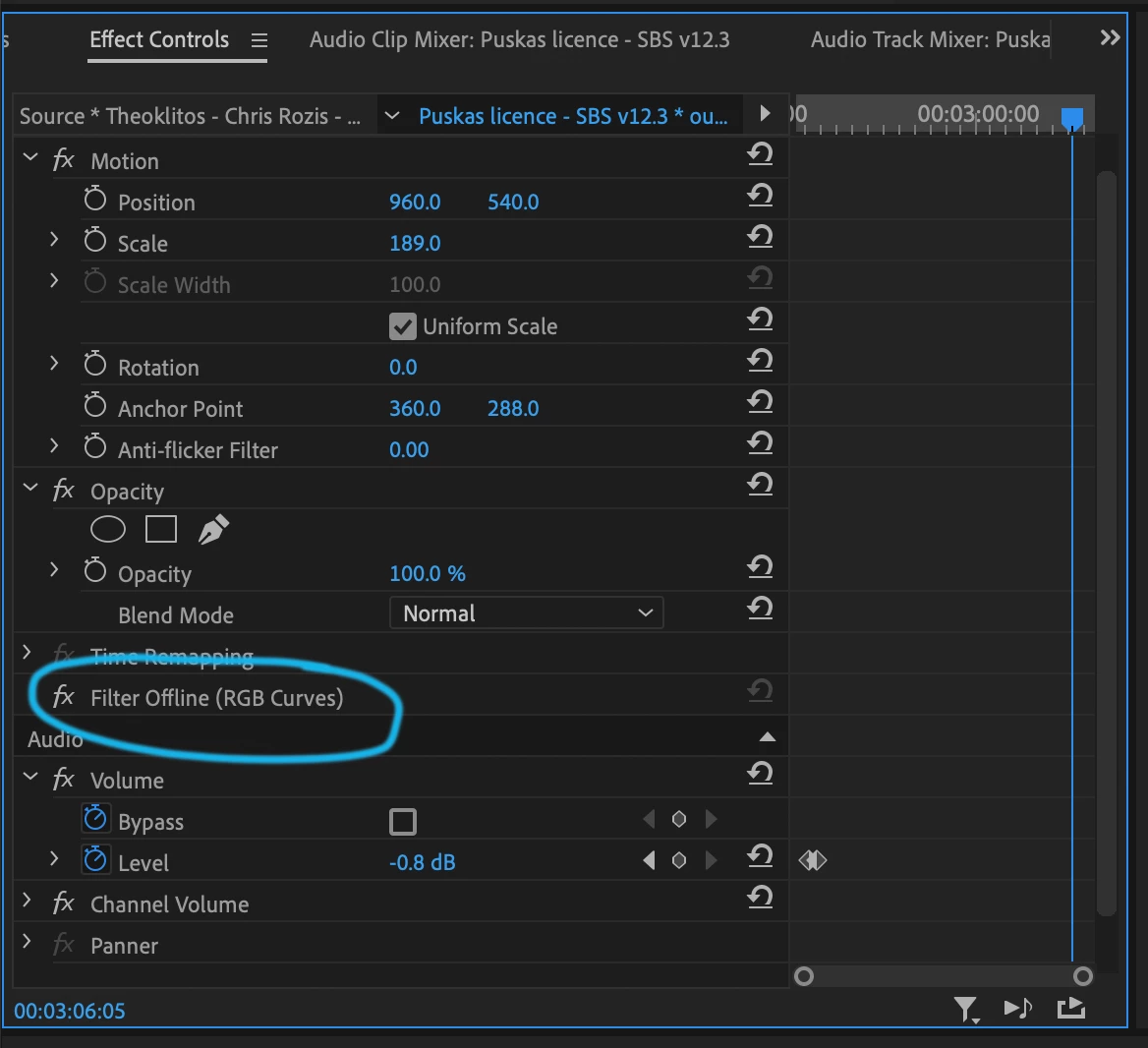
 

This means that a lot of color correction in existing projects no longer works. This is obviously VERY inconvenient! I tend to use the RBG curves filter for quick adjustments because it renders much faster than Lumetri. I can on longer make tweaks to existing edits without checking and fixing every clip that had the filter applied.


It seems odd to me that a filter would be disabled/offline. In other updates I've seen an "obsolete" label added, but the filter is still functional.


Is there a problem with how my update has treated the filters? I haven't had an "offline" error with any other filters.


This topic has been closed for replies.

3 replies

Known Participant
July 19, 2023

Following up with a solution to this issue on Apple Silicon Macs, the solution that works for me is to launch Premiere in Rosetta 2 mode, then open the project.


https://www.postproductive.tv/2023/07/12/premiere-pro-video-filter-missing-workaround-for-apple-silicon-m1-m2-macs/ 

Participating Frequently
May 20, 2023

For anyone who's searching for a solution to this, installing version 22 (from the Creative Cloud apps area, click the dots and pick "Other Versions") can fix it temporarily. Obviously installing an older version will allow you to use the effects again which were present in that version... but I also made an amazing discovery:


After installing the older version, the deprecated obsolete effects were also available again in the latest version of Premiere Pro! (At least in the Windows environment.)


It must install these effects to some common location. I couldn't find it in any obvious place (like inside AppData) so clearly this trick will only work until I uninstall the old version. But it could be a handy band-aid for others while you transition to newer versions of effects.

R Neil Haugen
Legend
December 2, 2021

Are you on an M1 Mac? I know on those, some of the "obsolete" effects are gone.


Actually, anymore you should be able to get the same performance if you just use the Lumetri Curves tab as you did with the RGB Curves effect. I can't tell any difference whatever in playback.


Neil

Everyone's mileage always varies ...
camfinkAuthor
Participant
December 9, 2021

Whilst that's fine going forward, it is EXTREMELY frustrating to edit old projects where I've used that filter.

R Neil Haugen
Legend
December 9, 2021

With all respect, to you the RGB legacy filter is very important. I can imagine that and not agreeing with Adobe taking away the tool that you've relied upon for so long. I too hate it when I open an old project and find out you have to go through the cuts to change things because the software you created it in no longer works the same way.


However, like R Neil pointed out, the only thing that is constant is the fact that everything changes. My best advice is to change your workflow a.s.a.p.


Using the color tab to navigate to the Curves section really is not much more work than searching for and adding the RGB effect.


Hope this helps.


 Very good point. Instead of hunting through the Effects panel, you just go to the third tab of the Lumetri panel. With actually all the other color tools what, one click away.


Neil

Everyone's mileage always varies ...