
Participant
June 29, 2024
Question

Flash of bright colour/light at start of clip

  • June 29, 2024
  • 4 replies
  • 655 views

Hey everyone,


I've recently started noticing a bright burst of colour or light at the begining of every clip after a cross dissolve, film disolve, dip to black transition. These transitions arent attached to the next clip theyre just on the end of the previous clip. It happens to every clip after a transtion clip.  I've made sure my colour grade adjustment layers arnt overlapping anywhere.. everything looks perfect but it just keeps happenning. Its a very quick thing that happens but  canr hepl but notice it every time now and I'm doing wedding videos so its really not ideal. 


Hopefully I've explained this well enough so you can understand what I'm dealing with.

Just let me know if anyone has dealt with this before and how you fixed it. If you need any more info, just let me know. 


Things that might help to find the answer: I've just pruchased a new macbook pro M2, thats what I'm using and have noticed it since using this laoptop.


You can see below I've attached a screenshot of the clip I've attached - the transition and the colourgrade are not affecting the start of the next clip.. but it only happens after a trtansition clip.
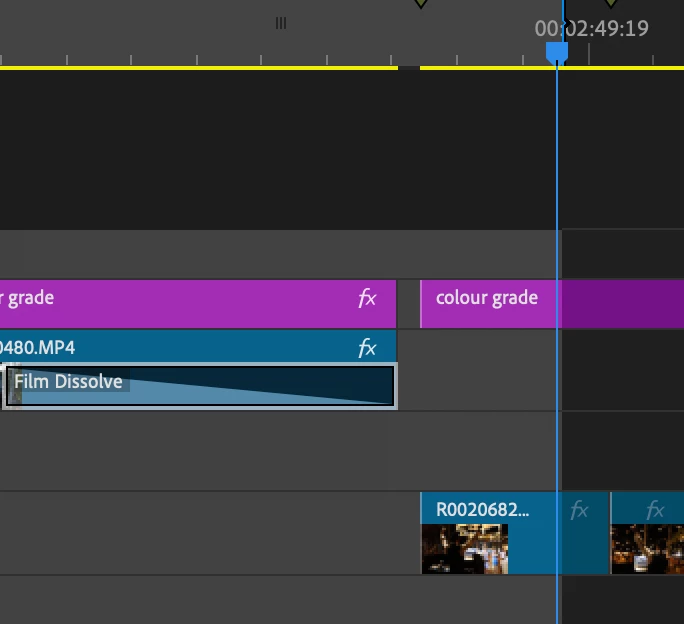
 I have also uploaded a snippet from the video here to show you - I feel this is the easiest thing to do rather than explaining something like this.


Any help would be appreciated 🙂

This topic has been closed for replies.

4 replies

Ann Bens
Community Expert
Community Expert
June 30, 2024

It also looks like the first 2 frames are a flashlight from a still camera (right bottom corner)

You can add a dissolve of  2 frames to make the first frame(s) less bright

Or color grade with Lumetri or just cut the first 2 frames.

Also empty spaces in the timeline can cause issues. Fill these with a black video. See how that goes.


Peru Bob
Community Expert
Community Expert
June 30, 2024

Try unchecking Composite in linear color in the sequence settings.
If that doesn't work, try turning off Hardware encoding in the export settings.

Participant
June 30, 2024

I also just tried using my partners Macbook Pro M1 to export and it still does it on the exported video.

kglad
Community Expert
Community Expert
June 30, 2024

in the future, to find the best place to post your message, use the list here, https://community.adobe.com/

p.s. i don't think the adobe website, and forums in particular, are easy to navigate, so don't spend a lot of time searching that forum list. do your best and we'll move the post (like this one has already been moved) if it helps you get responses.


<"moved from cc desktop">
kglad
Community Expert
Community Expert
June 29, 2024

is this a premiere pro question?

Participant
June 30, 2024

I am using premier Pro, yes. and I'm using the latest version, fully updated.