

hellopaul4
Inspiring
May 28, 2020
Question

Font menu is microscopic - can I change it?

  • May 28, 2020
  • 5 replies
  • 2197 views

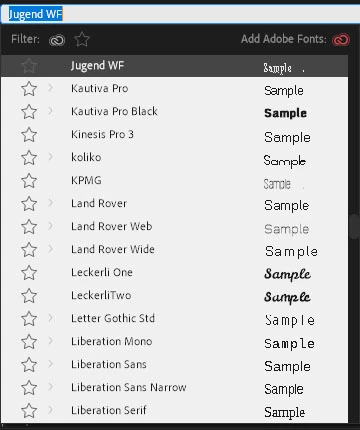
The font menu in the Effect Controls panel is so small that the preview (the word "Sample") is useless. Is there a way to enlarge that, like in After Effects?


I'va attached a screen shot of the PPro font list. I haven't scaled it down in Photoshop to 25% or anything, even though it appears so!
This topic has been closed for replies.

5 replies

MyerPj
Community Expert
Community Expert
November 14, 2022

Like Ann said, if you select your text in the program monitor, just a simple click, then when you scroll the list of fonts, you'll see it change on screen. And you could enlarge the text etc, to see it any size.

MyerPj
Community Expert
Community Expert
May 28, 2020

Pick your font in Illustrator then simply bring it into PP.


Put in an Enhancement Request here: https://adobe-video.uservoice.com/forums/911233-premiere-pro

hellopaul4
Inspiring
May 28, 2020

In an ideal world, Premiere would use Illustrator's font menu, whose preview can be made massive:

Known Participant
November 14, 2022

I have the same problem. The font menu is like a a gimmick. Completely useless. I'd also appreciate if it was possible to make the font previews as large as needed, without having to go the extra step of using a different application.

Ann Bens
Community Expert
Community Expert
November 15, 2022

Thanks. I tried that, since I'm used to doing it that way in Photoshop, but in Premiere the text doesn't change until I hit enter. Then I need to highlight it again, move the cursor back to the font menu and select the next font and so on. This takes a long time.


Must be doing something wrong.

Ann Bens
Community Expert
Community Expert
May 28, 2020

Looks normal to me.

What is your screen resolution?

hellopaul4
Inspiring
May 28, 2020

It might be "normal", but it is totally useless. There is no way to properly see the difference between, say, Kinesis Pro 3 and Land Rover - two entirely different fonts. Compare it to the After Effects font menu, which I screen-shot on exactly the same 4K 32" screen (with no Windows scaling/magnification - the system is set to display at 100%). As well as being tiny, some of the Premiere font samples are not even anti-aliased, like some pre-Adobe Type Manager bitmapped Macintosh System 7 fonts! Compare Liberation Serif at the bottom of the list.


Ann Bens
Community Expert
Community Expert
May 28, 2020

Please embed screenshot in original post.