
yannickt28190134
Participant
July 14, 2019
Answered

Force Render Settings

  • July 14, 2019
  • 1 reply
  • 705 views

In a Full HD video, I scaled the material in some places so that it no longer corresponds to full resolution. Now I can't render it in Full HD anymore and apparently need to use the lowest resolution of the video as the maximum rendering resolution... In the program HitFilmExpress, which I used before, one could very well render a poor quality video in Full HD, the pixels were simply stretched and thus the resolution artificially increased so that the parts of the video that were in Full HD did not suffer, and the others have been scaled up. How to force certain render settings in Premiere? Thank you very much!

YannickTK
This topic has been closed for replies.
Correct answer Meg The Dog

You can export the timeline in whatever frame size you choose, by setting the frame size desired in the Export Settings panel.

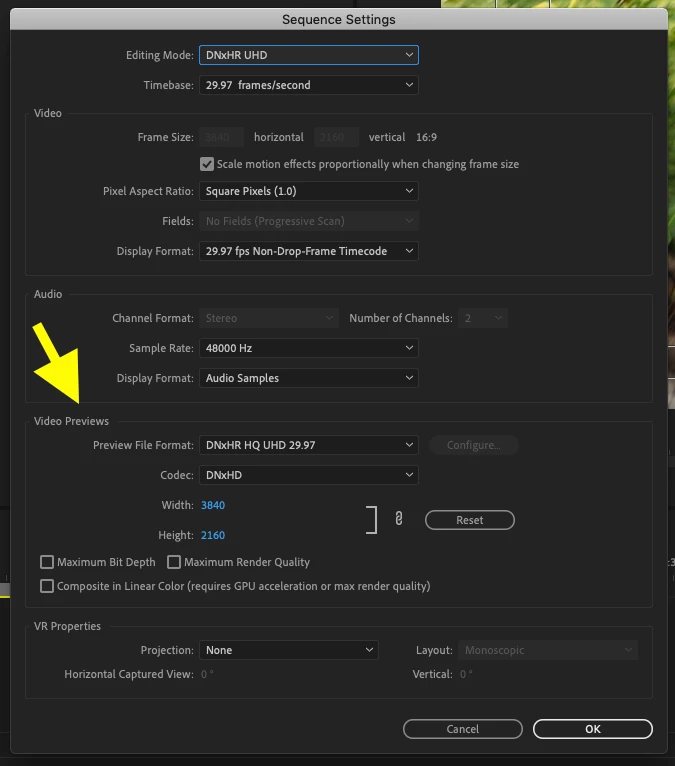
If you are using the Match Sequence function to set the export properties, click anywhere in the timeline to make it active, then go to the menu Sequence > Sequence Settings.

Make sure your Video Previews are set to the frame size and codec you want . . .

as this setting determines the export settings when Match Sequence is used.

MtD

1 reply

Meg The DogCorrect answer
Inspiring
July 14, 2019

You can export the timeline in whatever frame size you choose, by setting the frame size desired in the Export Settings panel.

If you are using the Match Sequence function to set the export properties, click anywhere in the timeline to make it active, then go to the menu Sequence > Sequence Settings.

Make sure your Video Previews are set to the frame size and codec you want . . .

as this setting determines the export settings when Match Sequence is used.

MtD

yannickt28190134
Participant
July 14, 2019

Thanks alot, now it works!