
Dave_London
Participant
June 24, 2022
Answered

frame rotation errors on clip import and exported MP4 viewing

  • June 24, 2022
  • 1 reply
  • 1200 views

I have a large number of clips all recorded widescreen HD 1920 1080 on my iPhone, filming with the phone in landscape orientation.  PremierPro is reading some in widescreen as expected, some it reads in rotated 90 degrees to portrait 1080 1920, no trimming.  All the clips show as Frame width 1920, frame height 1080 when checking properties in Win Exp.


If I just put one clip that Premier Pro read correctly as widescreen 1920 x 1080 into the timeline then export that as an mp4, the export window says will set the properties as Widescreen, 1920 x 1080.   If I view the output video in VLC it will be in portrait but viewed in Windows Media Player it will be widescreen.

If I just put one clip that Premier Pro read incorrectly as portrait into the timeline then export that as an mp4, Premier pro says as above it will set the properties as Widescreen, 1920 x 1080, then If I view the exported video in VLC it will be in Widescreen but viewed in Windows Media Player it will be portrait.

If I start a sequence with a clip it correctly imported as widescreen, thereby (I think) setting the Sequence Settings, if I try to add a clip read incorrectly as portrait only add the audio will drop to the timeline, not the video.

For full disclosure, 2things which I thiik ought not affect matters:  filmed on iPhone using am OSMO DJI gimbal; secondly launching Premier Pro I get “Intel HD Graphics 630 Unsupported Video Driver”  I have updated the drivers, I launch via the “continue with known issues button”.


Your insights and help will be so appreciated.


This topic has been closed for replies.
Correct answer Ann Bens

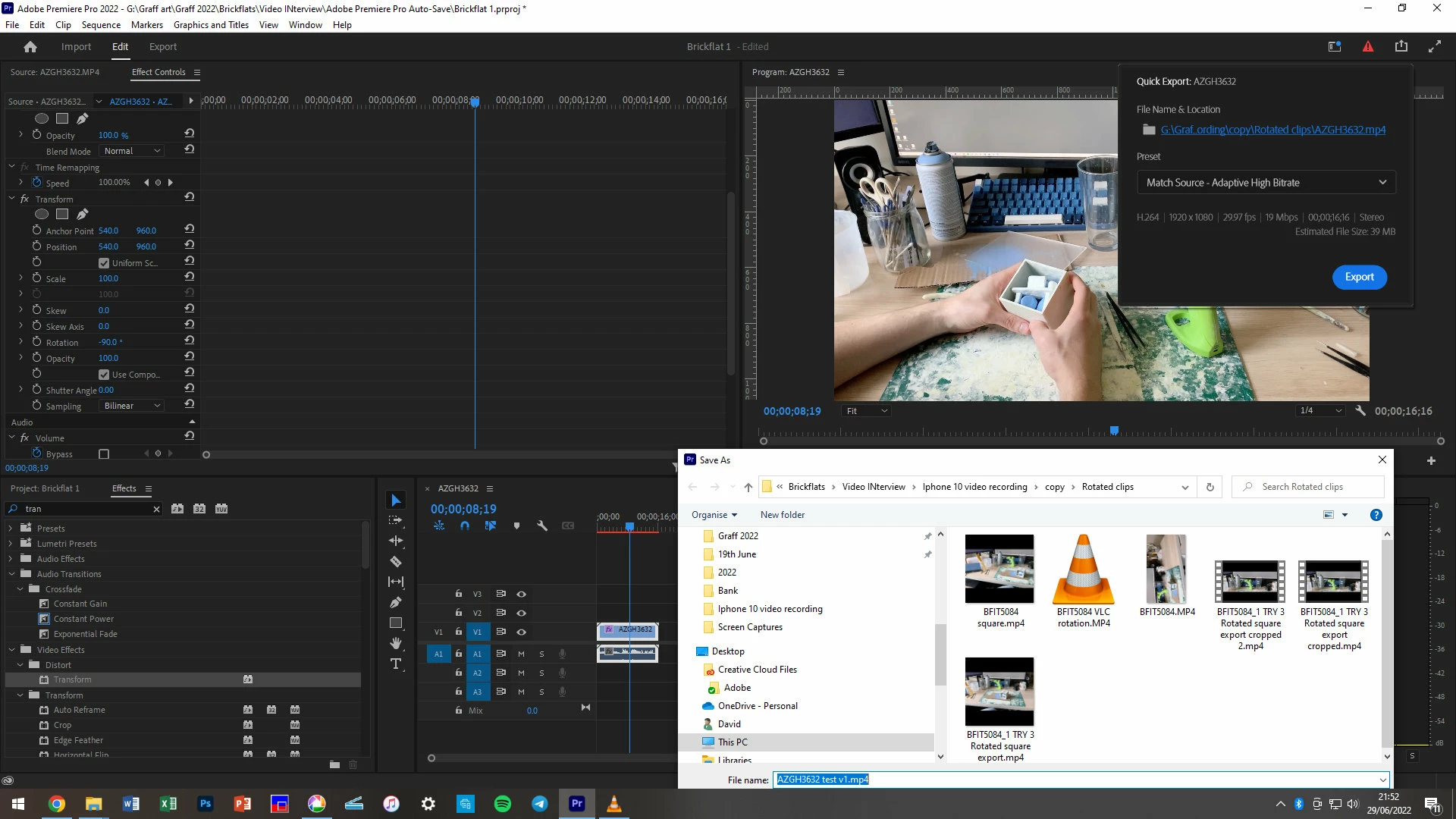
I rotated the source clip as described using transform effect, -90 degrees, producing a square image within a frame that appeared portrait in the program panel.


Checking your answers to other queries I applied a change to the sequence settings, switching 1080 1920 to 1920 1080.  This produced a widescreen clip in the program panel which looks correct.  As a check, I exported this one clip short sequence and the export parameters show frame width 1920, frame height 1080.


Thank you for your help


You added the transform effect as a regular effect I was talking about adding it as Source Clip Effect former Master Clip effect.

https://helpx.adobe.com/premiere-pro/using/master-clip-effects.html

1 reply

Ann Bens
Community Expert
Community Expert
June 24, 2022

When filming with an iPhone you need to pay attention to the orientation.

It's very easy to think you are on landscape while the program is in portrait mode or visa versa.

Check all your clips in your phone and correct the orientation in your phone before importing into Premiere.


Don't think the Intel 630 is supported any longer.

Dave_London
Participant
June 29, 2022

Dear ANn

Thank you for taking the time to help.  I can't dismiss the possibility that I wasn't paying sufficient attention at the time to the orientation. 


The clips are no longer on my phone so I can't go back back but in the meta data as checked via windows explorer and indeed looking at the clip data in Permier Pro, the frame width is reported as  1920, frame height 1080.  I am remain baffled.  

Dave_London
Participant
June 29, 2022

Celebrated too soon.  WHe nI tried wit ha econd clip it accepted the transform effect producing the square asbefore but the clip remains in portrait and wont move to the timeline which has 1920 1080 as sequence settings.


Any suggestion how I can apply the rotation to more than one clip in the sources would be appreciated


No wait - I saw another piece of advice you gave - toggle the track targetting.  V1 is not highlighted in the photo above so highlighting that resulted in the clip being accepted in the timeline AND it had the correct widescreen setting, so I hope for all the other clips I need perform only the first step you advised.  Thanks again.