
Participant
October 12, 2020
Question

Gaussian Blur mask is off-center

  • October 12, 2020
  • 4 replies
  • 4125 views

Really hoping this isn't a silly question as I've been fiddling with Premiere Pro for a while now.


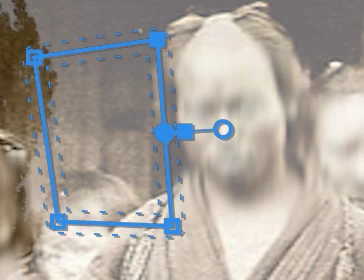
I added a Gaussian Blur to an image on my timeline with the intention of blurring out specific faces (moreso as a test to see how it would look and if it'd be viable for other areas of my project). However, for some reason it seems like the masks I create to isolate specific faces are off-center? I have to drag the actual mask either to the left or the right to get it to cover the face. See attached image. 


Anyone know why this is happening?
 

This topic has been closed for replies.

4 replies

Participant
June 13, 2023

Hello,


same Problem hier in Premier Pro 2021 / 15.4.1.

When I switched the Video-Rendering / Mercury Playback Engine from GPU to Software only, I get the Blur in the Center of the Mask. When I switched back to GPU/ OpenCL it drifted off again. Bug??


Participating Frequently
June 13, 2023

I was having this problem because my sequence setting were set to HD Anamorphic. Changing the settings to Square Pixels and adjusting the frame size fixed the issue for me.

MyerPj
Community Expert
Community Expert
October 12, 2020

I was referring to scaling in the OS. You hadn't mentioned a MAC in the original post, in Windows its located under Dispaly settings and it something I believe should be left at 100% always. If you have something like that, do check it...


Participant
October 12, 2020

Thanks for the reply. Turns out I'm a dumb rookie and it was a problem with the frame size of the imported clip in relation to the sequence -- I've figured it out now. 

Participant
April 20, 2021

I'm having the same issue. Could you tell me what was causing your issue and how you fixed it? My file was fine when I originally worked on it and exported my movie. But I came back to it months later and all the blurr effect is off center now.


I also am curious, as I'm currently suffering the same issues.

Participant
October 12, 2020

Was able to hook up to my second monitor again and move the window there to see if it had anything to do with that -- nope.


Tried another mask on a random clip, and it's still not centering properly with the shape of the mask.

MyerPj
Community Expert
Community Expert
October 12, 2020

Do you have an monitor / display scaling going on from the OS? Otherwise, you need to supply some info on your hardware and media.

Participant
October 12, 2020

I usually edit with the window on my second monitor which is a little bigger than that off my Macbook Pro which I'm working on, but right now I'm editing with just the one Macbook Pro monitor. I'm wondering if that might be the cause of the issue but I'm confused as to why it would be happening.


Checking again, it doesn't just seem to be the Gaussian Blur. I tried out the Sharpen effect on a random image just to give another example. See below. I have mask feather at 0, opacity at 100 and expansion at 0, yet the edges aren't aligned at all for any of the mask shapes I choose.


It also seems like as I drag around the penned area, the actual affected blur area starts to shift more to the left or more to the right depending on where I drag it.