
Participant
July 14, 2020
Answered

GeForce MX250: Unsupported Video Driver

  • July 14, 2020
  • 4 replies
  • 25240 views

Hey. I've installed Premiere Pro Recently and when I tried to run it after installation, This was the error I got.
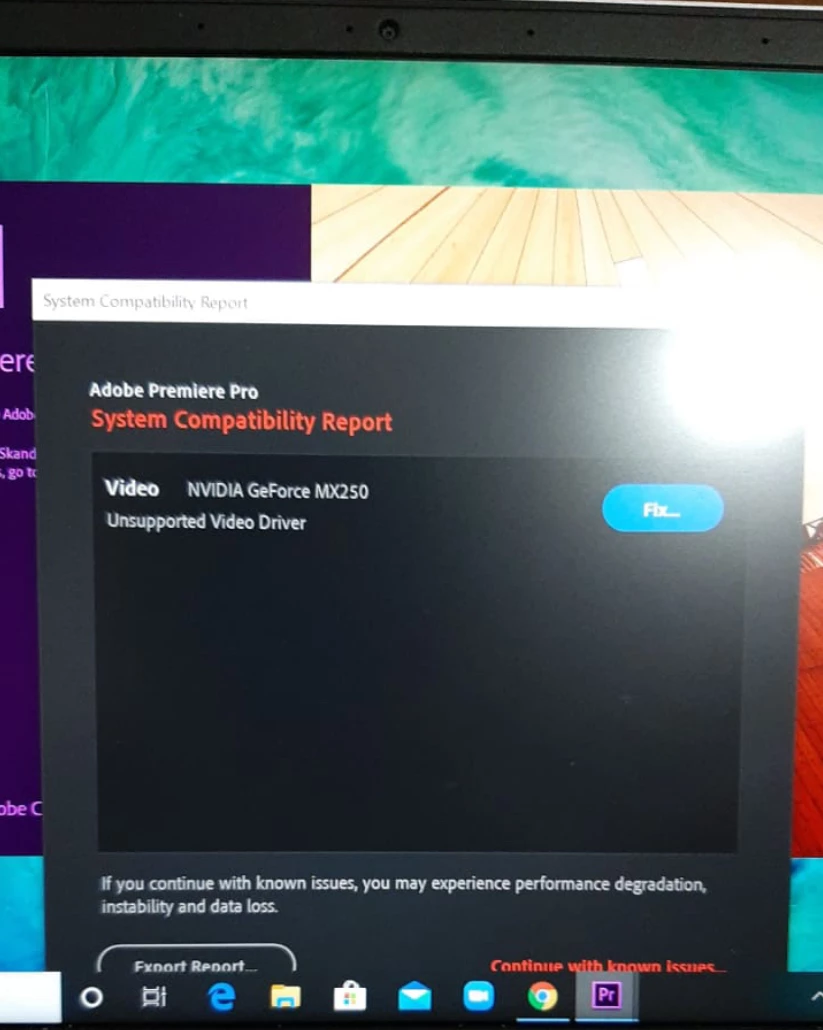

I have NVIDIA Control Panel Pre Installed and I followed the instructions it has given me when I hit "fix". It redirected me to download the studio drivers for my gpu. But there were no studio drivers available for MX250. I tried installing it on someone else's laptop which also has MX250 and it started up perfectly without any issues. Please help me out with this. Thanks in Advance.

This topic has been closed for replies.
Correct answer RjL190365

There is no hope. Since version 14.3.2, Premiere Pro will now require Studio drivers (which are, unfortunately, incompatible with any non-GTX or non-Titan or non-RTX GPU or with any GPU older than the Pascal-based GTX 10 series) and full 10-bit OpenGL output capability in order to even run properly. Even with a supported GPU, the Game Ready drivers will lock the output to only 8-bit output through OpenGL. And in newer versions of Premiere Pro, this will disable all hardware acceleration and you'll be permanently locked to software-only rendering and software-only encoding.

4 replies

Participant
October 1, 2020

Is the anser to roll back the Adobe install to a previous version?

This is very frustating!  I too bought a new computer because Adobe Premiere was giving me a similar error on an HP laptop from 2012.  Now less than 10 months later the new computer is "out of date" and "old" for Adobe Premiere Pro use?


Legend
October 2, 2020

Do so before this November. Moving forward, all future versions of Premiere Pro will now require workstation-capable discrete GPS in order to even run properly. Unfortunately, none of the low-end discrete GPUs such as the MX250 qualify because they do not support 10-bit output via the OpenGL API. They are restricted in hardware to 8-bit.

Participant
December 14, 2020

Hey there, 


Thanks for all the info. I tried rolling back to the recommended versions, but just like the other users above the first launch was fine but opening for the second time reverted back to the same error. I just bought this laptop about 6 months ago (Spent 2k on an Asus Zenbook), and can't seem to run Premiere Pro at all anymore because of this. Is it possible or realistic just to change out the graphics card in order to permanently solve this issue? I really want to avoid selling a brand new laptop and looking for another if possible.  


I discussed this option with a tech guy and his short answer was "no". This
problem is why they recommend desktop not laptop computers. You can upgrade
a desktop. Laptops are not usually made for upgrading anything other than
the RAM and possibly the hard drive. I sold my less than one year laptop
for half price to my grandkids and bought an MSI with an RTX 2060 GPU in
it. Only $1400 Canadian (about $1000US) Black Friday sale. I wish you
searching for a solution that suits your needs.
Participant
September 25, 2020

I just had the same problem with my laptop. I then updated Adobe Premiere to the newest version (14.4) via the creative cloud app and now there seems to be no compatibilty issues. I hope this works for you too! Greetings

Participant
September 25, 2020

Nevermind, the error message appeared again... This is really upsetting.

Legend
July 17, 2020

The driver version Sumeet linked to is the latest (as of 17 July 2020) Game Ready Driver, which is the one you want. There are absolutely no Studio Drivers at all whatsoever for any of the MX-series GPUs because the Studio Drivers require 128-bit or better memory in order to be compatible with non-Quadro GPUs. All of the MX-series GPUs have only 64-bit memory (and in the case of the MX250, it is based on the very same GP108 GPU as the GeForce GT 1030).


And even if the driver is compatible with Premiere Pro, be advised that you will not be able to use hardware H.264 or HEVC encoding using the Nvidia NVENC codec as all of the MX-series GPUs have either a missing or disabled NVENC encoder. And depending on the CPU that's installed in that laptop, if the "Hardware encoding" is present at all in the Export settings, it will use only the Intel QuickSync codec (or if that laptop has an AMD CPU installed, the encoding selection will be grayed out, permanently locking it to the software encoding mode).

Participant
September 22, 2020

The Game Ready Driver still is not compatible with Premier Pro 2020. I tried installing it and it still comes up with the same message. Does this mean there is no hope for us that has a pretty much brand new laptop with the MX250 graphics card but cannot use premier pro properly? It was actually working fine a few days ago but for some reason it only stopped working properly since 2 days ago..

RjL190365Correct answer
Legend
September 23, 2020

There is no hope. Since version 14.3.2, Premiere Pro will now require Studio drivers (which are, unfortunately, incompatible with any non-GTX or non-Titan or non-RTX GPU or with any GPU older than the Pascal-based GTX 10 series) and full 10-bit OpenGL output capability in order to even run properly. Even with a supported GPU, the Game Ready drivers will lock the output to only 8-bit output through OpenGL. And in newer versions of Premiere Pro, this will disable all hardware acceleration and you'll be permanently locked to software-only rendering and software-only encoding.

Community Manager
July 17, 2020

Hi anoops952,


Sorry to hear about this. Please try installing the latest version of NVIDIA driver (v251.67) and check if it's working properly. Let us know if it helps.


Thanks,

Sumeet 

Participant
September 22, 2020

Hi anoops952, 


Did you try the recommendation from Sumeet? Did it work? I am about to go through the same situation. My graphics card is also NVIDIA MX250. I would like to use Premiere Pro on my laptop for video edit. 


Awaiting for your response. 


Thanks,

Ezekiel