

Question
Getting Rid Of 'Join Clips Icons' (Small White Arrows On Cuts)
I recently started using a new computer at work, and when working in Premiere Pro (Version 12.1.1), I've noticed that when I make a new cut, two white arrows appear on either side of the cut. (Pictured below). As I understand, the arrows are there indicate that the clips can be rejoined.
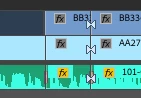
Is my understanding of their purpose correct, or do they indicate something else? And is there an option to remove these indicators?
 AdChoices