
dzgnr89
Inspiring
November 9, 2019
Question

Giving preference to Nvidia graphics card over integrated intel graphics

  • November 9, 2019
  • 5 replies
  • 2386 views

I am using Adobe Premiere pro cc 2019. I have Nvidia GTX 1050 Ti (4GB) on my laptop running Windows 10 -64 bit (v1903). 

I already enabled Mercury Engine GPU (CUDA) in my project settings. 
 
While exporting the video, I took some screenshots of my windows task manager. 
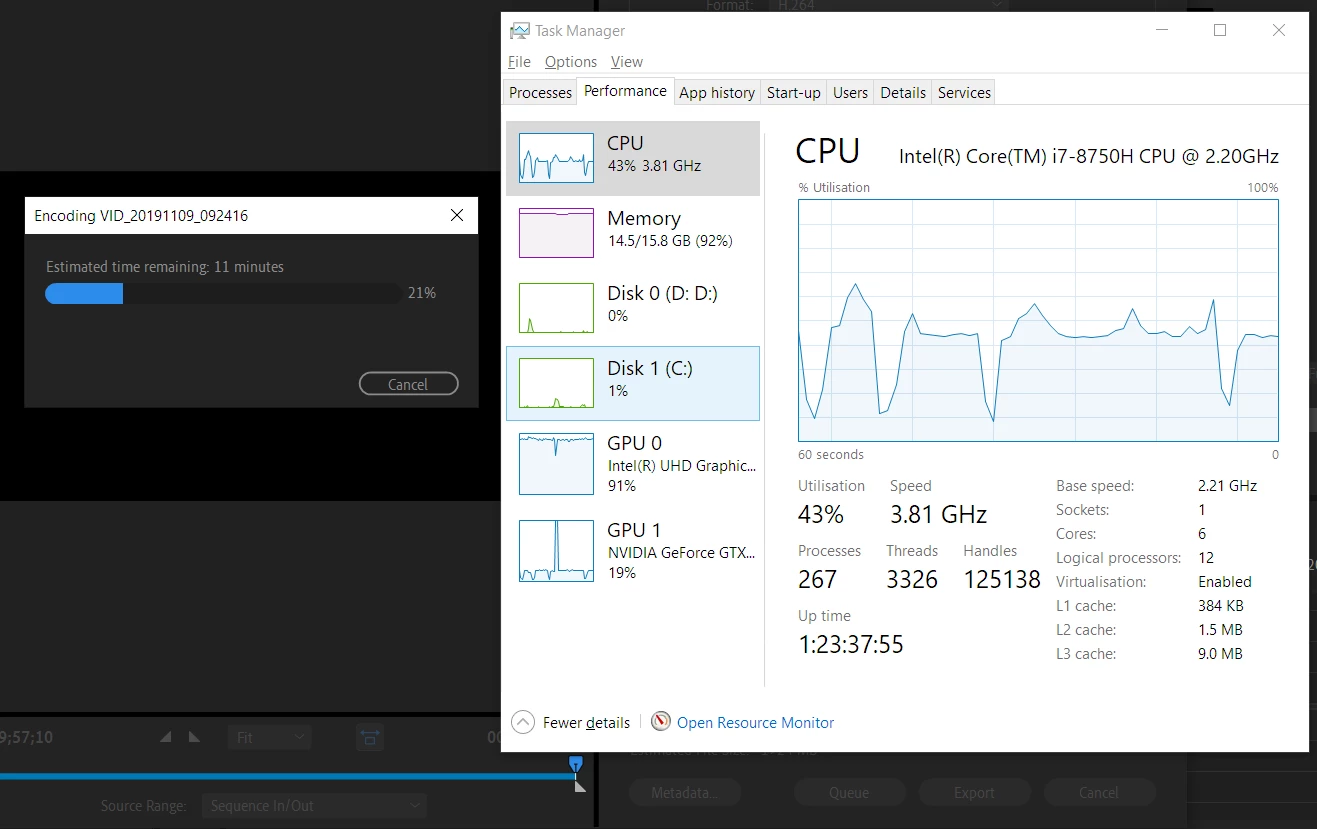
 
 
The intel HD graphics (91 percent of it was being used) was being given more priority over Nvidia graphics (only 19 percent being used).
 
How can I make Adobe Premiere give priority to Nvidia graphics card over intel integrated graphics?


This topic has been closed for replies.

5 replies

Inspiring
November 9, 2019

I look at it this way.. as I have an edit computer ( giant custom desktop I guess you could call it... bigger than the normal full case ). It has a dedicated graphics card in a pci slot and other stuff plugged into mobo slots ( like SDI inputs and outputs to real video stuff etc. ). It's OK for what I do ( full HD ). It is NOT plugged into the internet and is win 10 pro.


I also wanted a laptop to mostly take on locations ( if that ever happens ) to Xfer stuff from full camera SSD drives to 'storage' SSD drives ( to free up the camera stuff so I can keep shooting ). I got stuff on the laptop to do stupid stuff like scrub through takes and whatever ( what people used to call " check the gate " basically.. make sure you got what you want before moving on ). I don't use if for serious editing. It's not powerful enough. Also I have the internet on it ... for email and personal junk.


What does the gaming high quality laptop have ? A chip from NVidia, that claims it is X gigabytes, and super cool video 'card'.. But in fact it is just a chip. 


Look at the dimensions of a real dedicated graphics card that you put into a PCI slot. It's HUGE. WITH fans on it, and lots of power (watts ), etc.  It has dedicated outputs ( ports hdmi etc. )


If you look at that and then look at your laptop you will realize it is about HALF the size of your entire laptop in width and more than twice as THICK ( high ).  What does this mean ?  It means you cannot expect the hype of the chip in the laptop to perform anywhere NEAR what a desktop can do.   What does this mean related to mobo onboard native graphic chips ???

1) you can disable the desktop onboard graphics chip and pass EVERYTHING to your dedicated graphics card. Sometimes it will cuda, sometimes the cpu, but you actually boot up and SEE your monitors through that dedicated card, cause your mobo onboard graphics is DISABLED.


With a laptop if you disabled your onboard graphics mobo chip, ( intel or whatever ) you wouldn't be able to see your sreen.... your laptop would be dead, basically... nothin ... no screen.  Cause that onboard chip is what is allowing your laptop to boot and show you SOMETHING.  Then, when you open a program like PPro, the little directions in THAT program start to hunt for any graphic chip it can use for certain operations ( the NVidia chip).


When you close the program ( PPro ) is is all back to the onboard chip ... so you can see your screen...


So, some people are trying to make this faster and easier and all that.. but basically you HAVE to go through your onboard laptop chip FIRST... before anything gets directed to the other gadgets ( like NVidia chip ) inside.


🙂


R Neil Haugen
Legend
November 9, 2019

QuickSync is a specialized Intel hardware process ... and quite separate from the use of the GPU. Further, QuickSync is only applicable for H.264 long-GOP encoding/exports. From testing by the engineers for Premiere, it is a bit faster than 'software only' encoding ... and also slightly lower in quality.


Any phrase of hardware or software encoding in the Export dialog only refers to the presence or lack of QuickSync as a feature of an Intel CPU.


As noted above and elsewhere, Premiere uses the GPU for things on the GPU Accelerated Effects list. Resizing such as Warp Stabilizer and other major image resizing and color especially. And Premiere uses the GPU to support the CPU in such things as the CPU asks for help. So the GPU gets commands, does its thing, and waits for the next bit to be sent to it. In the chain of processing controlled by the CPU.


Also ... laptops especially often are designed to use the onboard graphics chips for varioous parts of the encoding process. As essentially an extension of their own capabilities. So frequently the onboard chip will be tasked with things that would NOT be something that Premiere would send to the GPU anyway.


Neil


Everyone's mileage always varies ...
dzgnr89
dzgnr89Author
Inspiring
November 9, 2019

Thanks for providing such a detailed answer and information. 

Inspiring
November 9, 2019

Try https://www.evga.com/precisionx1/


I've been using it for two days and works with evgs rtx2070

dzgnr89
dzgnr89Author
Inspiring
November 9, 2019

This precisionx1 utility is for adjusting fan speed and overclocking your GPU. It also shows the temperature and other stats from the video I saw on the page you shared.


How are you using it to control Adobe Premiere's priority to choose GPU?

John T Smith
Community Expert
Community Expert
November 9, 2019
Averdahl
Community Expert
Community Expert
November 9, 2019

I assume that you export H.264 and when you do Premiere Pro use the Intel GPU for Hardware Encoding.


For this Premiere Pro use Intel Quick Sync and thats not aviable on any graphic card.


So if you are exporting H.264 what you see is normal and expected and cannot be changed.

dzgnr89
dzgnr89Author
Inspiring
November 9, 2019

Okay. Thanks. Yes I'm using H.264 to output video to upload on YouTube. As you're saying that for H.264 , this behaviour is normal and cannot be changed.


Which output formats for mp4 video exports at 1080p give preference to nVidia graphics card?


Some more queries:


1) Does the usage of Intel or Nvidia graphics card by Premiere pro affects the output quality?

2) Should I be bothered about this at all when I demand faster performance while comparing intel integrated graphics+quick sync versus Nvidia graphics card? I believe that Premiere Pro is automatically choosing the fastest option or the user should be proactive in giving preferences to one of these two graphics cards?