
Participant
November 24, 2023
Question

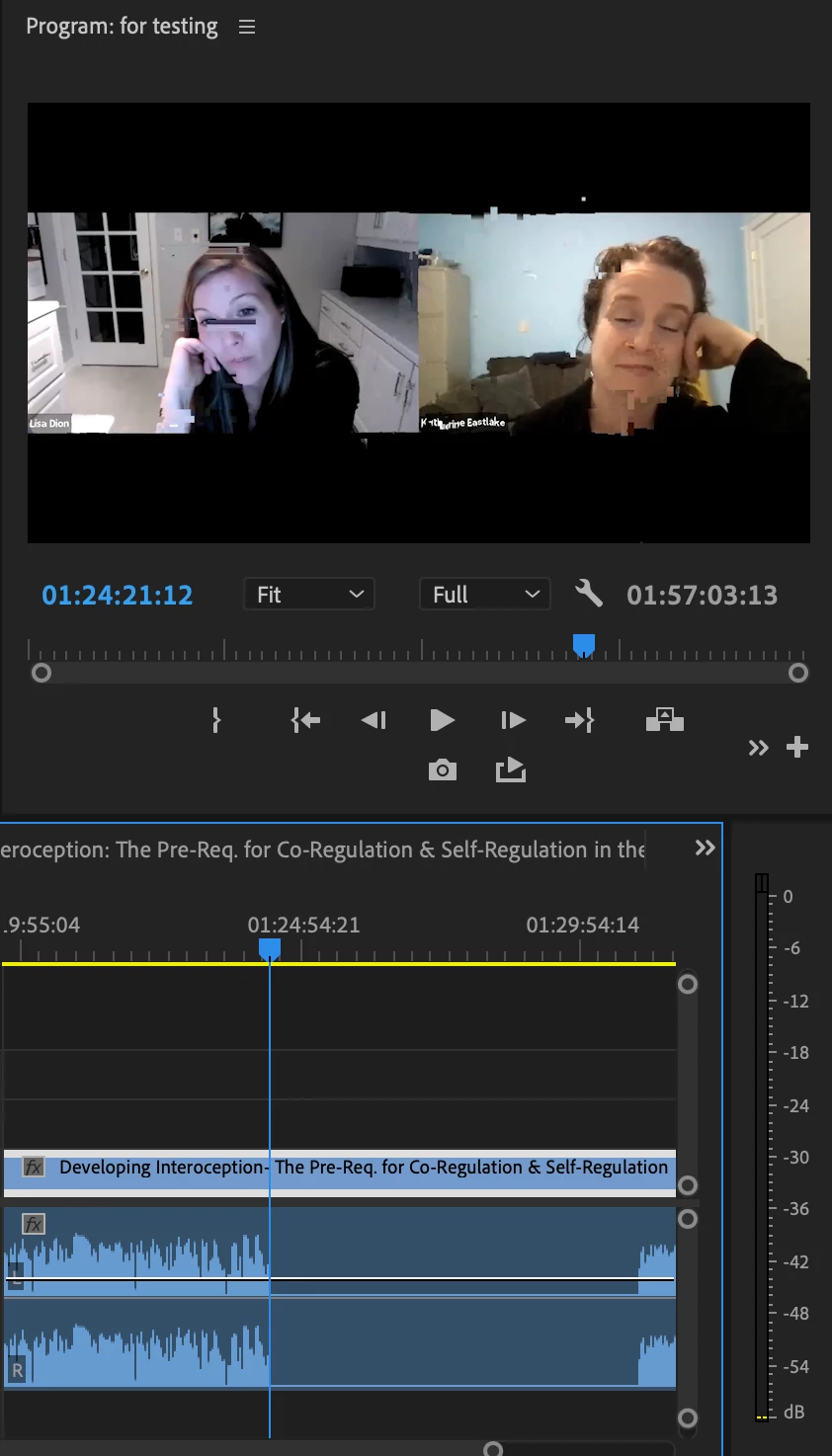
Glitch and Freezes in the video after render
  • November 24, 2023
  • 7 replies
  • 650 views

hi everyone, this has been a very concerning issue for almost 2 weeks now.
I am editing 2-3 hours webinars videos that are recorded from Zoom.

and somehow everytime i render them. i always get feedback from client that there are glitches and freezes and mute audios on the videos.
that's why i drag it to premiere pro to check first before sending the video to the client.

I use a macbook air M1 and the raw videos are just 360p from Zoom.


why is this always happening? it's taking so much out of my productivity.


is it time to switch to finalcut?


please let me know how to solve this issue.

This topic has been closed for replies.

7 replies

R Neil Haugen
Legend
December 20, 2023

Hey, understand the frustration. Totally. Just wish I could do something.


For a simple temporary workaround, have you considered using say a Watch folder in MediaEncoder, and transcoding those types of clips to maybe ProRes422 for now? Do it when you're away from the computer, so it does get done pretty quickly but doesn't waste your time.


At least ... you could get stuff done for now.

Everyone's mileage always varies ...
Participant
December 20, 2023

This isn't your fault at all. I am having serious issues with it, the support team responsed on my post and said they are aware of the issue but they have no timeline for when it should be resolved. 😞 all my recent videos have glitches and I have tried EVERYTHING to fix it. 

Participant
December 17, 2023

This is Adobe issues and i hate it!
I just exported a 34min video and there are still glitches in the rendered video!

footages are from my sony a6300 which i recored the Aroll with 60fps and Brolls at 120fps which is the usual yet i still have this glitches.


Participant
December 6, 2023

thanks for the tips. I have tried both Handbrake and Shutter Encoder. but after using it there are some renders that are not perfect. some are good but there are some that still have glitches.
It's taking up so much time and eating up of my productivity instead of moving on to other projects.

This is very disappointing and frustrating. especially when deadlines are coming

R Neil Haugen
Legend
November 24, 2023

I've seen a number of examples of this. The vast majority were as I noted above, VFR clips. But there are also some instances where the export was made from standard pro level video clips, and yet had some glitches. Not nearly as common, but they've happened, no question.


Why, I don't know. I've not had this happen so I have no way of testing.

Everyone's mileage always varies ...
Participant
November 24, 2023

I've been having the same issue... I must playback every video I render since I cannot trust Premier Pro.


I'm now slowly switching to Davinci since I don't run into the same issue when I render the same video in there. I think Premier Pro has a bug that's causing this. I hope they fix it soon because it's eating into my productivity.

R Neil Haugen
Legend
November 24, 2023

Those are most frequently caused by the fact that the initial recording was made using VFR ... variable frame rate ... rather than CFR, constant frame rate.


So there aren't exactly say 30 frames per second, for example ... but it may vary from 27.1fps to 31.4 fps in the same video.


NLEs don't tend to work with that type of media all that well. Straight video players can, but they're not trying to snag bits and pieces from hither and yon to string together like in an NLE. So that's probably the problem ... when the framerate jukes or jives, you get a doubled frame or something.


So ... use HandBrake or ShutterEncoder, two freeware utility apps that are good front ends for the noted ffmpeg "engine". Set them to convert the clips to CFR ... and you must specifically find the controls that say convert to CFR or it won't do so!


In Handbrake, there's a little circle you click in by the term CFR ... in S-E, you now have to go into the Preferences/Setting menu (top left corner icon of the app) to sort through to turn on that option.


Then replace the clip in Premiere with the CFR clip. Re-export, and probably your show will play normally.

Everyone's mileage always varies ...