ondrej_witke
Participant
June 27, 2019
Question

GoPro 7 Black - Protune to Rec.709 GrounControl LUT

  • June 27, 2019
  • 2 replies
  • 6141 views

Hi,

I've shot my footage on GoPro 7 Black in Protune and now I want to do some color grading, so I'm using free LUT from GroundControl to convert to Rec709.
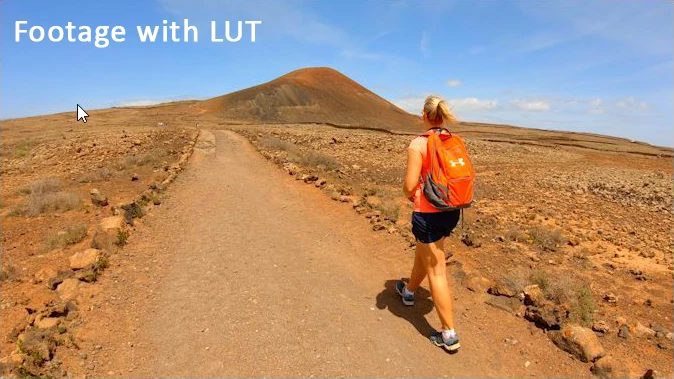
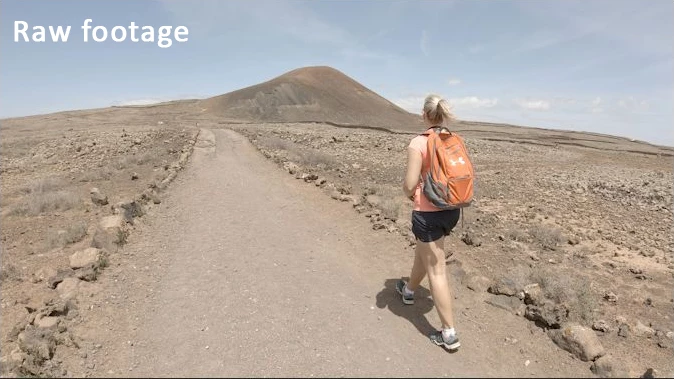
After I've applied LUT on my test footage the colors and overall appearance look oversaturated and unreal. I know that applying of LUT isn't enough and I have to do more edits to get final look, but I think that the start point after applying the LUT shouldn't be so drastically colored.

Do you have any idea what is wrong, should I set something in Premiere before I apply the LUT?

Thanks,

Ondrej
This topic has been closed for replies.

2 replies

Legend
June 28, 2019

My first thought is to make sure you're monitoring correctly, on a calibrated display from a dedicated I/O device.

"Grading by viewing the image in the GUI just doesn't work."  - Jamie LeJeune

DeckLink | Blackmagic Design

AJA Desktop I/O Tools: Work with the Products You Use Everyday

R Neil Haugen
Legend
June 27, 2019

As said so often by colorists "LUTs are the dumbest math there is." All s LUT is, is a table of data points. Says any pixel with X data gets put in Y spot.

I would suggest loading that LUT into your personal location for Creative tab LUTs/Looks (NOT in the Program files!) and applying in the Creative tab.

You can dial down the effect there, and you have some control in the Basic tab for adjusting/trimming the media into that LUT.

Neil

Everyone's mileage always varies ...