
G_B1
Participant
September 6, 2017
Answered

GPS Overlay

  • September 6, 2017
  • 1 reply
  • 4370 views

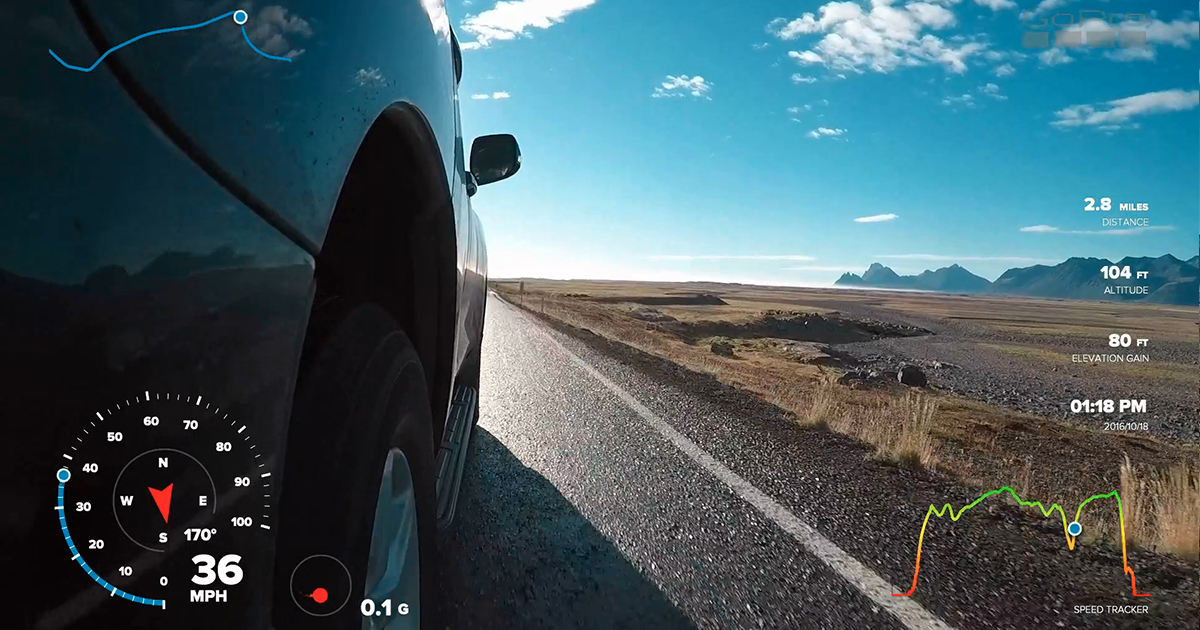
Is it possible to insert GPS information on GoPro clips as an overlay in a Premiere edit, like the ones GoPro Hero 5 Quik editor can insert (below)?

I have the .kml file from Google Maps and I'd like to sync the gps time with the clip time and add the speed, position, etc, on my Premiere edit.

Thanks in advance
GoPro-Hero5-GPS-Data-Overlay-Tutorial-fb.jpg

    This topic has been closed for replies.
    Correct answer excited_Genie16B8

    I'm thinking there's no automated way to do this.  You'd have to manually create such  graphic, changing every element manually and using a keyframe on nearly every frame.

    1 reply

    excited_Genie16B8Correct answer
    Legend
    September 6, 2017

    I'm thinking there's no automated way to do this.  You'd have to manually create such  graphic, changing every element manually and using a keyframe on nearly every frame.

    G_B1
    G_B1Author
    Participant
    September 6, 2017

    Ok, thanks! I thought if Virb by Garmin and GoPro Quik could sync GPS information with GPS on the video, Adobe Premiere Pro could do it too.

    Bummer

    Participant
    October 30, 2024

    Hi, if you are still trying to do this let me know. I made some PYTHON code that exports frames using .GPX data that you can import as a series into pro and use as an overlay. I use it in my videos: https://youtu.be/LGMZtSZg3Xo?si=GaLivRYVl3WmazoD