Participating Frequently
October 23, 2022
質問

GPU acceleration unavailable in 2023 update

  • October 23, 2022
  • 返信数 5.
  • 9886 ビュー

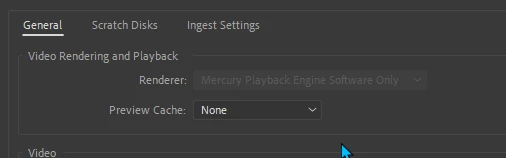
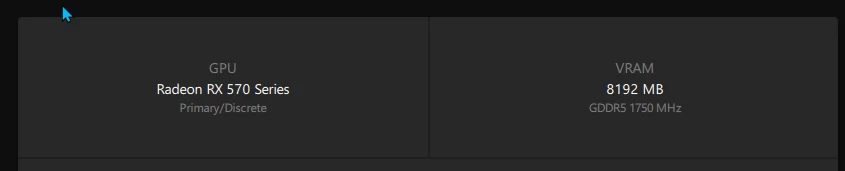
Is Premiere Pro 2023 incompatible with my GPU? I can't select Open CL. I don't have this issue with the 2022 versions. 
このトピックへの返信は締め切られました。

返信数 5

PDX NW作成者
Participating Frequently
December 11, 2022

With Premiere version 23.1, the latest update, GPU acceleration (OpenCL) is available for me again.

Legend
December 1, 2022

I'm sorry about the misinformation on my part. The problem with GPU acceleration being disabled might have resulted from some OEM system manufacturers completely disabling all GPGPU support in their OEM-specific drivers, therefore rendering their discrete GPUs as display-only components. In this case, then the only way to restore GPGPU support would be to completely remove all traces of the OEM-specific Nvidia or AMD graphics driver, and then clean-installing the latest generic driver from Nvidia or AMD. You will lose all OEM customized optimizations this way. And unfortunately, if you try to restore the OEM customizations, then the GPGPU support will be disabled once again.


Big-name OEM gaming PCs - both desktop and laptop - are guilty of this.

David Simonton, DVA
Community Manager
Community Manager
October 26, 2022

Your Radeon RX 570 should work fine with Premiere Pro 2023, and OpenCL should be selectable as the Renderer.  That your drop-down menu shows Software Only as the only available option indicates that our "GPU Sniffer" background process apparently didn't discover your compute-capable GPU.  I've seen this happen on another system recently, where re-installing the AMD driver fixed the issue.  You might be experiencing a driver-related issue, too.  If a reinstall of the AMD driver doesn't resolve the issue, you might try running the DDU tool (display driver uninstaller, publicly available), and then installing a fresh copy of the latest AMD driver for your RX 570.  I believe either the Adrenaline or Pro driver versions should suffice. 

PDX NW作成者
Participating Frequently
October 27, 2022

I uninstalled the AMD driver using a cleaner tool and then reinstalled. I ran the GPU sniffer in the Premiere Pro 2023 directory. It appears that it sees my GPU. 2022 versions don't have this issue; it's just this new updated version. Thank you for the suggested solutions, but still no luck so far getting Premiere 2023 to give me the OpenCL option.


Participant
December 1, 2022

I am experiencing this exact issue. I have a Nvidia 3070 Ti, and the update to Adobe Premiere 2023 disabled my Hardware Acceleration. Reverting to Adobe Premiere 2022 fixed the issue. 


I searched for a long time for a solution, and tried everything I found. Nothing worked. It seems that this issue happen sometimes with new releases. I have seen posts going all the way back to 2010 with people expeirencing this issue with new update. The issue is always something different. I think there was one in 2015 for example where NVIDIA changed the name of their graphics cards from GTX ____ to NVIDIA GTX ____ . The theory was that adobe software didn't detect the GPU as present.


The problem is many users don't experience and issue. But I am just posting to say, you aren't crazy. This is a real thing. it is maddening. The tech geeks will deny it's existence (the first step is always to blame the users) so it take a little while. But eventually someone will fix it. But my suggestion is revert to 2022 and just wait for the next update, they will probably sneak a bug fix in there.

Ray Tice
Adobe Employee
Adobe Employee
October 26, 2022

Premiere 2023 works with both OpenCL (on AMD & Intel GPUs) and CUDA (on NVIDIA).

In the screenshot below, I have both NVIDIA & AMD installed, and both CUDA & OpenCL show up as renderers.

(Of course, you can only pick one renderer at a time.)

OpenCL 3.0 is not required for Pr 2023.


PDX NW作成者
Participating Frequently
October 26, 2022

Any suggestions on how I can troubleshoot my issue? I have the latest drivers for my GPU.

I reverted to the 2022 version of Premiere and GPU acceleration, Open CL, was available again. 

Legend
October 23, 2022

I am sorry to tell you this, but the 2023 version of Premiere Pro now requires OpenCL 3.0 support in order to even use OpenCL GPU acceleration at all. Unfortunately, AMD chose not to support this newest version of OpenCL; its currently supported GPUs are currently restricted to OpenCL 2.1 support. Only Nvidia and Intel GPUs support OpenCL 3.0 at all.


Therefore, all discrete AMD GPUs will be permanently locked to the software-only mode unless or until AMD decides to add OpenCL 3.0 drivers to its graphics drivers - which is very, very unlikely since AMD has recently announced (silently) to completely discontinue OpenCL support (in favor of a different GPGPU API that Adobe does not currently support) moving forward.

Participant
October 23, 2022

my GPU is RTX 3080, and it is not avaulable either.

R Neil Haugen
Legend
October 23, 2022

With Nvidia GPUs, you select CUDA ... not OpenCL.


Neil

Everyone's mileage always varies ...