
Known Participant
October 18, 2024
Answered

Graphics template 2025 - WHY?

  • October 18, 2024
  • 2 replies
  • 5626 views

Why? In the latest 2025 update of Adobe Premiere, the possibility of modifying the graphics templates in the original panel to be placed in the effects control disappears... Is it just me?
Furthermore, some extremely convenient functions for editing texts have been removed, such as, above all, the possibility of having all the text in capital letters by pressing a simple key.
Does anyone know where they went?
Why is Adobe going from bad to worse?
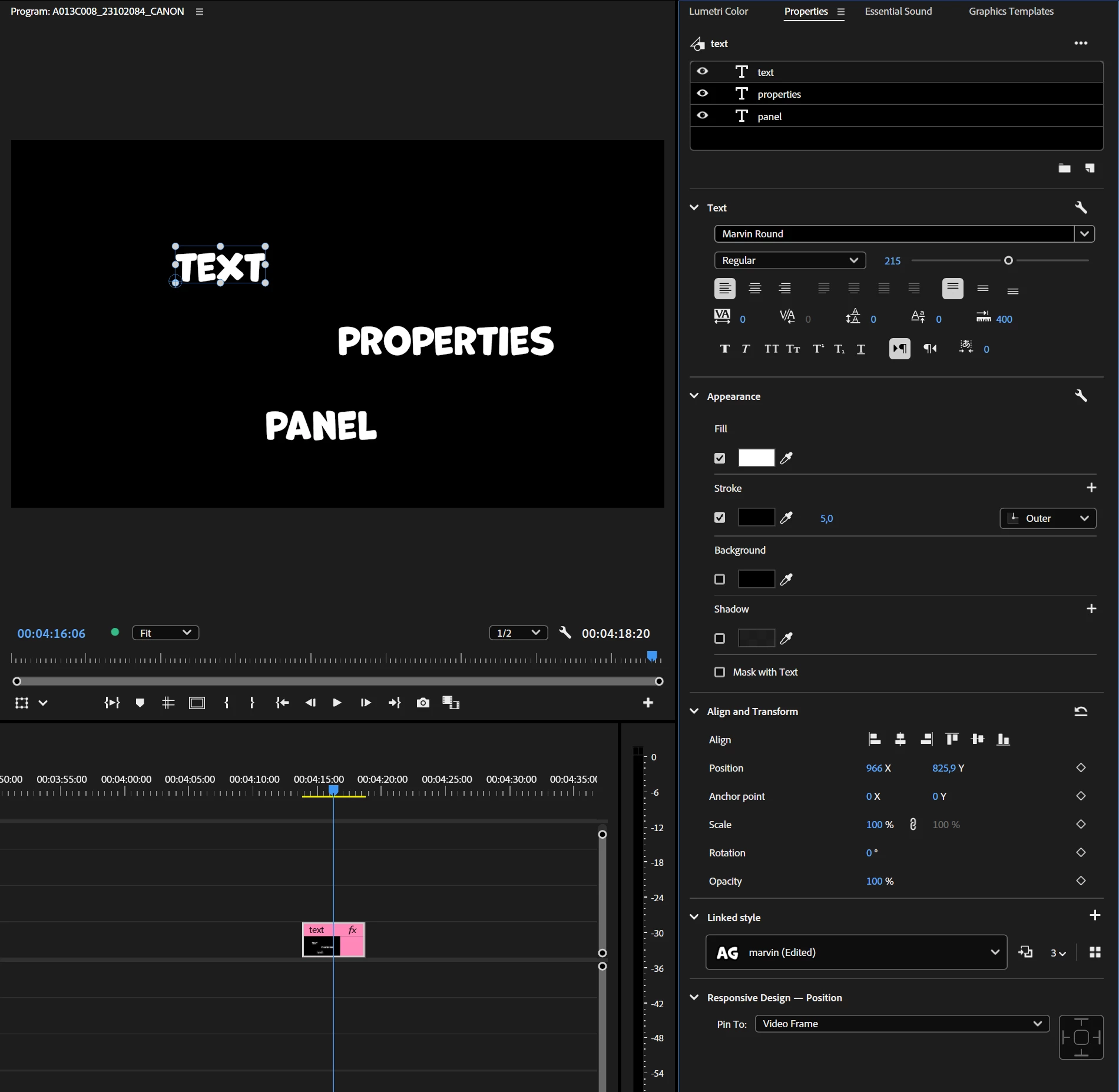
Correct answer Ann Bens

Ess Graphics panel has been replaced by the Graphics Templates and Properties Panel (open from the Window dropdown)


2 replies

Participating Frequently
January 12, 2025

It's a software program, not an easter egg hunt.  Stop hiding things that work great.  I could see if you wanted to improve things somehow, but all you did was taken essential graphics tools out of the essential graphics workspace, and hid them in Properties.  So Properties can no longer exist in the old area that I had it, I have to try to manually put it back in the Essential Graphics area so that I can use it at all.  And I can't use Properties the way I did in the past, it now has two completely different purposes, with two completely different location needs.  Keep hiding more things in "Properties", so that I have to change my window setup mid-process multiple times throughout the process.  Great way to drive efficiency!  

Ann Bens
Community Expert
Ann BensCommunity ExpertCorrect answer
Community Expert
October 18, 2024

Ess Graphics panel has been replaced by the Graphics Templates and Properties Panel (open from the Window dropdown)


Known Participant
October 18, 2024

Sorry but i can't find it. I dont have the same of you

Participating Frequently
January 12, 2025

Your screenshot shows the Properties Panel open. In the same panel group you have other panels, e.g. Lumetri Color, Essential Sound AND Graphics Templates.


Premiere Pro is moving towards a new approach where we will be adding more and more controls to the Properties panel. At this stage this is your new place for changing your Mogrts, your subtitles and your Titles. You also have the ability to transform and crop your video here or change the level of your Audio. It's contextual to what you have selected on the timeline. The Properties panel let's you also transform multiple clips on the Timeline for the first time! 


Expect to see more cool stuff coming to the Properties panel in the future!


It's a horrible change.  I used to have exactly what I needed in exactly the right place.  Now I stopped using the after effects templates I created because it's so time consuming to go in and make minor modifications to it.  I don't know what the use case was to try to hide the graphics editor from the graphics workspace, but I hope someone benefited from it.  All it made me do is use Premier Pro less.